
Archived topic
How can I make the featured posts different
9 replies · Started by Zipeng on September 26, 2018
I want some gravy color inside the featured post in the homepage to different from the regular ones.
Just like zerohedge.com's featured posts. gravy color in side the post. Please let me know the CSS codes for me to do this. Thanks.
Hi there,
try this CSS:
#page article:first-child .inside-article {
    background-color: #eee;
}The CSS code makes only the first one post gravy and it remove all the boundary around the post headline.
I want all stickied posts gravy inside and still keeping the boundary.
Maybe this will work better?:
.post.sticky .inside-article {
    background: #eee;
}
What do you mean by boundary?
Sorry, I mean the border.
and it only applies to the first sticked post.
I'm not sure if this is possible, but if it is, you would do this:
.post.sticky:nth-of-type(1) .inside-article {
    background: #eee;
}
I'm not currently seeing a border anywhere?
I have removed the code.
I mean I want it to applies to all stickied posts. But your CSS doesnt look right after implemented. The border has gone. and the gravy color spread to outside of the post.
http://www.investmentwatchblog.com/wp-content/uploads/2018/09/2018-09-27_11-30-22.png
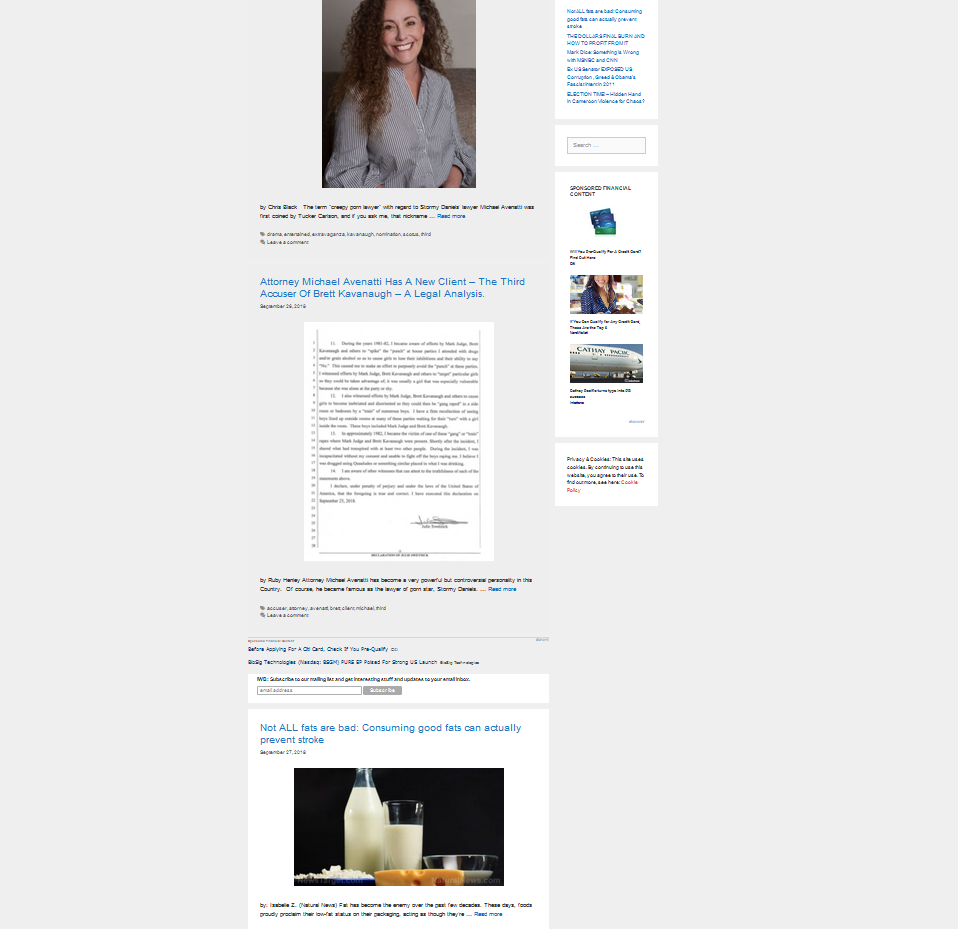
I change the background color to completely white and it looks fine now.
If you want it to apply to the blog page only, you can do this instead:
.blog .post.sticky:nth-of-type(1) .inside-article,
.archive .post.sticky:nth-of-type(1) .inside-article {
    background: #eee;
}
That way it won't affect the single post.