
- This topic has 57 replies, 5 voices, and was last updated 3 years, 4 months ago by
Fernando.
-
AuthorPosts
-
November 9, 2022 at 7:03 am #2408126
francesco
sorry for the reopening of the post, but I noticed this problem. i checked the css but i can’t find the problem.
.masonry-load-more {
    text-align: center;
}

@media (min-width: 769px) {
.inside-navigation.grid-container {
    width: fit-content;
}
form.search-form.navigation-search.nav-search-active {
    top: 45px;
	  width: 50%;
	  left: 75%;
transform: translateX(-50%);
}

@media (max-width: 768px) {
    form.search-form.navigation-search.nav-search-active {
    display: flex;
}

button.nav-search-button {
    margin-right: 56px;
    border: none;
}
}

.navigation-search.nav-search-active {
    display: flex;
}

.inside-navigation.grid-container form.search-form .search-field {
    background-color: #fff;
}

.inside-navigation.grid-container form.search-form {
    background-color: #dcf7f5;
    padding: 10px;
    display: flex;
    align-items: center;
    }

}

@media (max-width: 768px) {
    form.search-form.navigation-search.nav-search-active {
    display: flex;
}

button.nav-search-button {
    margin-right: 56px;
    border: none;
}
}

.navigation-search {
    z-index: 9999;
}

.navigation-search input[type="search"],
.navigation-search input[type="search"]:active,
.navigation-search input[type="search"]:focus {
    background-color: #fff;
}

/* After Post Social Share Design by technicaltricks.info*/

.technicaltricks-social-wrapper {
    margin: 30px 0;
    font-size: 0;
}

.technicaltricks-social-wrapper span {
    font-weight: bold;
    padding-right: 10px;
    font-size: 16px;
}

.technicaltricks-social-sharing {
    font-size: 17px;
    padding: 7px 20px;
}

@media only screen and (max-width: 600px) {
    .technicaltricks-social-sharing {
        font-size: 17px;
        padding: 6px 17px;
        display: inline-block;
    }
	.technicaltricks-social-wrapper {
    margin: 30px 0px;
    font-size: 0;
}

}

.technicaltricks-social-sharing svg {
    position: relative;
    top: 0.15em;
    display: inline-block;
}

.technicaltricks-social-sharing:first-of-type {
    border-radius: 100px 0 0 100px;
}

.technicaltricks-social-sharing:last-of-type {
    border-radius: 0 100px 100px 0;
}

.technicaltricks-social-facebook {
    fill: #fff;
    background-color: rgba(59, 89, 152, 1);

}

.technicaltricks-social-facebook:hover {
    background-color: rgba(59, 89, 152, .8);
}

.technicaltricks-social-twitter {
    fill: #fff;
    background-color: rgba(29, 161, 242, 1);
}

.technicaltricks-social-twitter:hover {
    background-color: rgba(29, 161, 242, .8);
}

.technicaltricks-social-pinterest {
    fill: #fff;
    background-color: rgba(189, 8, 28, 1);
}

.technicaltricks-social-pinterest:hover {
    background-color: rgba(189, 8, 28, .8);
}

.technicaltricks-social-linkedin {
    fill: #fff;
    background-color: rgba(0, 119, 181, 1);
}

.technicaltricks-social-linkedin:hover {
    background-color: rgba(0, 119, 181, .8);
}

.technicaltricks-social-whatsapp {
    fill: #fff;
    background-color: rgba(37, 211, 102, 1);
}

.technicaltricks-social-whatsapp:hover {
    background-color: rgba(37, 211, 102, .8);
}

.technicaltricks-social-reddit {
    fill: #fff;
    background-color: rgba(255, 87, 0, 1);
}

.technicaltricks-social-reddit:hover {
    background-color: rgba(255, 87, 0, .8);
}

.wp-block-latest-posts.wp-block-latest-posts__list li {
    padding-bottom: 15px;
    border-bottom: 1px solid rgb(38, 42, 130);
}

.main-nav > ul li ul.sub-menu li.menu-item:hover > a {
    background-color: #8ad6c1;
    color: #262a82;
}

.generate-back-to-top,
.generate-back-to-top:visited {
    bottom: 70px; /* 50px from the bottom of your screen */
}

@media(min-width: 769px) and (pointer: fine) {

    .paging-navigation p a:hover,
    .wp-block-latest-posts.wp-block-latest-posts__list li a:hover,
    .generate-columns-container article.post:hover h2 {
        text-decoration: underline;
    }

}

.border-hover:not(:hover) h2 {
    border-color: transparent !important;
}

@media(min-width: 769px) {
    .main-navigation ul.menu > li > ul {
        width: unset;
        left: 0 !important;
        right: 0;
    }
}
November 9, 2022 at 7:27 am #2408162David
StaffCustomer SupportCan you explains what the problem is ?
November 9, 2022 at 9:38 am #2408612As you can see from the image there is a blue border in the search button.
November 9, 2022 at 10:44 am #2408700Ying
StaffCustomer SupportChange this:
button.nav-search-button {
    margin-right: 56px;
    border: none;
}
to
button.nav-search-button {
    margin-right: 45px;
    border: none;
}
Please be noted, there’re duplicated CSS codes, make sure you remove the duplicated ones.
November 9, 2022 at 10:54 am #2408720Sorry ying, what would be the duplicate CSS codes?
this?
@media (max-width: 768px) {
    form.search-form.navigation-search.nav-search-active {
    display: flex;
}

button.nav-search-button {
    margin-right: 56px;
    border: none;
}
}
November 9, 2022 at 1:36 pm #2408859StaffCustomer SupportIn the CSS you attached here:
https://generatepress.com/forums/topic/drop-down-search-bar/page/4/#post-2408126This CSS appeared twice, you should only keep one of them.
@media (max-width: 768px) {
    form.search-form.navigation-search.nav-search-active {
    display: flex;
}

button.nav-search-button {
    margin-right: 56px;
    border: none;
}
}
November 10, 2022 at 1:06 am #2409389OK yes. I believe it is correct now.
.masonry-load-more {
    text-align: center;
}

@media (min-width: 769px) {
.inside-navigation.grid-container {
    width: fit-content;
}
form.search-form.navigation-search.nav-search-active {
    top: 45px;
	  width: 50%;
	  left: 75%;
transform: translateX(-50%);
}

.navigation-search.nav-search-active {
    display: flex;
}

.inside-navigation.grid-container form.search-form .search-field {
    background-color: #fff;
}

.inside-navigation.grid-container form.search-form {
    background-color: #dcf7f5;
    padding: 10px;
    display: flex;
    align-items: center;
    }

}

@media (max-width: 768px) {
    form.search-form.navigation-search.nav-search-active {
    display: flex;
}

button.nav-search-button {
    margin-right: 45px;
    border: none;
}
}

.navigation-search {
    z-index: 9999;
}

.navigation-search input[type="search"],
.navigation-search input[type="search"]:active,
.navigation-search input[type="search"]:focus {
    background-color: #fff;
}

/* After Post Social Share Design by technicaltricks.info*/

.technicaltricks-social-wrapper {
    margin: 30px 0;
    font-size: 0;
}

.technicaltricks-social-wrapper span {
    font-weight: bold;
    padding-right: 10px;
    font-size: 16px;
}

.technicaltricks-social-sharing {
    font-size: 17px;
    padding: 7px 20px;
}

@media only screen and (max-width: 600px) {
    .technicaltricks-social-sharing {
        font-size: 17px;
        padding: 6px 17px;
        display: inline-block;
    }
	.technicaltricks-social-wrapper {
    margin: 30px 0px;
    font-size: 0;
}

}

.technicaltricks-social-sharing svg {
    position: relative;
    top: 0.15em;
    display: inline-block;
}

.technicaltricks-social-sharing:first-of-type {
    border-radius: 100px 0 0 100px;
}

.technicaltricks-social-sharing:last-of-type {
    border-radius: 0 100px 100px 0;
}

.technicaltricks-social-facebook {
    fill: #fff;
    background-color: rgba(59, 89, 152, 1);

}

.technicaltricks-social-facebook:hover {
    background-color: rgba(59, 89, 152, .8);
}

.technicaltricks-social-twitter {
    fill: #fff;
    background-color: rgba(29, 161, 242, 1);
}

.technicaltricks-social-twitter:hover {
    background-color: rgba(29, 161, 242, .8);
}

.technicaltricks-social-pinterest {
    fill: #fff;
    background-color: rgba(189, 8, 28, 1);
}

.technicaltricks-social-pinterest:hover {
    background-color: rgba(189, 8, 28, .8);
}

.technicaltricks-social-linkedin {
    fill: #fff;
    background-color: rgba(0, 119, 181, 1);
}

.technicaltricks-social-linkedin:hover {
    background-color: rgba(0, 119, 181, .8);
}

.technicaltricks-social-whatsapp {
    fill: #fff;
    background-color: rgba(37, 211, 102, 1);
}

.technicaltricks-social-whatsapp:hover {
    background-color: rgba(37, 211, 102, .8);
}

.technicaltricks-social-reddit {
    fill: #fff;
    background-color: rgba(255, 87, 0, 1);
}

.technicaltricks-social-reddit:hover {
    background-color: rgba(255, 87, 0, .8);
}

.wp-block-latest-posts.wp-block-latest-posts__list li {
    padding-bottom: 15px;
    border-bottom: 1px solid rgb(38, 42, 130);
}

.main-nav > ul li ul.sub-menu li.menu-item:hover > a {
    background-color: #8ad6c1;
    color: #262a82;
}

.generate-back-to-top,
.generate-back-to-top:visited {
    bottom: 70px; /* 50px from the bottom of your screen */
}

@media(min-width: 769px) and (pointer: fine) {

    .paging-navigation p a:hover,
    .wp-block-latest-posts.wp-block-latest-posts__list li a:hover,
    .generate-columns-container article.post:hover h2 {
        text-decoration: underline;
    }

}

.border-hover:not(:hover) h2 {
    border-color: transparent !important;
}

@media(min-width: 769px) {
    .main-navigation ul.menu > li > ul {
        width: unset;
        left: 0 !important;
        right: 0;
    }
}
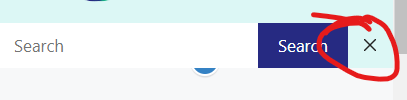
November 10, 2022 at 9:43 am #2410221I noticed something else. on mobile the “X key” to close the search bar does not seem to work.
 November 10, 2022 at 10:02 am #2410259StaffCustomer Support
Hum…Can you try this:
1. Remove this linemargin-right: 56px;from the below CSS:button.nav-search-button { margin-right: 56px; border: none; }2. Add this CSS:
@media (max-width: 768px) {
    .menu-bar-items {
        z-index: 2;
        position: relative;
    }
    form.search-form.navigation-search.nav-search-active {
        max-width: calc(100% - 46px);
    }
}
November 10, 2022 at 11:59 am #2410382correct?
If I may ask, why is CSS needed to solve this problem?
button.nav-search-button {
    border: none;
}
}

@media (max-width: 768px) {
    .menu-bar-items {
        z-index: 2;
        position: relative;
    }
    form.search-form.navigation-search.nav-search-active {
        max-width: calc(100% - 46px);
    }
}
November 10, 2022 at 12:03 pm #2410388StaffCustomer SupportCorrect.
If I may ask, why is CSS needed to solve this problem?
Because it’s a custom designed search bar.
November 10, 2022 at 3:17 pm #2410563I also wanted to ask you, I removed this CSS because it is completely useless or am I wrong?
.main-nav > ul li ul.sub-menu li.menu-item:hover > a {
    background-color: #8ad6c1;
    color: #262a82;
}
November 10, 2022 at 6:59 pm #2410676Fernando Customer Support
It’s alright to remove that. This code alters the background color and text color of the submenu items on hover. Moreover, these colors can also be altered through Appearance > Customize > Colors > Primary Navigation, thus you shouldn’t need that.
-
AuthorPosts
- You must be logged in to reply to this topic.
