

A client says, “Can we make the green a little less… green?” You nod like a professional. Then you open the site and discover that green lives in 43 places: the buttons, the links, the headings, a border you forgot about, and one mystery hover state that has been hiding since 2023.
That is what life looks like without a design system. With one, it looks like this:
- One source of truth. Colors, fonts, and spacing are defined once and used everywhere. Change the green in one place and the buttons, links, headings, and that mystery hover state all follow.
- Faster builds. You pick “Primary Color” from a list instead of hunting for a hex code you copied into a note three projects ago.
- Consistency that holds up. Your brand stays intact across pages, patterns, and every person who touches the site, because everyone is choosing from the same named set.
- Easier maintenance and rebrands. The “just a slightly different blue” request becomes a quick edit instead of a site-wide scavenger hunt.
- Responsive design with less work. A single token can carry different values for different breakpoints, so you write fewer per-device overrides.
- Safer client handoffs. Pair tokens with Editor Access and clients can edit content without wandering into the design system.
- A system you can reuse. Export and import tokens between sites, and imported patterns bring their tokens with them.
GenerateBlocks Pro 2.8 has all of this built in with Design Tokens.
The community has been testing 2.8 for weeks, and with this week’s launch, we want to answer two questions people keep asking:
- I already use Global Styles. Should I migrate to Design Tokens?
- I’m new to GeneratePress. Why is this the way to build?
This post answers both questions. If you have questions that this post doesn’t answer, please feel free to leave a comment.
First, what is a design token?
A design token takes a raw value, like a hex color or a pixel size, and gives it a name. #44ff22 becomes --color-primary, and in the editor it shows up as a friendly Primary Color you can pick anywhere you would normally choose a color.
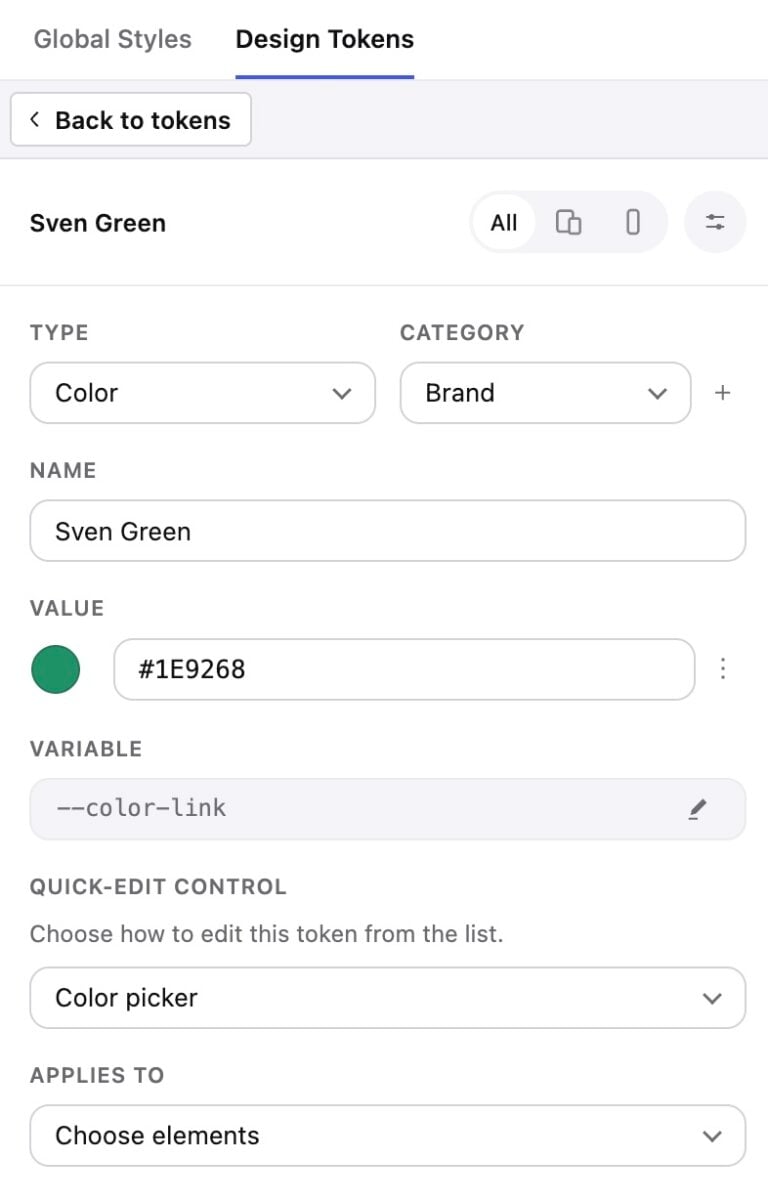
Under the hood, a token is just a CSS custom property.
Three things make GenerateBlocks tokens worth your attention:
- They are typed. Each token is a Color, a Unit (like 1.5rem or clamp(1rem, 2vw, 2rem)), or Text (font stacks, grid templates, anything else).
- They know where they belong. “Applies to” controls which style pickers offer the token, so your spacing tokens do not clutter the color picker.
- They are responsive. A token can hold different values at different breakpoints or under prefers-color-scheme. “Spacing large” can be generous on desktop and tighter on mobile without a second token or extra styles.
You find them under Dashboard > GenerateBlocks > Design, or from the Design button in the editor top bar.
Path 1: You already use Global Styles
Good news: you’re already ahead
This is not a migration. Nothing is deprecated, nothing breaks, and your Global Styles keep working exactly as they do today.
If you’ve built with Global Styles, you already have the best possible starting point. Your site’s look is defined in one place instead of scattered across blocks. Design Tokens simply sit underneath, giving names to the values your styles already use.
There is no deadline and no big rebuild. Add tokens when it suits you, on the sites where it pays off, a few at a time.
Where tokens pay off most
You’ll feel the difference fastest if:
- The same color, font stack, or spacing value shows up in several Global Styles
- You manage multiple sites that should share a brand
- Your clients have opinions about “just a slightly different blue”
- You want responsive spacing without a pile of per-breakpoint overrides
And if you have a small, finished site where nothing will change, leave it be. Not every site needs a design system. Some of them just need to be left alone.
Bringing tokens into an existing site, one layer at a time
Every step below stands on its own. Stop after any of them and your site is still better off.
1. Take a backup. Both the Global Styles and Design Tokens workspaces have Import/Export. That export can come in handy if you need to refer back to it.
2. Spot the repeats. Scan your Global Styles for values that appear more than once: brand colors, font stacks, border radius, section padding, container width. Those are your first tokens. Values that appear once can stay exactly as they are.
3. Create tokens with names that will make sense in a year. Click New token, give it a friendly name, and GenerateBlocks generates the CSS variable for you (a token named “Brand color” becomes --brand-color). Group them with categories like Colors, Typography, Spacing, and Radius. Boring names beat clever names. “Space large” will still make sense at 4pm on a Friday. “Spacey McSpaceface” will not.
Already have a design system? Skip the clicking.
If your colors, type, and spacing already live as CSS variables, you can bring them in wholesale:
- Copy the CSS variables from your design system.
- In the Design Tokens panel, switch to CSS Edit mode and paste them into the :root style.
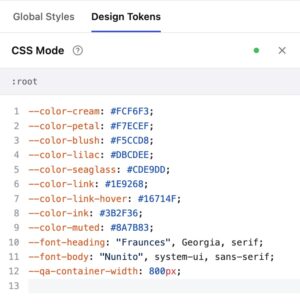
GenerateBlocks does the rest. Your tokens show up in the panel, ready to organize with names and categories, instead of being typed in one at a time.
4. Point your Global Styles at them. This is the highest-leverage step. Your Global Styles feed everything downstream, so swapping a hardcoded hex for a token there updates dozens of blocks at once. Use the token button in the style controls to pick from your list.
5. Tidy up the strays, whenever you like. Block-level styles and custom CSS can follow later. In custom CSS or an advanced selector, reference tokens the plain-CSS way:
.my-card { background-color: var(--brand-color); padding: var(--space-lg); }
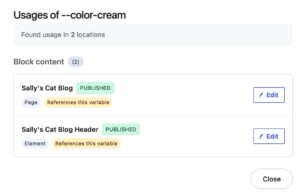
6. Run Check Usage before renaming or deleting. Every token has a Check Usage option that scans Global Styles CSS, block content across your posts and pages, other tokens’ preset options, and other custom properties on the root Global Style. On very large sites it may scan only a recent subset of content, and it tells you when that happens rather than falsely reporting “not used anywhere.” Renaming or deleting a token does not rewrite CSS that references the old name, so check first.
7. Take over your container width (optional). Create a Unit token named --gb-container-width and it overrides the legacy container width setting under GenerateBlocks > Settings. Your old setting is set aside, not lost, and returns if you delete or rename the token.
8. Retire responsive overrides as you go. Once your spacing and type tokens carry their own breakpoint values, you can delete the per-block tablet and mobile tweaks you were maintaining. This is the part that feels like cleaning out a garage.
Permissions apply
Tokens are managed with the same permission as Global Styles. If someone can’t manage Global Styles, they won’t see the Design Tokens workspace at all. For agencies, that’s a feature. Pair it with Editor Access and clients can edit content without wandering into your design system.
A bonus for GenerateCloud users
When you import a pattern from GenerateCloud, GenerateBlocks checks its Global Styles for new tokens and brings them along. A site that already uses tokens absorbs imported patterns far more smoothly than one with a pile of competing hex codes.
Path 2: You’re kicking the tires on GeneratePress
First, welcome! We trust that you’ve seen the speed tests, the performance rankings, and other reasons that people choose GeneratePress. Design Tokens add to the competitive advantage.
Start with the system, not the pages
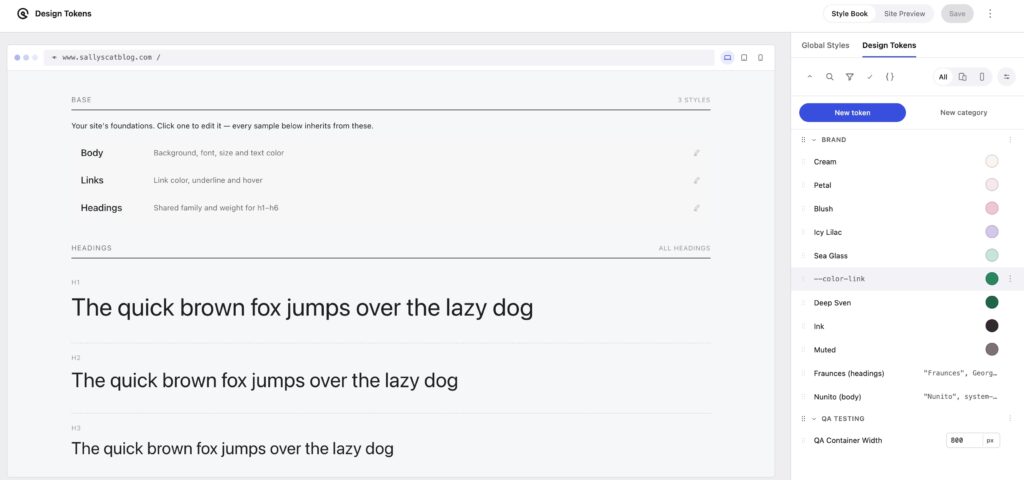
Most people build a site page by page, then try to make it consistent afterward. That is how you get 43 greens. With GenerateBlocks Pro, it’s incredibly easy to flip the order, and you should.
- Define your tokens (colors, type, spacing, radius).
- Style your theme elements in the Style Book, a live list of body text, links, headings, images, tables, forms, and more.
- Build pages from blocks that inherit all of it.
The Style Book is the tool we all wish we had years ago. Often, we’d create style pages to keep track of what was happening with each element. The Style Book gives you that one page within the system, editable. You click an element, style it, and see the result without bouncing between the editor and a preview tab.
Why this way is worth it
It is plain CSS underneath. Tokens are standard CSS custom properties. There is no proprietary wrapper to escape later. You can read them, copy them, and write custom CSS against them. The friendly names and pickers sit on top as an optional layer.
You can style anything without leaving the editor. Global Styles are no longer limited to classes. They can target HTML tags like body, h1, a, and button, plus advanced selectors such as .woocommerce .button. So your theme, your WooCommerce buttons, and your custom HTML all follow the same rules.
Define once, apply widely. One style can apply to several selectors, so h2 and .looks-like-h2 share a definition. Update it once and both follow.
Color management stops being a nightmare. With OKLCH and color-mix support, you can adjust a tokenized color’s shade and opacity right in the color picker, instead of creating seven near-identical hex values.
Your design system travels. Tokens can be exported and imported separately from Global Styles, or together. Build a system for one client and reuse the foundation on the next.
Bringing a system from somewhere else? Paste your existing CSS variables straight into the Design Tokens panel in CSS Edit mode and you’re most of the way there.
The honest caveat
Design Tokens are a GenerateBlocks Pro feature. If you are on the free plugin, you can still build great sites, but this workflow needs Pro (or GeneratePress One, which includes it and so much more).
A tiny starter system
If you want a first set that is small enough to actually finish, here is one that works:
- 5 to 9 color tokens (background, text, accent, plus a couple of supporting colors)
- 2 font tokens (headings and body)
- A short spacing scale (small, medium, large)
- 1 radius token
That is it. You can add shadows, opacity, and motion later. Start small, finish, then grow.
Try it
Design Tokens ship in GenerateBlocks Pro 2.8. Download it from your account dashboard, set up a test site, and tell us what you think. The full guide lives in the Learn GeneratePress docs under Design Tokens.
If you have a site with 43 greens, I have good news. You only need one.
Thanks Kathy. I’ve been experimenting with the alpha, beta and RC and it really does look good.
One question. What is the suggested approach to using GeneratePress colours set in the Customiser along with GenerateBlocks Design Token system? For example, GP colours are the only ones which will be available in the colour picker for core blocks – GB tokens are not. So do we need to maintain both systems? And say we want to create derivative colours (as in, shades of other token colours), then we’d need to use the GB system, even if the colour exists as a GP colour.
Thanks again for testing through the alpha, beta, and RC, and great question.
You’re right that GP’s Customizer colors and GenerateBlocks Design Tokens are separate systems today, and core blocks only see the GP palette. You don’t have to maintain both, though. The approach we’d suggest is to build everything in the Design System: set your defaults (body, headings, links, buttons) in the Style Book and let core blocks inherit from those. For anything that needs to break from those defaults, build it with GenerateBlocks, where your tokens are available.
Connecting tokens to the core block palette is something the team may consider down the road, but the approach above is how I would handle things for longevity.