
- This topic has 38 replies, 4 voices, and was last updated 4 years, 12 months ago by
Elvin.
-
AuthorPosts
-
May 31, 2021 at 8:04 pm #1805352
Rob
I’m using 2 GP elements (‘Last Updated’ and ‘Breadcrumbs’) and they seem to be in conflict with each other, as the same date is appearing twice at the top of all my blog posts (e.g. https://robpowellbizblog.com/top-10-lead-capture-tools/). The second date should be the date of first publication.
Can you help with this?
Many thanks!
May 31, 2021 at 11:00 pm #1805462Elvin
StaffCustomer SupportHi Rob,
The entry meta date shouldn’t display the modified date unless filtered.
Can you share the snippets used in this?
June 1, 2021 at 12:35 am #1805515Here is th code:
strong.breadcrumb_last {
display: none;
}.entry-header {
display: flex;
flex-direction: column-reverse;
}.single .updated-date-label {
font-size: 16px;
}.single .modified-date {
font-size: 16px;
}Thanks.
June 1, 2021 at 4:12 am #1805728David
StaffCustomer SupportHi there,
did you use a Hook Element or a PHP Function to add the dates ?
June 1, 2021 at 4:49 am #1805762for the breadcrumb snippet, I used the hook: generate_before_entry_title
for the ‘date modified for blog posts’ I have the hook: ‘generate_before_content’ plus the following code:
<span class=”updated-date-label”>Last Updated: </span><span class=”modified-date”><?php echo get_the_modified_date(‘F j, Y’); ?></span>
June 1, 2021 at 6:22 am #1805850StaffCustomer SupportDo you have any functions anywhere eg. in Code Snippets or Child Theme ?
June 2, 2021 at 8:12 pm #1808089No, I don’t think so. I just followed the instructions from you guys at GP on how to add ‘last updated’ to my articles.
June 2, 2021 at 8:21 pm #1808098StaffCustomer SupportHi Rob,
I did a bit of history backreading from previous topics you’ve open and I believe that duplicate you see is hooked in by an element on the screenshot on one of your replies (this one – https://generatepress.com/forums/topic/display-last-updated-date-on-blog-posts/#post-1619382)
Assuming the label is actually what it does, I believe it’s “Date Modified for blog posts” Hook element. It matches the hook. The duplicate shows on
generate_before_contenthook. And what it shows matches the label.You can try removing that and see if the duplicate gets removed.
June 2, 2021 at 8:44 pm #1808113June 2, 2021 at 8:45 pm #1808114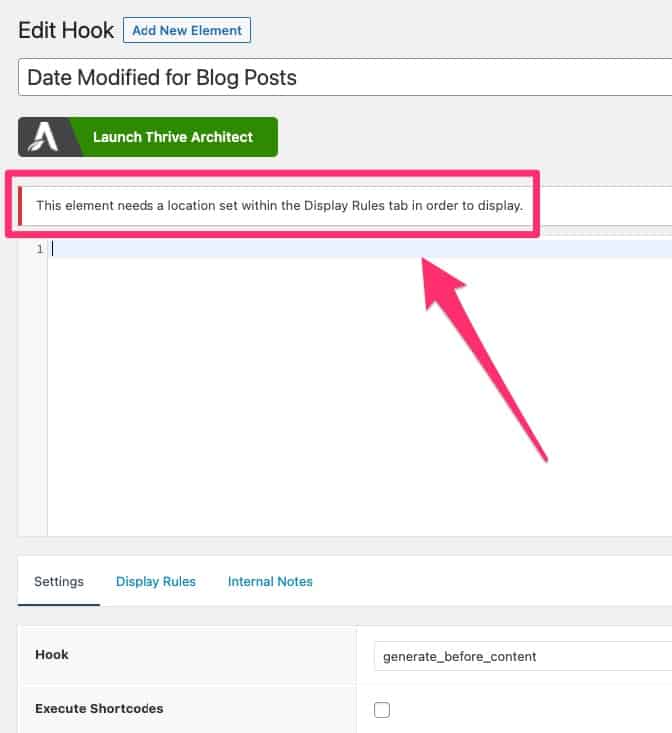 June 2, 2021 at 8:58 pm #1808122
So I have now resolved the above problem and have set a location for the rule to display:
 June 2, 2021 at 8:58 pm #1808123
However, I now have no ‘Last Updated Info’ above my blog posts:
 June 2, 2021 at 8:59 pm #1808127
Can you help with this?
Thanks.
June 2, 2021 at 9:21 pm #1808149StaffCustomer SupportTo make things clearer:
If an HTML element appears on the front-end, it’s usually added by the theme, or a plugin, or hooked in by either manually writing an
add_action('hook_name_here',function(){...})code or by using equivalent to it like hooking things in using Block or Hook Element.Doing a deeper dive to your site’s DOM structure, the duplicate appears where the
generate_before_contenthook is located – https://github.com/tomusborne/generatepress/blob/b60b853630da6d9015722da903e53c8064148b0a/content-single.php#L23With this, we have a clue as to what it is. This means, there’s likely something hooking into the mentioned hook. We just need to figure out which one. (manually coded, Hook element or Block element).
Now the normal causes of this is when users hook in something using a Hook element or a Block element. More advanced users do this by manually writing the code on a functions.php or a code snippet. The more daring uses use a child theme template or modify the actual parent theme file. And they eventually forget how it’s added, hence the confusion.
Now in your case, I’m not exactly sure which one you want to remove.
If it’s the 1st one, with the label “Last Updated:” label, that one is added manually by hook. You remove it by simply deleting the add_action() code or the hook element you’ve inserted it through.
If it’s the 2nd one, right before the “by author”, that one is the default date meta generated by the theme which we can easily hide by using CSS, or completely remove from render by unchecking “Display post date” on Appearance > Customize > Layout > Blog for Posts tab.
June 2, 2021 at 9:32 pm #1808158StaffCustomer SupportHowever, I now have no ‘Last Updated Info’ above my blog posts:
We can simply add it in using CSS:
Example:
.posted-on time.entry-date.updated-date:before { content: "Last Updated: "; } -
AuthorPosts
- You must be logged in to reply to this topic.
