Archived topic
the date is being duplicated on my blog posts
38 replies · Started by Rob on May 31, 2021
Thanks, this is what it looks like now:

But I still want to display the original date of publication. Is there some CSS I can use for that?
Thanks.
But I still want to display the original date of publication. Is there some CSS I can use for that?
Can we lay down all the scenarios?
Let's clarify a bit:
I believe what you're aiming for is, to display the last update date AND publish date at the same time?
If this is the case, let's review any filters used.
If you've used this filter - add_filter( 'generate_post_date_show_updated_only', '__return_true' ); - it will only show one date. It's either it displays the publish date or the modified/update date if it exists.
If you've used this filter - generate_post_date_output - to modify the date output, you can remove that as well. There's no need to filter anything if you simply want to display both dates at the same time. The theme automatically outputs both dates. It just hides the update date by default using CSS.
If you want to display both dates at the same time, remove the mentioned filters and simply go the CSS route.
Example: - https://generatepress.com/forums/topic/publish-date-and-modified-date-on-a-post/#post-1181495
And here - https://generatepress.com/forums/topic/how-to-show-published-and-updated-dates/#post-1466990 - where David mentioned that the theme automatically outputs both dates and provides the CSS to show both.
Thanks, what I'm trying to achieve is to have both the original published date (the date the post was first published) and the 'last updated' date displayed.
Regarding the filters you mentioned, I don't think I have them.
This is my added CSS now:

Since beginning this thread earlier today I have uploaded a child theme for my GP installation. So the previous CSS that I had is now in the 'parent' theme.
Thanks for your help.
Regarding the filters you mentioned, I don’t think I have them.
Can you link me to a sample page in question to confirm?
I'm not sure I'm seeing the right one because I still see this - https://share.getcloudapp.com/yAuroRLK
This is clearly different from what you've shown here - https://generatepress.com/forums/topic/the-date-is-being-duplicated-on-my-blog-posts/page/2/#post-1808162
I'm seeing different meta data at the top of that blog post (to what was shown in your screenshot):
https://share.getcloudapp.com/kpuDd8EPscreenshot
Here is a link to the page, as you requested: sample page
Thanks for your help with this.
Just to clarify: all I'm trying to do now is add the original date of publication, so that at the top of each article I have (a) the original date of publication, (b) the last updated date.
I have (b) so all I need now is (a).
Thanks again for your help! :)
Hi there,
Just read through this to try to get a grasp on what could be happening.
By default, GeneratePress will output the HTML for the published date and the updated date, so really we'd only need a little bit of CSS.
However, you're not using the default HTML, you've hooked in the modified date manually. Any reason for this vs. using the core theme structure? I tried to find the answer in the topic but might have missed it.
We can always provide some PHP to add the published date, but I think using the core theme solution is likely the better route if we can.
Let us know :)
Thanks.
I'm happy to remove the 'modified date' hook and just use CSS instead (if that's the solution).
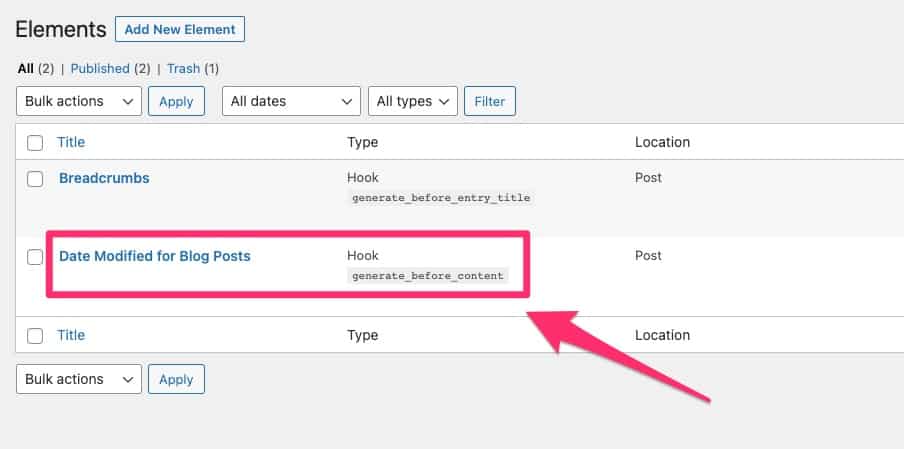
Should I go ahead and delete this element?
Thanks for your help.
Thanks.
I’m happy to remove the ‘modified date’ hook and just use CSS instead (if that’s the solution).
Should I go ahead and delete this element?
Yes that's actually what I've been suggesting from my previous replies - https://generatepress.com/forums/topic/the-date-is-being-duplicated-on-my-blog-posts/#post-1808098
You don't have to hook in a new date if the theme's default is enough. We can just filter it or add the labels on CSS which I've also suggested here - https://generatepress.com/forums/topic/the-date-is-being-duplicated-on-my-blog-posts/#post-1808158
Thanks for that. I've now deleted that hook:

This is what the article meta data looks like now:

The article meta data is missing the original publication date. Do you have some CSS script I can use to add the date of first publication?
Thanks.
Sorry for asking again but can you check for any filters related to the post date?
I've inspected your site and it seems to be filtered.
An unfiltered, default render of post date meta would look like this -
https://share.getcloudapp.com/jkuPKjJl
But your site doesn't render the published date as shown here -
https://share.getcloudapp.com/BluKBmEZ
This normally occurs when a site has this filter on - https://docs.generatepress.com/article/generate_post_date_show_updated_only/
There might be filters in the added-on CSS in the parent theme. But I can't access the parent theme now because I'm using a child theme.
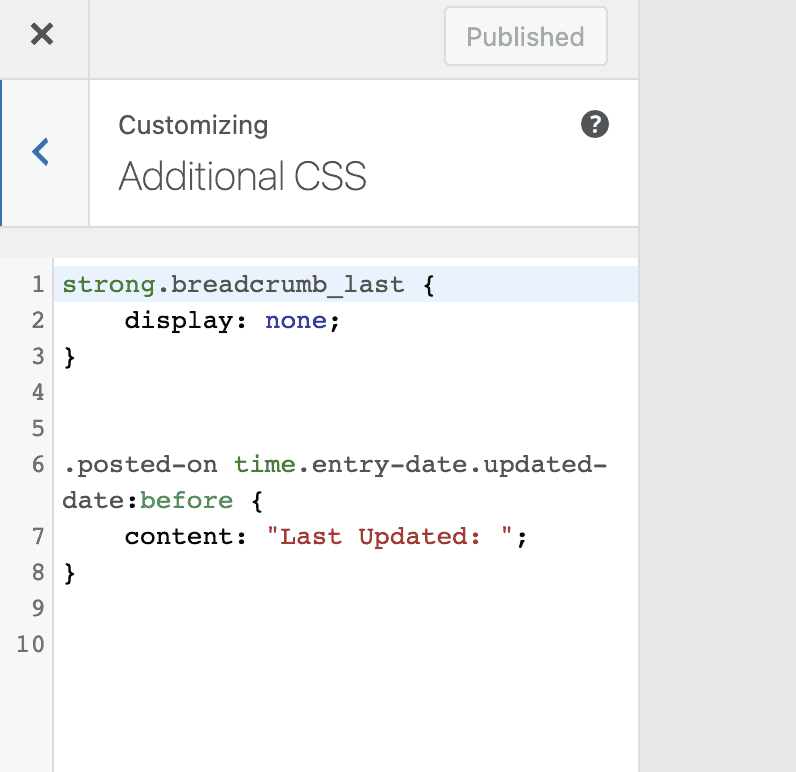
This is the sum total of the added CSS in my child theme:
Thanks for your help.
There might be filters in the added-on CSS in the parent theme. But I can’t access the parent theme now because I’m using a child theme.
It's a PHP filter so it won't be on the additional CSS area.
PHP snippets are usually placed on Hook elements, Code Snippets plugins or a functions.php of a parent theme or a child theme. These are the places you must check. :)
This is the code in the functions.php file from the parent theme.
I can't see the filter that you refer to:
<?php
/**
* GeneratePress.
*
* Please do not make any edits to this file. All edits should be done in a child theme.
*
* @package GeneratePress
*/
if ( ! defined( 'ABSPATH' ) ) {
exit; // Exit if accessed directly.
}
// Set our theme version.
define( 'GENERATE_VERSION', '3.0.3' );
if ( ! function_exists( 'generate_setup' ) ) {
add_action( 'after_setup_theme', 'generate_setup' );
/**
* Sets up theme defaults and registers support for various WordPress features.
*
* @since 0.1
*/
function generate_setup() {
// Make theme available for translation.
load_theme_textdomain( 'generatepress' );
// Add theme support for various features.
add_theme_support( 'automatic-feed-links' );
add_theme_support( 'post-thumbnails' );
add_theme_support( 'post-formats', array( 'aside', 'image', 'video', 'quote', 'link', 'status' ) );
add_theme_support( 'woocommerce' );
add_theme_support( 'title-tag' );
add_theme_support( 'html5', array( 'search-form', 'comment-form', 'comment-list', 'gallery', 'caption', 'script', 'style' ) );
add_theme_support( 'customize-selective-refresh-widgets' );
add_theme_support( 'align-wide' );
add_theme_support( 'responsive-embeds' );
add_theme_support(
'custom-logo',
array(
'height' => 70,
'width' => 350,
'flex-height' => true,
'flex-width' => true,
)
);
// Register primary menu.
register_nav_menus(
array(
'primary' => __( 'Primary Menu', 'generatepress' ),
)
);
/**
* Set the content width to something large
* We set a more accurate width in generate_smart_content_width()
*/
global $content_width;
if ( ! isset( $content_width ) ) {
$content_width = 1200; /* pixels */
}
// This theme styles the visual editor to resemble the theme style.
add_editor_style( 'assets/css/admin/editor-style.css' );
}
}
/**
* Get all necessary theme files
*/
$theme_dir = get_template_directory();
require $theme_dir . '/inc/theme-functions.php';
require $theme_dir . '/inc/defaults.php';
require $theme_dir . '/inc/class-css.php';
require $theme_dir . '/inc/css-output.php';
require $theme_dir . '/inc/general.php';
require $theme_dir . '/inc/customizer.php';
require $theme_dir . '/inc/markup.php';
require $theme_dir . '/inc/typography.php';
require $theme_dir . '/inc/plugin-compat.php';
require $theme_dir . '/inc/block-editor.php';
require $theme_dir . '/inc/class-theme-update.php';
require $theme_dir . '/inc/deprecated.php';
if ( is_admin() ) {
require $theme_dir . '/inc/meta-box.php';
require $theme_dir . '/inc/dashboard.php';
}
/**
* Load our theme structure
*/
require $theme_dir . '/inc/structure/archives.php';
require $theme_dir . '/inc/structure/comments.php';
require $theme_dir . '/inc/structure/featured-images.php';
require $theme_dir . '/inc/structure/footer.php';
require $theme_dir . '/inc/structure/header.php';
require $theme_dir . '/inc/structure/navigation.php';
require $theme_dir . '/inc/structure/post-meta.php';
require $theme_dir . '/inc/structure/sidebars.php';
I haven't touched the functions.php in the child theme, so it would just contain the code that it came with.
Thanks for your help :)