GP Premium 1.6 is a significant update, with a few different features to highlight.
GeneratePress Sites
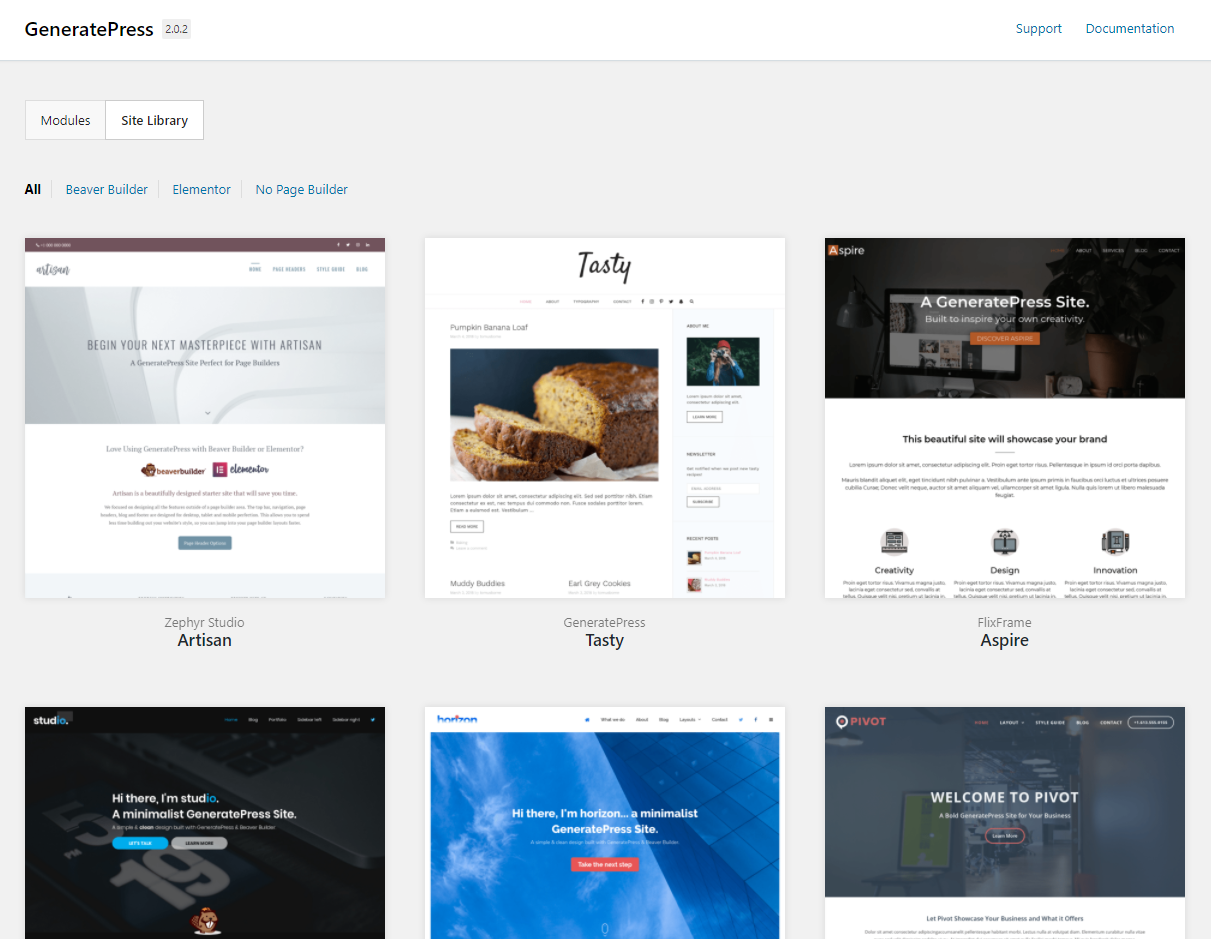
The biggest feature of this update is GeneratePress Sites. We’re entering 1.6 with 21 sites to choose from, thanks to some really talented designers who worked with us.
These are importable sites that are built to give you a head start when building new websites.
Once 1.6 is installed, you can find the sites in Appearance > GeneratePress > Site Library.
These sites include GeneratePress options and demo content. If you already have content, you can choose to only import the GeneratePress options. The demo content should only ever be imported on fresh website with no content.
As time goes on, we’ll be release more and more of these sites, which will be delivered to your Dashboard automatically.
The extra cool part? You can build and sell your own GeneratePress Sites! They’re super easy to export and package up. More on that soon!
Huge thanks to the following awesome people for helping us start our Site Library!
Translations
We’ve simplified translations in this version, which is something we’ve been wanting to do for a long time. Instead of each module having separate translations, everything has been merged into one translation file.
This will simplify things for translators, and will prevent the same terms being translated over and over again.
If you’re a translator – please check your translations! This merge of files was a huge job, and there’s bound to be some missing translations that need to be re-added.
Mobile Header + Flexbox
We rebuilt the mobile header in 1.6 to use Flexbox. This simplifies the mobile header considerably, and allows for easier modifications.
Slideout Navigation
The slideout navigation script was replaced with a vanilla javascript library, which is another step towards ditching jQuery in the theme.
We also added a widget area to the navigation, and made it so having a navigation in there isn’t even necessary. You could turn it into an off canvas panel full of widgets super easily!
Along with those changes, we added color and typography options, so you can customize the slideout area.
Smooth Scroll
A smooth scroll option has been added in Customize > General. Turning this option on will allow you to add the smooth-scroll class to your links, which will force them to smooth scroll to their anchor points.
This option is also integrated with the sticky navigation, so the top of your anchor point isn’t hidden.
One Click Import/Export
The Import/Export module has been re-written from the ground up. It now allows you to export all of your GP options into one file, instead of one for each individual module.
You can still choose to only export individual modules if need be.
What Else?
This version includes lots of other tweaks and fixes. You can read the full changelog here:
3/22/2018
- New: Sites module
- Translations: Merge all translations into gp-premium text domain
- General: Add smooth scroll option
- General: Move batch processing files into library
- General: Add GPP icon set
- General: WPCS and PHPCS improvements
- Blog: Fix PHP 7.2 warning
- Blog: Fix Safari infinite scroll issues with srcset
- Blog: Refresh masonry on infinite scroll append
- Blog: Remove infinite scroll on 404 and no results pages
- Blog: Fix Yoast SEO breaking columns with certain settings
- Blog: Re-layout masonry on load
- Colors: Add slideout navigation color options
- Colors: Merge navigation + sub-navigation options into one section
- Import/Export: One click export and import
- Menu Plus: Re-build slideout navigation to use vanilla JS
- Menu Plus: Add slideout navigation widget area
- Menu Plus: Add close icon to slideout navigation
- Menu Plus: Set sticky nav ID on refresh if stuck
- Menu Plus: Allow WPML to modify Page Header select metabox
- Menu Plus: Re-build mobile header using flexbox
- Menu Plus: Use CSS for slideout navigation icon
- Menu Plus: Fix sticky navigation slide down in Safari
- Menu Plus: Add workaround for iOS sticky nav search issue
- Page Header: Improve Page Header metabox UI on smaller screens
- Page Header: Use author display name in template tag
- Page Header: Add generate_page_header_id filter
- Page Header: Fix vertical center issues in IE11
- Page Header: Remove flexibility.js for IE8 support
- Page Header: Fix GiveWP compatibility
- Secondary Navigation: Re-build CSS
- Sections: Disable Gutenberg if Sections are activated
- Sections: Add generate_sections_gutenberg_compatible filter
- Spacing: Fix one container widget padding preview in Customizer
- Typography: Add Slideout Navigation typography options
- WooCommerce: Clear up-sells when directly after entry content
- WooCommerce: Fix placeholder text cut off in Firefox
- WooCommerce: Use GPP icon set for cart menu item
- WooCommerce: Load .js in the footer
- Update Background Process library
- Clean up code license key activation code
- Remove verify.php
- Prevent PHP notice when saving empty license
- Add beta testing checkbox to license key area
Leave a comment