- This topic has 29 replies, 6 voices, and was last updated 3 years, 5 months ago by
Eroan.
-
AuthorPosts
-
February 13, 2022 at 10:23 am #2116924
Eroan
Hi beautiful team!
I’ve been working on moving my fonts optimizations to GP V3 and the new typography system. I’m looking to 2 things here:
- Removing Google fonts from the new Typography System. I previously used a variation of this doc but it does not work anymore.
- Detecting the fonts used on a page in order to load the appropriate CSS files. I previously got the settings with $settings = wp_parse_args(get_option(‘generate_settings’, array()),generate_get_default_fonts()); then made an ugly $settings[‘font_body’], etc.
Thanks for your help 🙂
February 13, 2022 at 9:07 pm #2117292Elvin
StaffCustomer SupportHi Eroan,
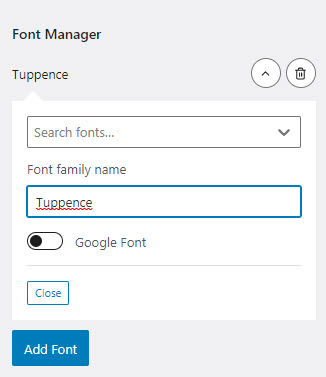
With the new Typography system, you can toggle of the Google font request.
More about the new Typography system –
https://docs.generatepress.com/article/dynamic-typography-overview/There’s a Google toggle under the font family name field. 😀
https://docs.generatepress.com/wp-content/uploads/2021/12/add-local-font.jpgReminder: Toggling the Google font request will require a locally hosted font if you want to keep using the font family. 😀
February 14, 2022 at 12:52 am #2117438Hi Elvin.
Thanks for your answer.
My question is though how can I deactivate the Google fonts, including the toggle system. I’m creating a child theme where I only want users to use local fonts, and be sure they don’t activate Google fonts.
Any way to make that happen?
Thanks.
February 14, 2022 at 2:07 am #2117523StaffCustomer SupportMy question is though how can I deactivate the Google fonts, including the toggle system. I’m creating a child theme where I only want users to use local fonts, and be sure they don’t activate Google fonts.
If this is the case, it may be better to instead fix the user role privileges so no users have the access to activate Google fonts from customizer.
But to answer the question directly:
This should work remove the google request regardless if the Google font is toggled on/off on the customizer.
add_action( 'wp_enqueue_scripts', function() {
    wp_dequeue_style( 'generate-google-fonts' );
},99 );
February 14, 2022 at 2:32 am #2117559Hi Elvin, thanks for your answer.
I can’t rely on user roles since this is a child theme that has to work without other modifications.
What I am looking for here is for example a php hook that would empty the default Google Fonts list, preventing anybody from selecting one in the Fonts Customizer.
And for the dequeue this is not what I am looking for either. I want to prevent people from selecting a Google Font, not break the display.
I also asked for a php function that would list the fonts activated on the website. Do you have information about rhe way it’s stored in db or the location of the native function that handles that part ?
Thanks.
February 14, 2022 at 2:39 pm #2118669Tom
Lead DeveloperLead DeveloperHi there,
As of right now it’s not possible to remove that option from the Customizer, unfortunately.
However, I agree it would be a useful addition with a simple filter. I’ve added an issue here for 3.2.0: https://github.com/tomusborne/generatepress/issues/354
February 15, 2022 at 1:20 am #2119037Hi Tom,
Thanks a lot, this is excellent 🎉
Regarding the best way to get an array of the activated fonts, do you have any insight I could leverage ?
Thanks.
February 15, 2022 at 3:10 am #2119165Hello, done for the fonts list :
function generatepress_child_active_fonts()
{
    if (!function_exists('generate_get_default_fonts')) {
        return array();
    }

    $settings = wp_parse_args(
        get_option('generate_settings', array()),
        generate_get_default_fonts()
    );

    // Détection de la version 3 avec Font Manager
    if(isset($settings['font_manager']) && isset($settings['typography'])){

        $used_fonts = wp_list_pluck($settings['typography'], 'fontFamily');

    } else {

        $used_fonts = array(
            $settings['font_body'],
            $settings['font_top_bar'],
            $settings['font_site_title'],
            $settings['font_site_tagline'],
            $settings['font_navigation'],
            $settings['font_widget_title'],
            $settings['font_buttons'],
            $settings['font_heading_1'],
            $settings['font_heading_2'],
            $settings['font_heading_3'],
            $settings['font_heading_4'],
            $settings['font_heading_5'],
            $settings['font_heading_6'],
            $settings['font_footer']
          );

    }

    return array_unique($used_fonts);
}
February 15, 2022 at 3:52 am #2119220My last question would be :
How can I pre-populate the “System Fonts” category with my own list of fonts ?
I previously did that but it no longer works :
add_filter('generate_typography_default_fonts', 'generatepress_child_fonts_in_customizer', PHP_INT_MAX);
function generatepress_child_fonts_in_customizer($fonts)
{
    return array_merge($fonts, $my_custom_fonts_array);
}
February 15, 2022 at 8:27 pm #2120451Lead DeveloperLead DeveloperThis is the same issue – there is no filter available as there’s an input now that you can add any font you’d like.
Of course, there’s obviously a need to alter the select list as well, which our new filter will cover.
Thanks!
February 16, 2022 at 2:04 am #2120700Hi Tom, thanks.
I guess I just have to wait, then 😅
July 13, 2022 at 12:52 pm #2281954Hi there, any news about the possibility to declare my own font-stacks instead of Google Fonts ?
Thanks for your answer.
July 13, 2022 at 2:06 pm #2281997Ying
StaffCustomer SupportHi Eroan,
The filter has been added to our ongoing development, it will be released with GP 3.2.0.
For more info: https://github.com/tomusborne/generatepress/pull/393
July 14, 2022 at 12:01 am #2282253Hi,
Excellent, thanks for your answer !
Do you have an example of the generate_font_manager_system_fonts JS filter implementation ?
Thanks.
July 14, 2022 at 2:39 am #2282364David
StaffCustomer Support -
AuthorPosts
- You must be logged in to reply to this topic.