Archived topic
Remove Google Fonts
29 replies · Started by Eroan on February 13, 2022
Hi beautiful team!
I've been working on moving my fonts optimizations to GP V3 and the new typography system. I'm looking to 2 things here:
- Removing Google fonts from the new Typography System. I previously used a variation of this doc but it does not work anymore.
- Detecting the fonts used on a page in order to load the appropriate CSS files. I previously got the settings with $settings = wp_parse_args(get_option('generate_settings', array()),generate_get_default_fonts()); then made an ugly $settings['font_body'], etc.
Thanks for your help :)
Hi Eroan,
With the new Typography system, you can toggle of the Google font request.
More about the new Typography system -
https://docs.generatepress.com/article/dynamic-typography-overview/
There's a Google toggle under the font family name field. :D
https://docs.generatepress.com/wp-content/uploads/2021/12/add-local-font.jpg
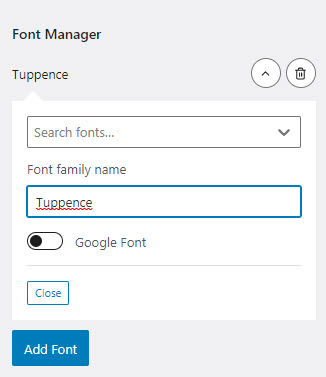
Reminder: Toggling the Google font request will require a locally hosted font if you want to keep using the font family. :D
Hi Elvin.
Thanks for your answer.
My question is though how can I deactivate the Google fonts, including the toggle system. I’m creating a child theme where I only want users to use local fonts, and be sure they don’t activate Google fonts.
Any way to make that happen?
Thanks.
My question is though how can I deactivate the Google fonts, including the toggle system. I’m creating a child theme where I only want users to use local fonts, and be sure they don’t activate Google fonts.
If this is the case, it may be better to instead fix the user role privileges so no users have the access to activate Google fonts from customizer.
But to answer the question directly:
This should work remove the google request regardless if the Google font is toggled on/off on the customizer.
add_action( 'wp_enqueue_scripts', function() {
    wp_dequeue_style( 'generate-google-fonts' );
},99 );Hi Elvin, thanks for your answer.
I can't rely on user roles since this is a child theme that has to work without other modifications.
What I am looking for here is for example a php hook that would empty the default Google Fonts list, preventing anybody from selecting one in the Fonts Customizer.
And for the dequeue this is not what I am looking for either. I want to prevent people from selecting a Google Font, not break the display.
I also asked for a php function that would list the fonts activated on the website. Do you have information about rhe way it's stored in db or the location of the native function that handles that part ?
Thanks.
Hi there,
As of right now it's not possible to remove that option from the Customizer, unfortunately.
However, I agree it would be a useful addition with a simple filter. I've added an issue here for 3.2.0: https://github.com/tomusborne/generatepress/issues/354
Hi Tom,
Thanks a lot, this is excellent 🎉
Regarding the best way to get an array of the activated fonts, do you have any insight I could leverage ?
Thanks.
Hello, done for the fonts list :
function generatepress_child_active_fonts()
{
    if (!function_exists('generate_get_default_fonts')) {
        return array();
    }

    $settings = wp_parse_args(
        get_option('generate_settings', array()),
        generate_get_default_fonts()
    );

    // Détection de la version 3 avec Font Manager
    if(isset($settings['font_manager']) && isset($settings['typography'])){

        $used_fonts = wp_list_pluck($settings['typography'], 'fontFamily');

    } else {

        $used_fonts = array(
            $settings['font_body'],
            $settings['font_top_bar'],
            $settings['font_site_title'],
            $settings['font_site_tagline'],
            $settings['font_navigation'],
            $settings['font_widget_title'],
            $settings['font_buttons'],
            $settings['font_heading_1'],
            $settings['font_heading_2'],
            $settings['font_heading_3'],
            $settings['font_heading_4'],
            $settings['font_heading_5'],
            $settings['font_heading_6'],
            $settings['font_footer']
          );

    }

    return array_unique($used_fonts);
}My last question would be :
How can I pre-populate the "System Fonts" category with my own list of fonts ?
I previously did that but it no longer works :
add_filter('generate_typography_default_fonts', 'generatepress_child_fonts_in_customizer', PHP_INT_MAX);
function generatepress_child_fonts_in_customizer($fonts)
{
    return array_merge($fonts, $my_custom_fonts_array);
}This is the same issue - there is no filter available as there's an input now that you can add any font you'd like.
Of course, there's obviously a need to alter the select list as well, which our new filter will cover.
Thanks!
Hi Tom, thanks.
I guess I just have to wait, then 😅
Hi there, any news about the possibility to declare my own font-stacks instead of Google Fonts ?
Thanks for your answer.
Hi Eroan,
The filter has been added to our ongoing development, it will be released with GP 3.2.0.
For more info: https://github.com/tomusborne/generatepress/pull/393
Hi,
Excellent, thanks for your answer !
Do you have an example of the generate_font_manager_system_fonts JS filter implementation ?
Thanks.