
Archived topic
PageSpeed scores.
8 replies · Started by Elhosseyn on January 20, 2023
welcome
I purchased the generate press template in hopes of improving my Google Speed rating
But it all fumigated after using the template
I did not get the desired result
Is there a solution to reach the goal
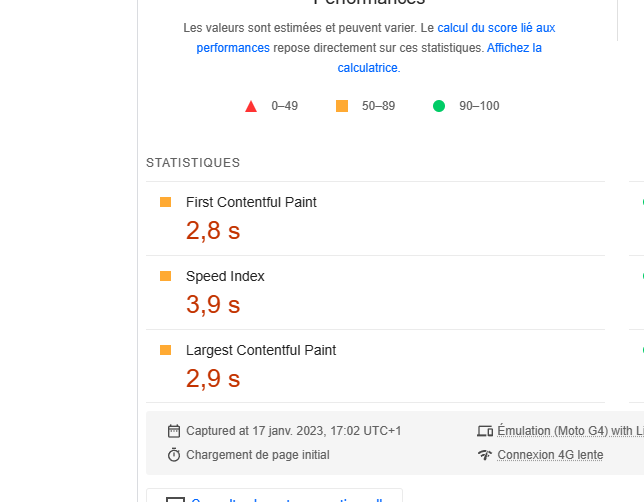
I am currently using wp rocket
And when adding the Autoptimize extension, a conflict occurred between them
Hi there,
where can i see the site ?
can you share a link.
I can then advise on what improvements you can make.
Of course it has been added
a7la-home.com/
Hello there, I am learning more about website speed, after checking your page I notice one thing, "/wp-content/uploads/generateblocks/" this part of your site is indexable and also followed. I guess this part should not be indexable.
Hi
Why should not be indexable
Do I block it with robots.txt
Theres a couple of improvements you can make.
The first one i recommend is to load the Google Fonts locally:
Hi
Why when making a table that is not compatible with a mobile phone and its size changes with a mobile player
error
Why pages aren’t usable on mobile
Pages with these issues don’t provide a good page experience
Issue Validation Trend Pages
Text too small to read
Failed
7
Clickable elements too close together
Not Started
7
Content wider than screen
Not Started
7
Tab Targets fonts should be at least 16px - at least it was for me. The default in the starter theme I customized was 15px. Changed it to 16px and that issue went away this includes lists - numbered or not. Clickable menu items in my footer were also too close together by default so adding left padding to each fixed that for me.
https://www.a7la-home.com/wp-content/uploads/2023/01/google_g_hero.jpg is your LCP and is slowing page render. A CDN will help with this tremendously.

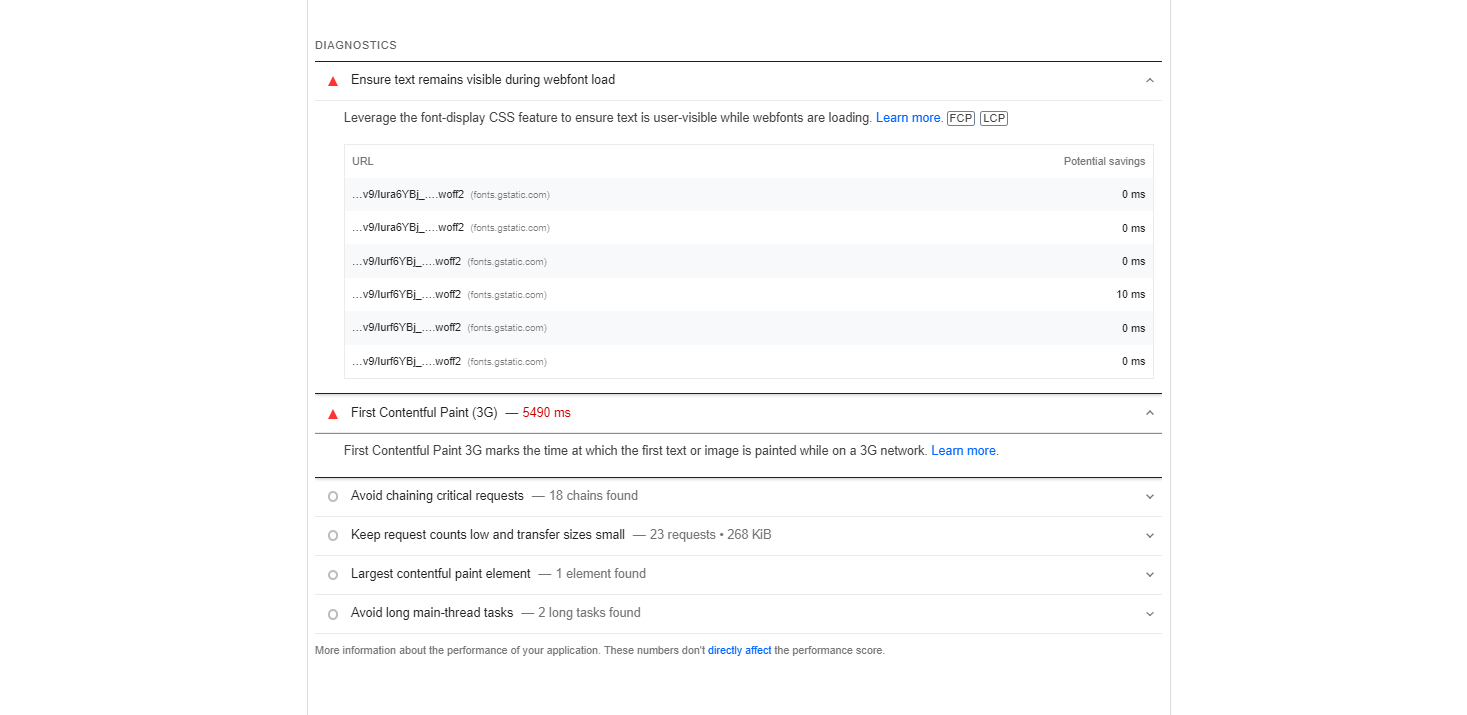
These fonts are killing performance as they’re hosted at google.
https://fonts.gstatic.com/s/tajawal/v9/Iura6YBj_oCad4k1nzSBC5xLhLFw4Q.woff2
https://fonts.gstatic.com/s/tajawal/v9/Iura6YBj_oCad4k1nzGBC5xLhLE.woff2
https://fonts.gstatic.com/s/tajawal/v9/Iurf6YBj_oCad4k1l8KiHrRpiZtK6GwN9w.woff2
https://fonts.gstatic.com/s/tajawal/v9/Iurf6YBj_oCad4k1l8KiHrFpiZtK6Gw.woff2
https://fonts.gstatic.com/s/tajawal/v9/Iurf6YBj_oCad4k1l4qkHrRpiZtK6GwN9w.woff2
https://fonts.gstatic.com/s/tajawal/v9/Iurf6YBj_oCad4k1l4qkHrFpiZtK6Gw.woff2
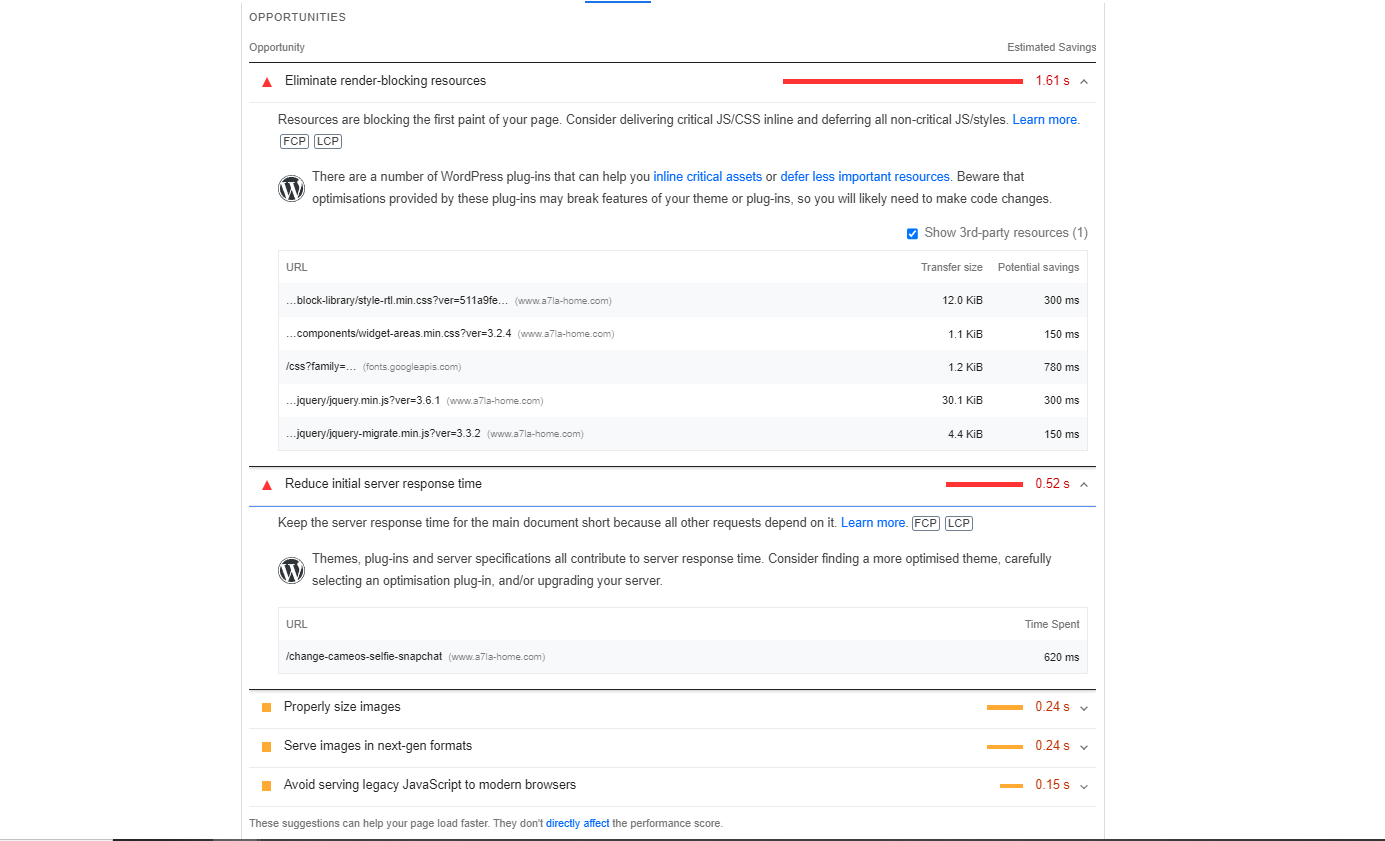
These are blocking page rendering by about 250ms on my end:
/wp-content/cache/min/1/wp-content/plugins/gtranslate/gtranslate-style16.css?ver=1674417138
/wp-includes/css/dist/block-library/style-rtl.min.css?ver=511a9fee9e18a2f76b924faf32a01d04
/wp-includes/css/classic-themes.min.css?ver=1
/wp-content/cache/min/1/wp-content/plugins/ad-inserter-pro/includes/aos/ai-aos.css?ver=1674417138
/wp-content/themes/generatepress/assets/css/main.min.css?ver=3.2.4
/wp-content/themes/generatepress/assets/css/main-rtl.min.css?ver=3.2.4
/wp-content/cache/min/1/wp-content/uploads/generateblocks/style-154.css?ver=1674417138
/css?display=swap&family=Tajawal%3A200%2C300%2Cregular%2C500%2C700%2C800%2C900&display=auto&ver=3.2.4
Don’t minify and combine js in WP Rocket if you have that turned on. Websites with heavy js usage tend not to play well with them combined and minified. Combined and minified CSS usually works just fine in my experience.
For a site with no CDN yours really isn’t that bad. Numbers at pagespeed insights don’t paint the whole story. Run their website on their own tool and you’ll understand what I mean.

Thanks for the input Scott
Regarding the issues you state here:
https://generatepress.com/forums/topic/pagespeed-scores/#post-2505149
Are generally reported if Google bot cannot or did not load all the necessary resources to render the page correctly.
This can happen for various reasons, if your run a Mobile Friendly test and it fails, check the Info tab, it will tell you what resources could not be loaded, and it ill generally label it with one of the following errors:
1. robots.txt
Make sure the /wp-content/ folder is not blocked.
And neither are .css or .js files
2. server errors eg. 404, 503 etc.
Address the specific server error
3. Other
This is very common. It generally occurs when google could not allocate enough crawl quota to test your site.
Retest the site at a later time.
If it comes up regularly look to further optimize your site to minimize this.