
Archived topic
Mobile Menu Dropdown Shows Under Slideout On Tablet
3 replies · Started by Zach on February 5, 2019
Viewing posts 1–4 of 4
Hello,
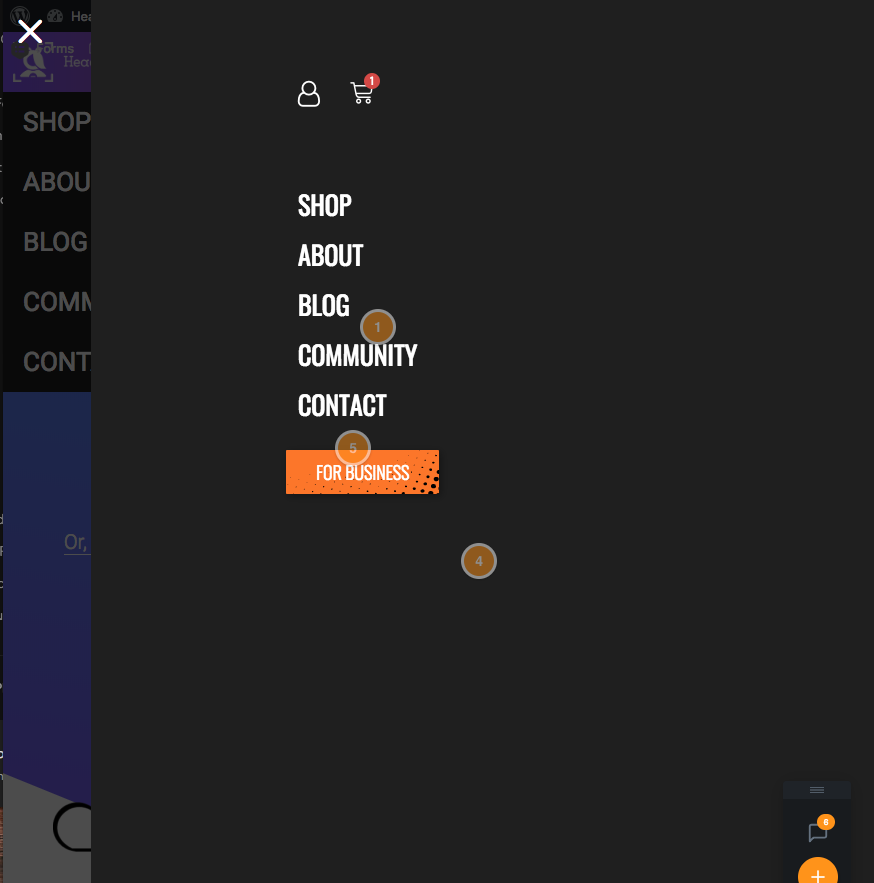
I am using the generate slideout navigation on mobile and tablet. On tablet the original mobile dropdown shows under the slideout as seen in the screenshot below. How can I stop the standard mobile menu from appearing when the hamburger icon is clicked. I am displaying the mobile header on tablet also with:
@media (max-width: 1024px) {
	#mobile-header, .main-navigation .menu-toggle {
		display: block !important;
	}

	.main-navigation ul,
	.gen-sidebar-nav, .main-navigation .sub-menu {
		display: none;
	}

	[class*="nav-float-"] .site-header .inside-header > * {
		float: none;
		clear: both;
	}
}
Thanks!
Hi there,
Strange, that shouldn't happen - I'll look into it.
Give this CSS a shot for now:
.slide-opened #mobile-header .menu {
    display: none;
}That did the trick, thanks!
You're welcome :)
This archived topic is closed to new replies.