
Archived topic
Migrating to GeneratePress - code changes a bad thing?
20 replies · Started by William on March 7, 2021
Hi there,
I am finally moving my main site to the new theme I've had the pleasure of developing in GeneratePress.
Before moving, I am doing everything I can to make sure its swift and clean. However, something that seems to have traction on the internet is that, although a theme might look better, the code itself is coded different, which can cause crawl robots to basically not like it, giving SEO penalties.
I just want to confirm would this ever be the case with GeneratePress, especially having some content in the page heroes? Having content from the article in page heros, is this bad?
I'll give examples to this as I do see the div elements and other areas (even schema) might be different, but I appreciate it if you guys can tell me definitively if this is nothing to worry about and I should be fine migrating.
New theme post vs old theme post
New theme post with featured image vs old theme post
New theme custom post vs old theme custom post
New theme category page vs old theme category page
As you can imagine, its absolutely paramount there is no technical issues with moving to GeneratePress - I love the UX of the new site, I just need to make sure the code is just as good for robots and SEO reasons.
For example, on the post, I see there are a lot of elements missing it seems:
New theme vs old theme in Google structured data.
I can see the structured data is different and it also seems the 'post-excerpt' div element in the page hero has not been included in the structured data? Same applies for this page and this page too. GeneratePress also has a ton of hcards?
Kind regards,
Will
Hi Will,
The code output from GeneratePress is very clean, so I wouldn't worry there.
However, the structured data output from GeneratePress is very simple - it provides the bare minimum for a basic site.
If you need a more complex structured data output, you should look into using a JSON-LD plugin. Most SEO plugins have JSON-LD built-in, but there are some dedicated plugins to it as well.
Then you could disable the structured data from GeneratePress:
add_filter( 'generate_schema_type', '__return_false' );
I think that a theme having a complex structured data system is a mistake, and your current situation kind of shows that. Structured data is tied to your content, and a theme should have minimal impact on your content.
Using a plugin should give you the desired output regardless of the theme you choose or switch to.
Hi Tom,
I do use Yoast SEO Premium which seems to add schema to the website. The issue, such as for this article (and all others on the site), if I have an excerpt showed in a page hero, it is seemingly not classed as in the content. This does not seem the most ideal.
See these images of how the sentence in the page hero (WordPress excerpt) is not appearing in the schema but missed out:
On the site:

How it is not included in schema:
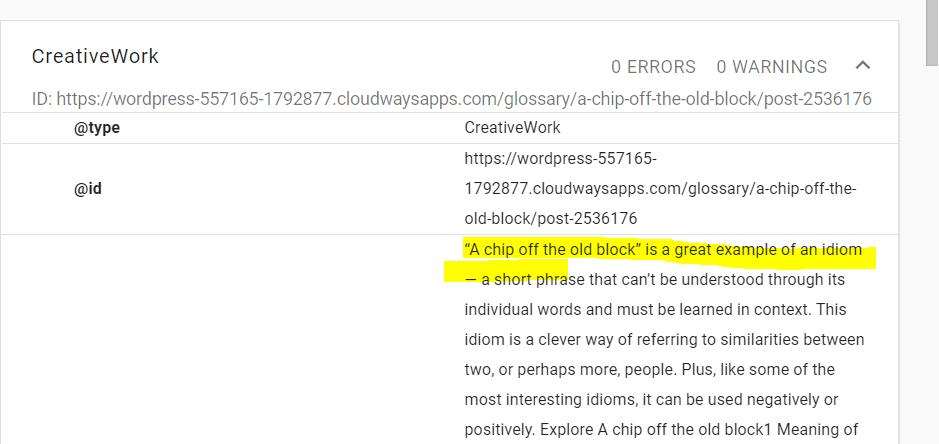
Is there some way to make the page hero content be included as content for such a schema, or is there some markup I could add to this schema? Would not having this sentence be troubling for schema? It currently seems a terrible idea having any content, including images, text or anything, in GeneratePress header elements, if they are not included in schemas for good SEO?
Or is it I am using elements wrong and should not be using header elements but some other element that would fix this? Hopefully, there is an easy fix for this!
Kind regards,
Will
The structured data you're highlighting there is being pulled from the actual content area (set to CreativeWork).
Your Header Element outside of this area, so the schema focusing on the content area won't pick it up.
You could:
a) Add your own structured data to the HTML in the Header Element.
b) Rely on JSON-LD instead of structured data markup. This way, depending on the plugin you're using, you should be able to set the excerpt for the page.
JSON-LD is preferable here, and it doesn't care about the structure of your page, the data is fed directly to the JSON-LD markup.
Also, it's important to note that Google will still read and use text that isn't included in your schema - it's still content on the page that it crawled. The structured data is simply a guide that some search engines use to better understand the structure of the page.
If it was me, I would go the JSON-LD route via a plugin that is 100% dedicated to it.
Thanks Tom - is it detrimental to have such content not in schema?
Also, I use Yoast SEO premium - does that overwrite what GeneratePress output or not?
Many thanks,
Will
If you have JSON-LD outputting the same data in that format instead of structured data, then there should be no difference.
Without it, your structured data will change from the old site to the new site - I'm not sure what kind of importance Google puts into structured data like this when it comes to rankings.
Nothing will overwrite what GeneratePress outputs - you need to manually disable the GP output like this: https://generatepress.com/forums/topic/migrating-to-generatepress-code-changes-a-bad-thing/#post-1686988
Then, you need to set up the JSON-LD output (whether that's from Yoast or another source) to include things like the excerpt, content, author, and so on.
Gotcha Tom - sorry for being pedantic. Basically GeneratePress hsa their own schema - if Yoast creates their own, is it recommended or not to disable your schema, as you do add schema to the header etc.
Yes, I would disable the basic GP schema in favor of a more robust JSON-LD solution (like Yoast provides).
The GP solution is as simple as it gets for very basic websites. In your case, you're adding excerpts and other things outside of the content area, so a more robust solution is a good idea.
Is this the recommendation for any time you use schema from the likes of Yoast, Rank Math, etc.? The reason I say this is that I am migrating other sites to GeneratePress and they will have the schema from Yoast done on it. (bookanalysis.com is already migrated).
What schema will be lost by disabling GeneratePress, and that will not cause any SEO schema declines due to this?
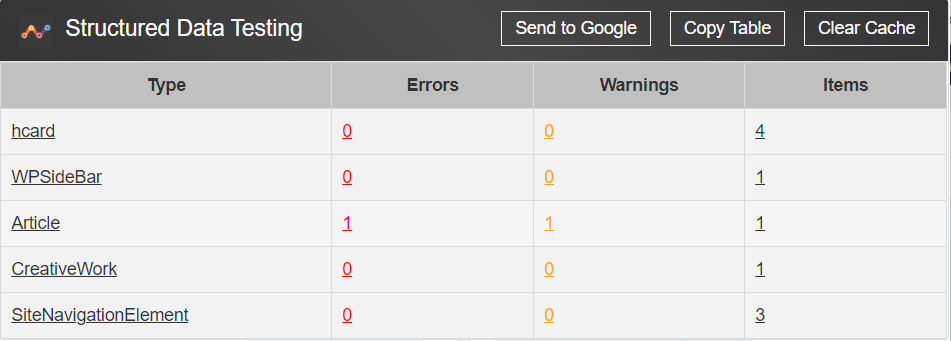
You would likely lose the CreativeWork, hcard, and SiteNavigationElement entries there.
You shouldn't notice any declines, but I can't really guarantee anything when it comes to Google/ranking. As long as the page still has all of the necessary data being output, Google should be happy.
I would probably not want to remove your markup - I presume having a creativework and article does not result in a conflict though?
SiteNavigationElement won't conflict as Yoast doesn't mess with this but CreativeWork most likely will.
It's recommended to completely disable theme generated schema of you're using Yoast.
Okay - is there a way to just disable your Creativework then?
Using the little code snippet I mentioned here will tell GeneratePress to get out of the way and allow Yoast to do what it needs to do: https://generatepress.com/forums/topic/migrating-to-generatepress-code-changes-a-bad-thing/#post-1686988
Okay thanks Tom, much appreciated.
