- This topic has 12 replies, 3 voices, and was last updated 7 years, 11 months ago by
Tom.
-
AuthorPosts
-
May 2, 2018 at 12:04 pm #565803
Amanda
I sent this to Woocommerce first, but their support rep said it looked like it was an issue with the theme and not woocommerce.
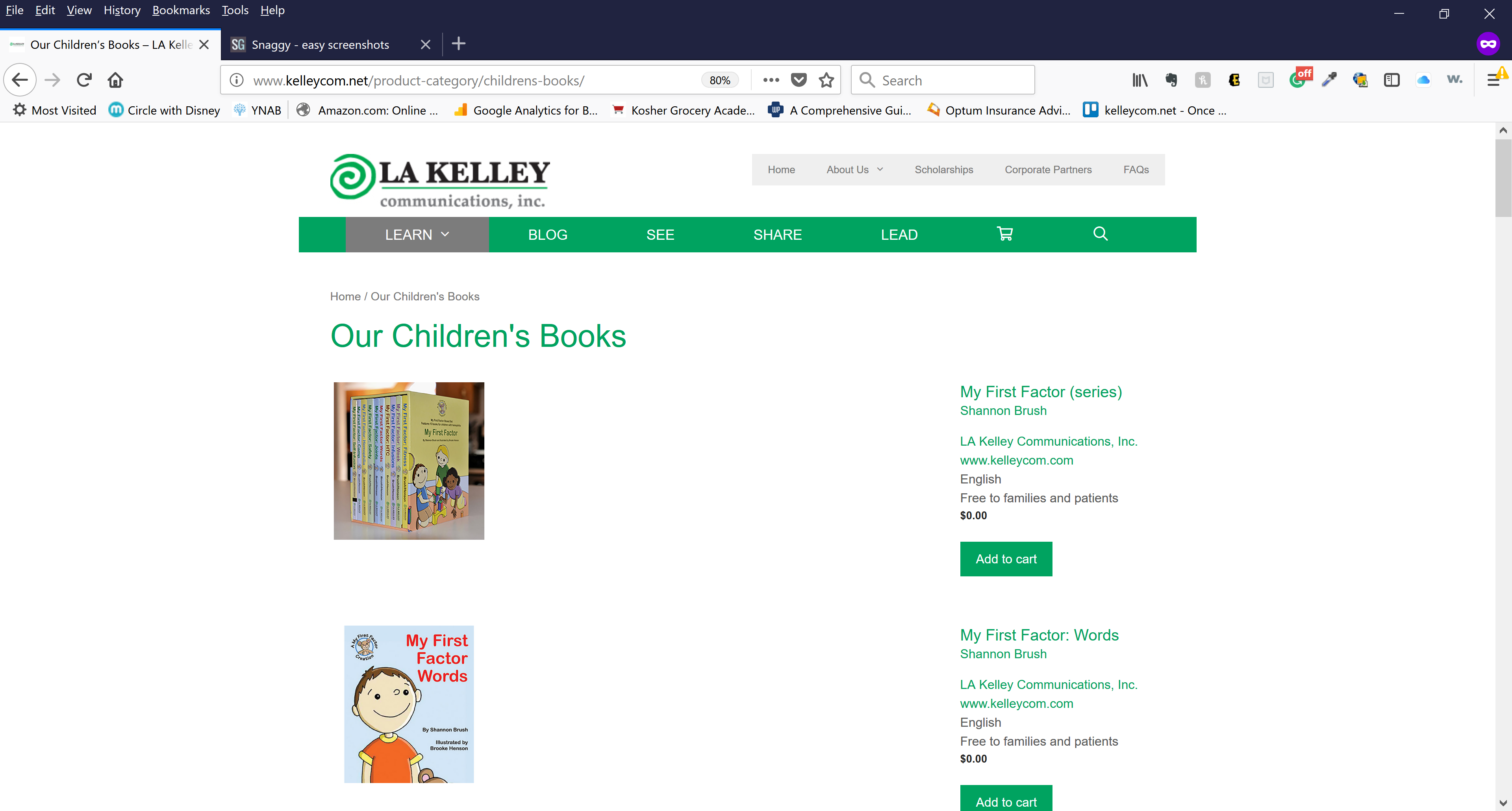
On my category pages the images are left-aligned…but it almost looks like it is a table and there is an empty < td > in the table in between the image and the short description.
Except for one product…which is aligned properly.
Any thoughts?
May 2, 2018 at 3:06 pm #565923Tom
Lead DeveloperLead DeveloperHi there,
I’m not too sure I understand – I’m not seeing any
<td>elements.Can you show me a screenshot of one of the problem products, and what it should look like?
Thanks!
May 2, 2018 at 3:33 pm #565952Hi Tom,
I used the <td> as an example. There isn’t a td there, but it looks like there is a large space.
Please see this snaggy with my comments:
May 2, 2018 at 9:41 pm #566103Lead DeveloperLead DeveloperStrange, this is what I’m seeing in Chrome and Firefox: https://www.screencast.com/t/nAarpaXOIXLl
Did you make any changes?
May 3, 2018 at 7:58 am #566546Chrome looks ok. This is Firefox right now. Didn’t make any changes at all.
May 3, 2018 at 10:21 am #566651Lead DeveloperLead DeveloperWhat version of Firefox?
May 3, 2018 at 11:15 am #56668359.0.3 (64-bit)
May 3, 2018 at 9:06 pm #566960Lead DeveloperLead DeveloperHmm, me too. Wonder why we’re seeing completely different things.
Can you try inside a “Private Window”? I believe that will rule out browser extensions.
May 4, 2018 at 8:16 am #567397May 4, 2018 at 9:31 am #567499Lead DeveloperLead DeveloperIt seems your browser extensions are still loaded. Can you disable those just to test?
Here’s what I’m seeing: https://www.screencast.com/t/tOh1AYOsXxf
May 4, 2018 at 10:52 am #567590Hi Tom,
The extensions are disabled.
https://snag.gy/vuF7hL.jpgI open it in a Private Window and it still looks the same…
https://snag.gy/2rzsX3.jpgAmanda
May 4, 2018 at 2:18 pm #567733Leo
StaffCustomer SupportThis is what I’m seeing: http://www.screencast.com/t/2TB8xsvgx1nt
Can’t see any issues either.
May 4, 2018 at 8:23 pm #567892Lead DeveloperLead DeveloperI’ve checked in Chrome, Firefox and Safari and can’t get it to happen, which is frustrating. Without seeing it, I can’t inspect the code to see what’s causing that gap. Code-wise, I can’t think of what would cause that.
Can you confirm that this is happening on another computer? A friend, family or co-worker?
-
AuthorPosts
- You must be logged in to reply to this topic.