Archived topic
How to align buttons to the bottom of a container?
17 replies · Started by Sascha on October 1, 2021
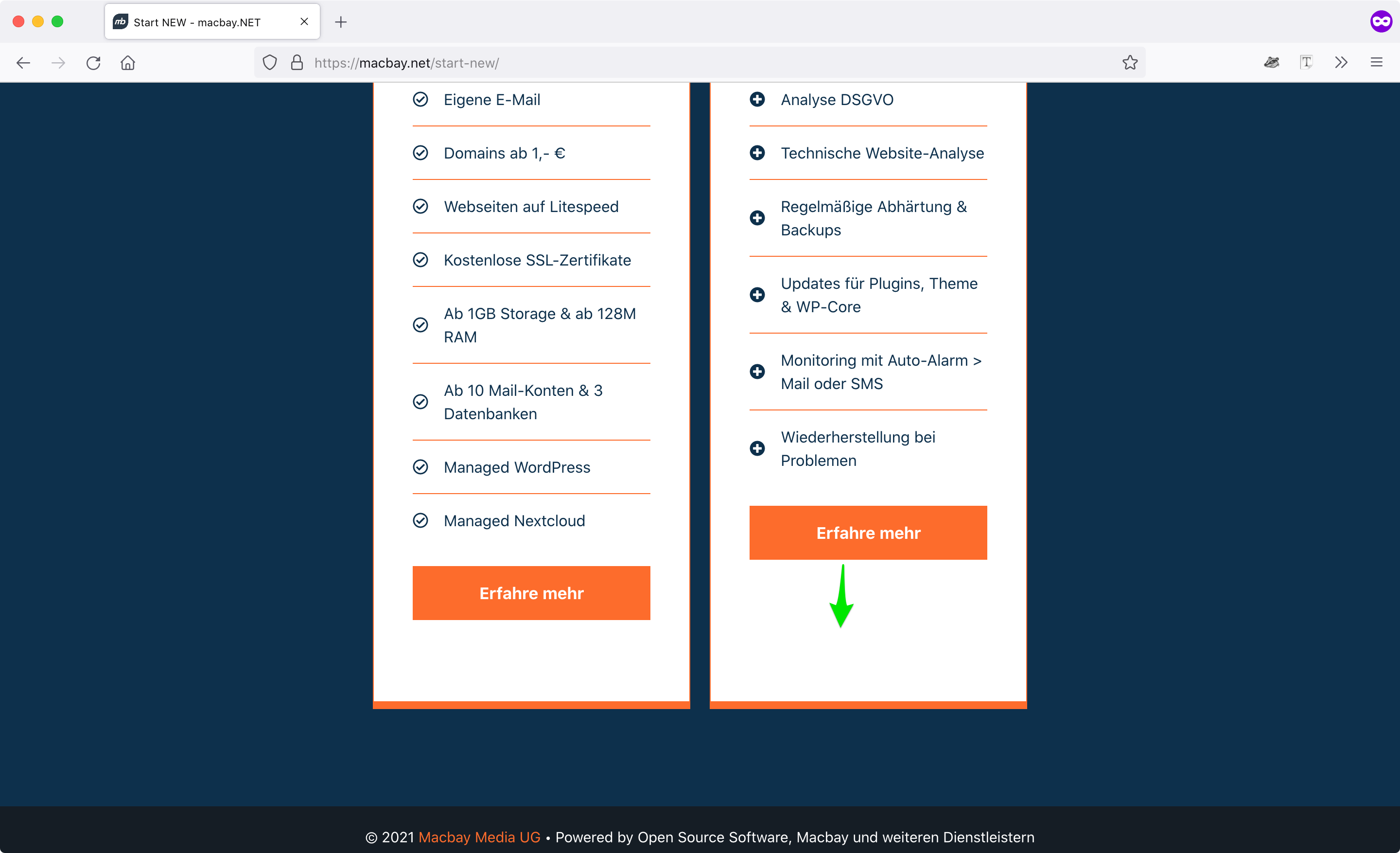
On this page I have used a GBP Pricing-Table-Template and now need to align the buttons to the bottom of each table.
Check this screenshot please.
The containers already have 100 vh each, so the buttons should always align to bottom no matter how many other items are between the button and the upper headline.
I had already added this CSS to customizer, but didn't work:
@media screen and (max-width: 1008px) {
  body.page-id-5870 .gb-button-wrapper {
    position: absolute;
    bottom: -80vh;
  }
}
Please help :)
Thank you in advance and kind regards,
Sascha
Hi Sascha,
Can you open a support topic in GB's support forum as it's a GB-specific question?
https://wordpress.org/support/plugin/generateblocks/
It's a good question that should help other users as well :)
Thanks!
Hey there, sure, just allow me to say that I find it really inconvenient to use two different forums.
Why not using one forum for all your GB and GP users? I can hardly imagine that any GP user is not using GB …
Thanks
Sascha
Hi Sascha,
There're also a lot of GB users who are using other themes.
GB is a plugin that can be used in all other WordPress themes.
So your question would be useful for other non-GP GB users :)
Thanks for your understanding!
Got it, thanks for clarifying :)
No problem :)
GB Forum did not help :(
GB Forum has almost never replied to my queries :(
Whereas the GP-support is superb, I'm very frustrated that you don't allow me to place ALL my GP & GB (using Pro versions for both) here for a better overall support-experience.
The issue is already occurring on many of my sites:
site1 > check the table below "LÖSUNGEN"
site2 > check the bottom of the table
site3 > check the buttons
I'm struggling to align all these buttons to the bottom of the surrounding container.
Can you please help me with this, to find a general solution I can apply to all these buttons?
Thank you in advance and kind regards,
Sascha
Hi Sascha,
I believe you won't need to set a min-height.
You can use the idea of this topic -
https://community.generateblocks.com/t/grid-items-with-different-content-heights-aligned-bottom-block/36
Not mentioned on the topic is you have to make sure the Grid block and its container block's vertical alignment has to be set to "Default" for it to work. :) (Don't forget the CSS class(es) as well. ;) )
So instead of giving the class to the button, I give the class to the surrounding container?
So instead of giving the class to the button, I give the class to the surrounding container?
That's correct :)
Hi again,
I have applied the CSS-code (via Simple CSS) and classes to the pricing table on this page, but it does not work.
Can you please help once more?
All 3 tables should have the same height.
The buttons and the pricing-headline above the button should be aligned to the bottom of each table.
Access credentials below.
Thank you in advance and kind regards,
Sascha
Hi there,
The login doesn't work for me, I'm not able to log in and check the backend.
In the page editor, select the Grid block, set the vertical alignment to defaultinstead of top.
Let me know if this helps :)
Oops, sorry, please try again now …
Still doesn't work:
https://www.screencast.com/t/Lbf06fY3C
Have you tried my suggestion? It should work.
Hello,
I'm terribly sorry, when adding this new "techmin" user I didn't realize it was not added properly. Now I have added properly, tested in incognito window and the login works :)
Regarding your previous suggestion, the vertical alignment in grid settings was already set to "top". However, it interferes with the workaround that Elvin has previously suggested above.
For this pricing table, I have 2 requirements:
1. All tables should have the same height
2. In each table, the last two blocks (pricing & button) should align to the button
I hope you can help me achieve this.
Thank you in advance and kind regards,
Sascha
PS: Please find the credentials below