Hello,
I just purchase GeneratePress last night and have been digging into it for a photography website that I am building.
One of the issues that I am up against is that some pages want to have a full width (photo gallery pages) and other (like the contact page) wants to be contained.
First, I tried setting Customize > Layout > Container and using the “Container Width” slider but it did not effect the page container. It only seems to effect the Header of the page. BTW, I have “Content Layout” set to “Separate Containers”. But, even with it set to “One Container”, still the slider does not effect the page’s width.
I inspected the elements of the page and it seems to be that there is a max-width set at the .no-sidebar .inside-article > * element. I could override this using an !important declaration but this would effect the layout site wide and I need to be able to control the container on a page by page basis.
Some Google searching led me to the support article that goes into “Layout” setting for “Page Builder Container”. I set this to full width but, again, it had no effect on the main page content.
I am stumped. Is there a way to control the width of the main page somewhere? Here are some screenshots of what I have been trying so far: 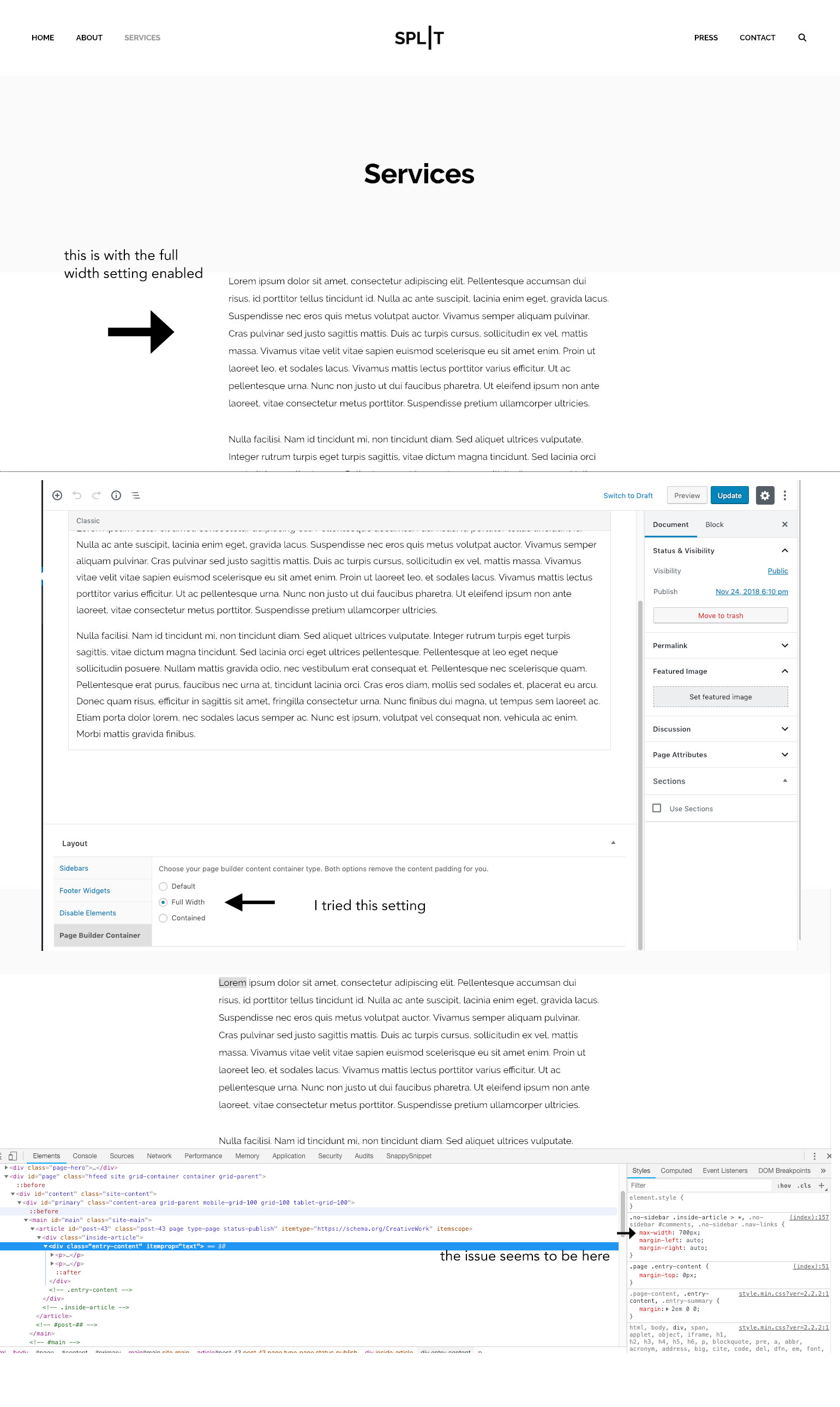
Also, the css that I added into the Custom CSS field is this:
.no-sidebar .inside-article > *{
max-width:95%!important;
}
I really appreciate any help in this matter so I can move forward with this project.
-Richard
.


