
Archived topic
customize search bar
34 replies · Started by francesco on January 8, 2023
hi david i did as you suggested but it doesn't seem to work.
in what sense is it inside a query?
We can't seem to view the site right now as it's set to "under construction".
Can you provide login credentials so we can check why it's not working?
Please use the Private Information field for this: https://docs.generatepress.com/article/using-the-premium-support-forum/#private-information
As David mentioned, you currently have the code nested under another @media query. The code provided by David wouldn't work because of this.
Example @media query:
@media (min-width:1025px) {

}
Basically, you need to place the code provided by David out of anything similar to this one.
So if i place it under this it wouldn't work?
/* Set menu */
@media (min-width: 769px) {
.inside-navigation.grid-container {
    width: fit-content;
}
how can i close a query?
No, it wouldn't work.
You need to find the closing bracket of the @media query.
In the code you shared, there's only one } whereas there are two {.
For reference, every @media query or CSS code needs to be closed. If it isn't closed, there's going to be a syntax error.
So if that code you shared has no } for the @media query, you need to add one.
If it does, you need to place David's code after that closing bracket.
If you put David's code at the very top of everything, it should work as well.
so to close the @query i should use this structure?
/* Set menu */
@media (min-width: 769px) {
.inside-navigation.grid-container {
    width: fit-content;
}
}
or should i use this?
/* Set menu */
@media (min-width: 769px) {
.inside-navigation.grid-container {
    width: fit-content;
    }
}Either will work, but for legibility you should use:
/* Set menu */
@media (min-width: 769px) {
.inside-navigation.grid-container {
        width: fit-content;
    }
}thanks david, i noticed that among the various css codes i have others would appear to be open. I should close them all I guess?
Yeah, but be careful not to add ones that are not needed :)
ok david thanks. if I may I would like to ask you how to further modify the search bar. changing the typography in the customizer it changed and I don't understand why honestly.
it would appear to be missing some edge at the top
it would seem to be a body typography problem, if it decreases or increases the font everything changes. how can i avoid this?
If you want to change the font sizes for the input and the button you can use this CSS:
.navigation-search input {
    font-size: 13px;
}
.navigation-search button {
    font-size: 15px;
}thanks david, can you explain how to remove the word search inside?
Which function did you use to add the Submit Button ? Can you share that here ?
I would like to delete this text that says "search", as it is already present in the button on the right.
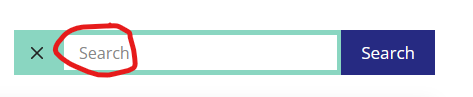
You can just go to that block and remove the Search placeholder text.