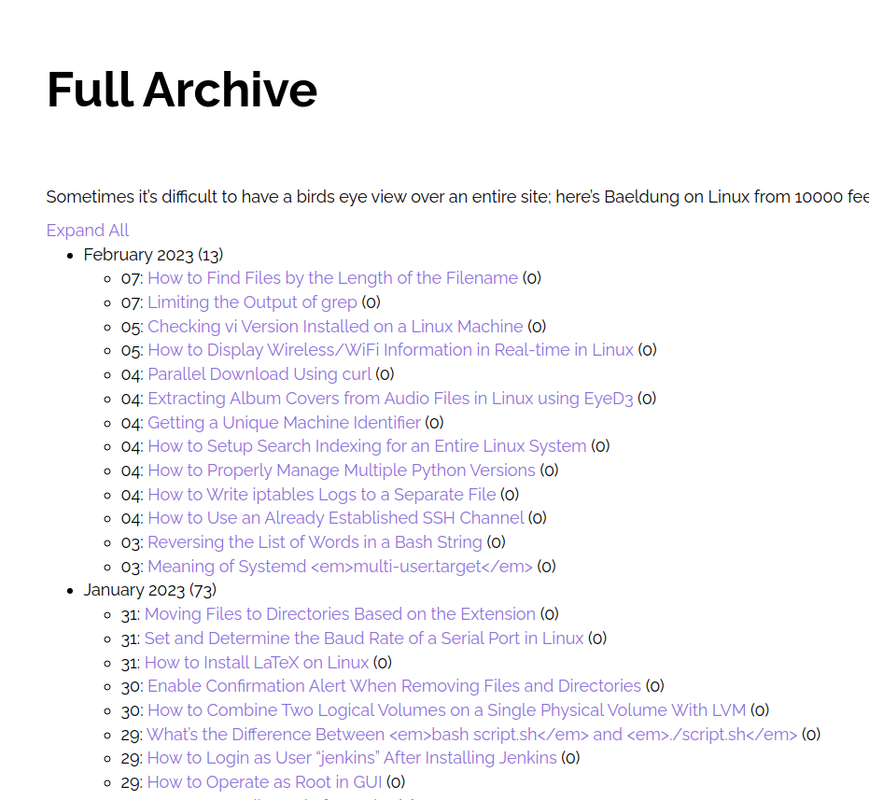
Home › Forums › Support › How to Create Archive Page with Month Wise Posts Counts This topic has 11 replies, 3 voices, and was last updated 3 years, 2 months ago by Fernando. Viewing 12 posts - 1 through 12 (of 12 total) Author Posts February 20, 2023 at 12:49 am #2539421 Ravi Saive Hi Support, I wanted to create an archive page with month-wise that shows the posts count as well… See the example screenshot – https://i.postimg.cc/65hLS5Zw/Screenshot-2023-02-20-13-17-29.png February 20, 2023 at 1:28 am #2539457 Fernando Customer Support Hi Ravi, To clarify, is this a page with a list of all categories? February 20, 2023 at 2:58 am #2539572 Ravi Saive @Fernando, It is a page with a list of all published posts month-wise… February 20, 2023 at 5:39 am #2539759 DavidStaff Customer Support Hi there, that kind of thing requires custom development. But i had a similar function – which i saved in this GIST: https://gist.github.com/diggeddy/41970526b34574a2a4c960869f14b12a The top PHP snippet will create a [post_cal] shortcode to add to the page. And beneath it is the CSS to make the monthyear a toggle to show hide the list. February 20, 2023 at 10:59 pm #2540741 Ravi Saive @David, Where to upload a php snippet? and how to add the shortcode to page? just i need to copy/paste [post_cal] will work? I have placed the php snippet to file ‘post_cal.php‘ in child_theme and created a page with the [post_cal] shortcode, but it not working… February 20, 2023 at 11:14 pm #2540744 Fernando Customer Support Hi Ravi, You can add it to your functions.php file. Add [post_cal] to a Page through a Shortcode Block: https://wordpress.org/documentation/article/shortcode-block/ February 20, 2023 at 11:50 pm #2540764 Ravi Saive @David and @Fernando, Thanks, it works fine…:) Can we make it ‘Expand All‘ and ‘Collapse All‘. February 21, 2023 at 12:05 am #2540769 Fernando Customer Support You’ll need a custom Javascript code for that. It would be best to reach out to a developer regarding this as this would be out of our scope of support. February 21, 2023 at 12:09 am #2540772 Ravi Saive @Fernando, Okay, thanks for your support…:) February 21, 2023 at 12:12 am #2540774 Fernando Customer Support You’re welcome, Ravi! This article shows an example how: https://www.w3schools.com/howto/howto_js_toggle_hide_show.asp You can add JS through a Hook Element hooked to wp_footer. February 21, 2023 at 2:49 am #2540924 Ravi Saive @Fernando, Thanks, I will try and get back to you if any help is needed… February 21, 2023 at 2:51 am #2540928 Fernando Customer Support You’re welcome, Ravi! Author Posts Viewing 12 posts - 1 through 12 (of 12 total) You must be logged in to reply to this topic. Log In Username: Password: Keep me signed in Log In