Archived topic
How to Create Archive Page with Month Wise Posts Counts
11 replies · Started by Ravi Saive on February 20, 2023
Hi Support,
I wanted to create an archive page with month-wise that shows the posts count as well...
See the example screenshot - https://i.postimg.cc/65hLS5Zw/Screenshot-2023-02-20-13-17-29.png
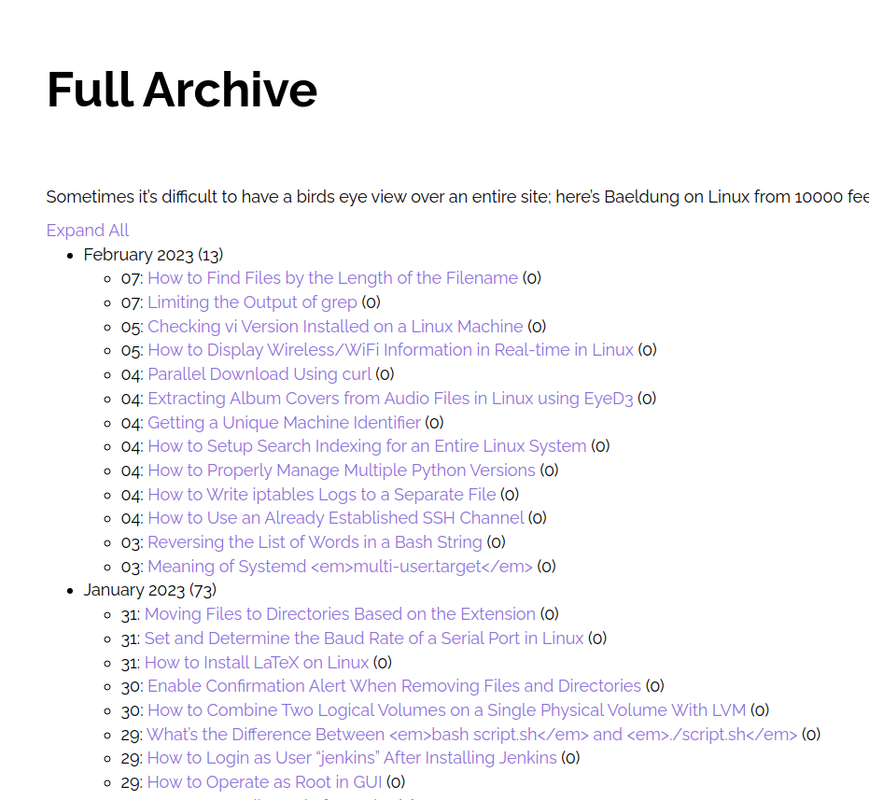
Hi Ravi,
To clarify, is this a page with a list of all categories?
@Fernando,
It is a page with a list of all published posts month-wise...
Hi there,
that kind of thing requires custom development.
But i had a similar function - which i saved in this GIST:
https://gist.github.com/diggeddy/41970526b34574a2a4c960869f14b12a
The top PHP snippet will create a [post_cal] shortcode to add to the page.
And beneath it is the CSS to make the monthyear a toggle to show hide the list.
@David,
Where to upload a php snippet? and how to add the shortcode to page? just i need to copy/paste [post_cal] will work?
I have placed the php snippet to file 'post_cal.php' in child_theme and created a page with the [post_cal] shortcode, but it not working...
Hi Ravi,
You can add it to your functions.php file.
Add [post_cal] to a Page through a Shortcode Block: https://wordpress.org/documentation/article/shortcode-block/
@David and @Fernando,
Thanks, it works fine...:)
Can we make it 'Expand All' and 'Collapse All'.
You'll need a custom Javascript code for that. It would be best to reach out to a developer regarding this as this would be out of our scope of support.
@Fernando,
Okay, thanks for your support...:)
You're welcome, Ravi! This article shows an example how: https://www.w3schools.com/howto/howto_js_toggle_hide_show.asp
You can add JS through a Hook Element hooked to wp_footer.
@Fernando,
Thanks, I will try and get back to you if any help is needed...
You're welcome, Ravi!