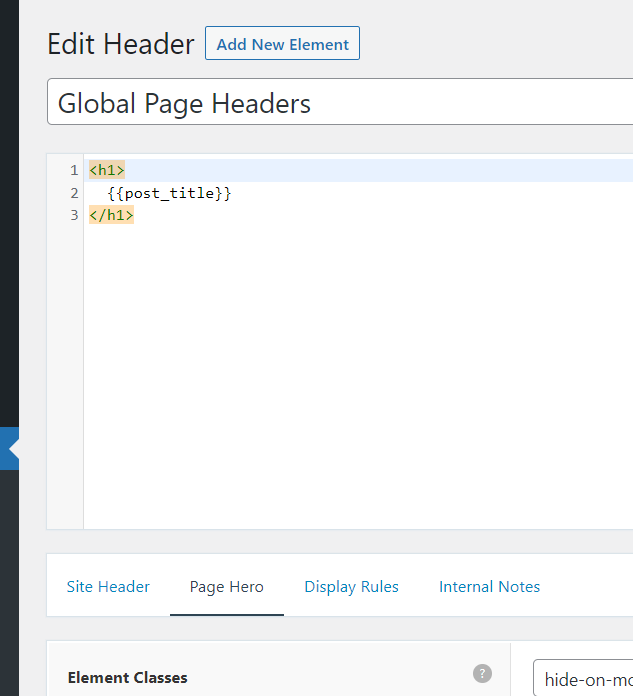
Home › Forums › Support › Elements not opening in Block Editor This topic has 5 replies, 3 voices, and was last updated 3 years, 2 months ago by David. Viewing 6 posts - 1 through 6 (of 6 total) Author Posts February 16, 2023 at 9:34 am #2535840 Mattias GenerateBlock 1.6.0 installed and active Site health Good I cannot understand why elements do not open in BlockEditor. Also, what is the original size of the Global Page Header image for Wordsmith? All the best Mattias February 16, 2023 at 11:08 am #2535931 LeoStaff Customer Support Hi there, I cannot understand why elements do not open in BlockEditor. Not sure if I fully understand – we’ve never heard of this issue before. Are you getting any specific errors? Also, what is the original size of the Global Page Header image for Wordsmith? Please open a new topic for the separate question. Thanks! February 18, 2023 at 2:12 am #2537683 Mattias Hi again I want to be able to edit Elements in Block editor. Please see below: In Dashboard: 1. Appearance > Elements 2. Click Edit on the Element I want to edit 3. I get the view below: February 18, 2023 at 4:23 am #2537782 DavidStaff Customer Support Hi there, that is a Header Element, its the legacy system that uses text / HTML. Use a Block Element instead: https://docs.generatepress.com/article/block-element-overview/ February 18, 2023 at 5:32 am #2537835 Mattias Thanks! February 18, 2023 at 7:02 am #2537911 DavidStaff Customer Support You’re welcome Author Posts Viewing 6 posts - 1 through 6 (of 6 total) You must be logged in to reply to this topic. Log In Username: Password: Keep me signed in Log In