Site logo

[Resolved] customize list

Home Forums Support [Resolved] customize list

Home Forums Support customize list

Viewing 6 posts - 1 through 6 (of 6 total)
  • Author
    Posts
  • #2522534
    francesco

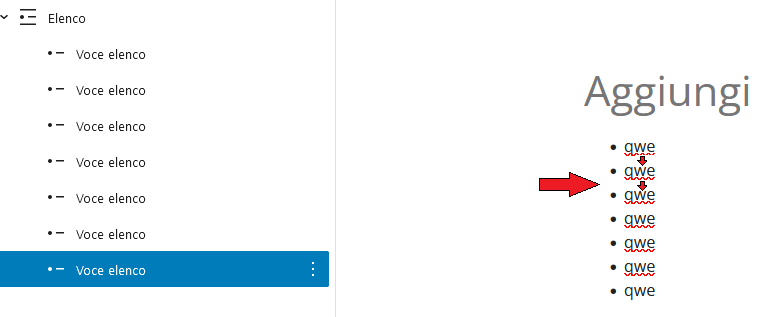
    How can I custom of space the list element of the articles? for example by spacing the points more or less from the left edge and between the points themselves?

    #2522598
    Leo
    Staff
    Customer Support

    Hi there,

    Any chance you can link us to the page in question?

    You can use the private information field:
    https://docs.generatepress.com/article/using-the-premium-support-forum/#private-information

    Let me know 🙂

    #2522959
    francesco

    hi leo, done!

    #2523098
    David
    Staff
    Customer Support

    Hi there,

    you can apply this CSS to style all UL lists in the page content:

    #page ul li {
        margin-bottom: 1em !important;
        padding-left: 20px;
    }

    Or if you want to apply it to just specific lists use:

    ul.custom-list li {
        margin-bottom: 1em !important;
        padding-left: 20px;
    }

    Then select the List Block, and in Advanced > Additional CSS Class(es) add: custom-list

    #2523133
    francesco

    hi david, margin-bottom works perfectly, but the desired effect of moving the points does not occur. I would like the list with the dots to move to the left (I would like this to happen for mobile screens mainly if possible).

    #2523351
    David
    Staff
    Customer Support

    This CSS for all lists:

    #page ul {
        margin-left: 1.2em;
    }
    #page ul li {
        margin-bottom: 1em !important;
    }

    Or this for the specific list with the custom-list class:

    ul.custom-list {
        margin-left: 1.2em;
    }
    ul.custom-list li {
        margin-bottom: 1em !important;
    }
Viewing 6 posts - 1 through 6 (of 6 total)
  • You must be logged in to reply to this topic.