Site logo

[Resolved] Elements GB block container not showing full width

Home Forums Support [Resolved] Elements GB block container not showing full width

Home Forums Support Elements GB block container not showing full width

Viewing 9 posts - 1 through 9 (of 9 total)
  • Author
    Posts
  • #2491961
    Peter

    In Elements I have made a block for posts.
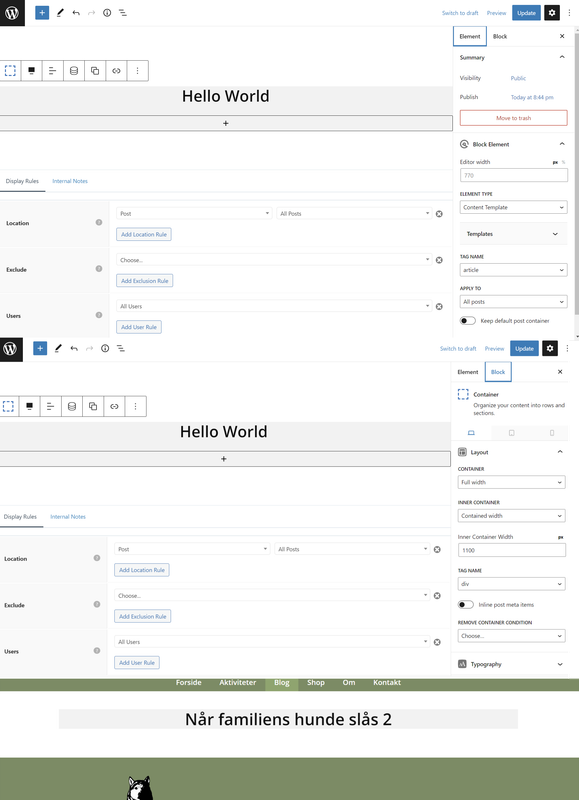
    I have an issue with a GB container in Elements > Block, how not will show up in full width. It does correct when I build it in elements – but not on the page…
    I have done the same things before and on the same site I have made the footer without no problems. I must have overlooked something….

    Screenshot

    #2491964
    Peter
    #2491978
    Leo
    Staff
    Customer Support

    Hi there,

    Any chance you can link us to the page in question?

    You can use the private information field:
    https://docs.generatepress.com/article/using-the-premium-support-forum/#private-information

    Let me know 🙂

    #2491988
    Peter

    Of course 🙂

    #2491991
    Leo
    Staff
    Customer Support

    Can you explain what you are trying to achieve here?

    Are you actually trying to create a content template for single posts?

    #2492008
    Peter

    With the element “blogpost” I will create a single post for some post categories.
    With the element “blogside” I will create an archive page for the post category “blog” for blogpost use.
    The category “blog” will contain the blog. Later I will use other categories for other purposes.

    #2492017
    Leo
    Staff
    Customer Support

    Ok I just want to make sure content template is actually what you needed.

    In order to create a full width layout, the theme container needs to be full width:
    https://docs.generatepress.com/article/content-container/

    You can set it globally with a layout element:
    https://docs.generatepress.com/article/content-container/#apply-the-option-to-multiple-pages-or-globally

    #2492374
    Peter

    Thank you very much, Leo.
    I had forgot all about setting the Content Area to Full Width in a Layout Element.
    Now it works as I like.

    #2493405
    Leo
    Staff
    Customer Support

    No problem 🙂

Viewing 9 posts - 1 through 9 (of 9 total)
  • You must be logged in to reply to this topic.