
- This topic has 11 replies, 4 voices, and was last updated 4 years, 10 months ago by
David.
-
AuthorPosts
-
July 24, 2021 at 9:49 am #1869345
Sanu Kumar
Hi,
On this blog page: https://www.masteryblogging.com/blog/ , I want to remove this part:
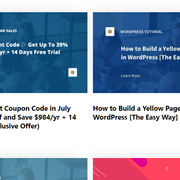
How can I do that? I only want to show Stackable’s post block.
July 24, 2021 at 1:55 pm #1869518Leo
StaffCustomer SupportHi there,
The better solution would be to create a static page with the Stackable post blocks and use that page as your blog page.
Let me know if this helps 🙂
July 24, 2021 at 4:22 pm #1869571how to create static page
July 24, 2021 at 4:47 pm #1869594StaffCustomer SupportJust add a new page like you normally do.
July 29, 2021 at 10:40 am #1876150I tried but can’t figured it out yet
July 29, 2021 at 10:43 am #1876152StaffCustomer SupportWhat issue are you having?
Just create a static page with the Stackable post blocks then link the Blog menu item to that page should work.
July 29, 2021 at 9:11 pm #1876531Here’s what I did:
Settings » Reading » Post Page » Blogs
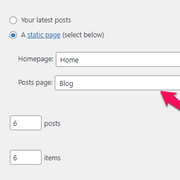
I already have a blog page. I added articles with the help of Stackable List Post Blocks
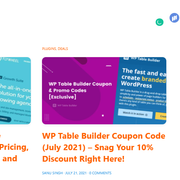
and published the page. Then when I saw live that page, nothing changed.
July 29, 2021 at 9:21 pm #1876541Elvin
StaffCustomer SupportHi there,
Here’s what Leo meant (in details).
First, we need to create a page. (Created in Dashboard > Pages > Add new).
We then add the
Stackable List Post Blocksinside the container of this newly created page.We then go to Appearance > Menu and change the link of the menu item “Blog” to point to the newly created page.
If you already did this but you’ve set it up as the blog index page on Settings » Reading, please revert this setting and keep the “post page” empty.
Having a static page set as the post page in Settings » Reading will turn the static page into a blog index page, completely disregarding it’s contents.
This is actually why your Stackable List Post Blocks wasn’t working. It got replaced with the default post loop of the theme.
July 30, 2021 at 6:14 am #1877033Thanks Elvin, I did as you said and it worked. but here’s one thing. I don’t want to show the H1 title.
On the blog page, right sidebar – I select “content title” under disable elements to hide the title but it didn’t work. How can I hide this? Any solution.
July 30, 2021 at 10:14 am #1877527David
StaffCustomer SupportDo you mean this:
https://www.screencast.com/t/5vAEbpHN5wY7
If so you just need to remove the Header Element you have assigned to that page.
July 30, 2021 at 8:42 pm #1877914got it.
July 31, 2021 at 2:50 am #1878115StaffCustomer SupportGlad we could be of help
-
AuthorPosts
- You must be logged in to reply to this topic.
