Site logo

[Resolved] How to have featured image at same dimension, which fit with the theme

Home Forums Support [Resolved] How to have featured image at same dimension, which fit with the theme

Home Forums Support How to have featured image at same dimension, which fit with the theme

Viewing 12 posts - 1 through 12 (of 12 total)
  • Author
    Posts
  • #1797036
    Morgan

    Hi,

    I would like to use the theme https://gpsites.co/broadcast/
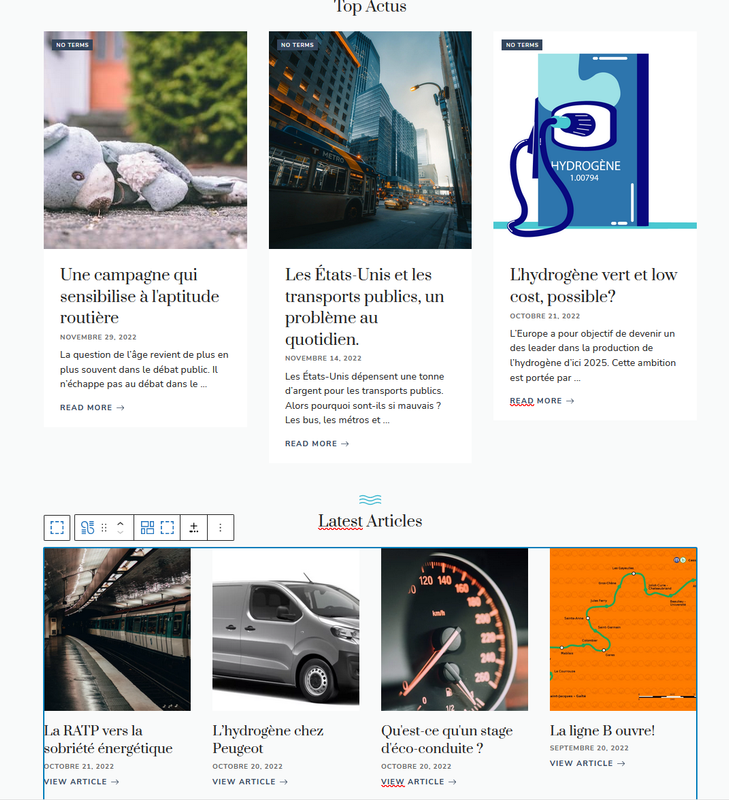
    However it needs to have featured image at same dimension in order to have beautiful result on front homepage.
    How can i do that ? With a plugin or an additional code in fuction.php ?

    Thanks

    #1797094
    David
    Staff
    Customer Support

    Hi there,

    go to Customizer > Layout > Blog –> Featured Images >>> Archives Tab – and set just a Height value of say 235px – this ‘should’ force all images to the same height.

    #1799805
    Morgan

    Wonderful ! Thanks 🙂

    #1799907
    David
    Staff
    Customer Support

    You’re welcome

    #2444735
    Morgan

    Hi,

    It’s me again. I have the same issue with Explore theme.
    I did the modification Customizer > Layout > Blog –> Featured Images >>> Archives Tab

    But it seems the homepage wasn’t modified. Do i need to do something else ?

    #2444793
    David
    Staff
    Customer Support

    Hi there,

    those posts are displayed using the GB Query Loop blocks, you can edit the Front Page, select one of the images in the Query loop and edit its sizes.

    #2449907
    Morgan

    Hi,

    I think i modify the right settings on the page but it doesn’t update the page.
    I purged cached and other stuff.

    Additional question, what about the text after the image, is it possible to force it too, in order to have same breaking lines and height ?

    #2450107
    David
    Staff
    Customer Support

    Follow these steps:

    1. Select a Query Loop.
    2. Select the Image block for the first post in the loop.
    2.1 in the Image settings, set just the height eg. 250px and then set the OBJECT-FIT to Cover

    Repeat this for each Query Loop you have on the page.

    #2450215
    Morgan

    I don’t understand, it works in back office but not on the published page.

    #2450461
    David
    Staff
    Customer Support

    Can you disable any plugins that are optimizing the images ?

    #2451241
    Morgan

    You find the issue, it was Imagify and its <picture> option that i changed by the rewrite rule option.

    #2451342
    David
    Staff
    Customer Support

    Are you ok with that now ?

Viewing 12 posts - 1 through 12 (of 12 total)
  • You must be logged in to reply to this topic.