
Archived topic
How to have featured image at same dimension, which fit with the theme
11 replies · Started by Morgan on May 25, 2021
Hi,
I would like to use the theme https://gpsites.co/broadcast/
However it needs to have featured image at same dimension in order to have beautiful result on front homepage.
How can i do that ? With a plugin or an additional code in fuction.php ?
Thanks
Hi there,
go to Customizer > Layout > Blog --> Featured Images >>> Archives Tab - and set just a Height value of say 235px - this 'should' force all images to the same height.
Wonderful ! Thanks :)
You're welcome
Hi,
It's me again. I have the same issue with Explore theme.
I did the modification Customizer > Layout > Blog –> Featured Images >>> Archives Tab
But it seems the homepage wasn't modified. Do i need to do something else ?
Hi there,
those posts are displayed using the GB Query Loop blocks, you can edit the Front Page, select one of the images in the Query loop and edit its sizes.
Hi,
I think i modify the right settings on the page but it doesn't update the page.
I purged cached and other stuff.
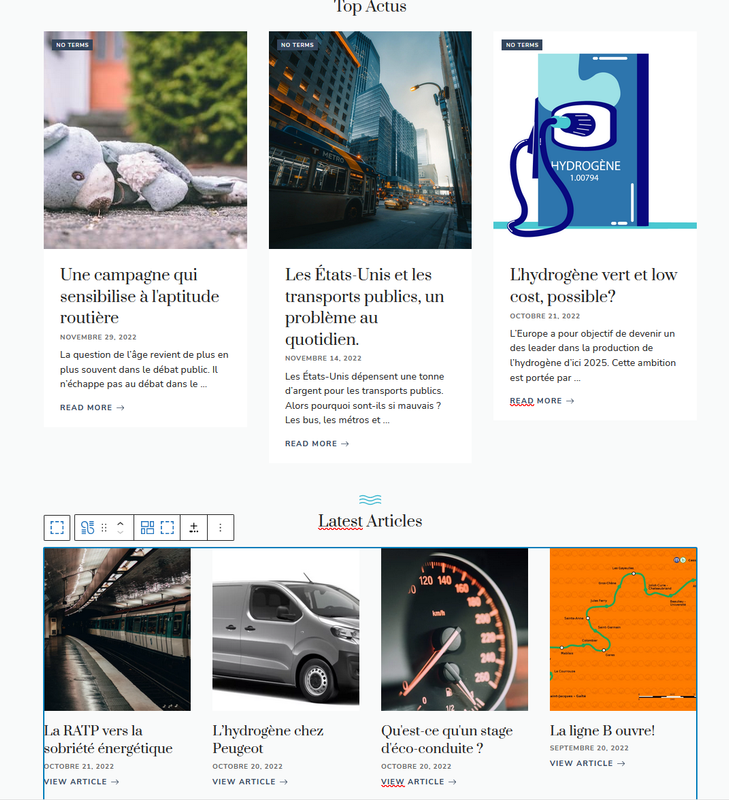
Additional question, what about the text after the image, is it possible to force it too, in order to have same breaking lines and height ?
Follow these steps:
1. Select a Query Loop.
2. Select the Image block for the first post in the loop.
2.1 in the Image settings, set just the height eg. 250px and then set the OBJECT-FIT to Cover
Repeat this for each Query Loop you have on the page.
I don't understand, it works in back office but not on the published page.
Can you disable any plugins that are optimizing the images ?
You find the issue, it was Imagify and its <picture> option that i changed by the rewrite rule option.
Are you ok with that now ?