- This topic has 21 replies, 6 voices, and was last updated 3 years, 10 months ago by
Fernando.
-
AuthorPosts
-
January 13, 2021 at 10:05 pm #1617970
Rob
Hi,
I’ve looked at about 5 threads on this topic in the GP forums and I’ve tried adding the various different CSS snippets, but no date displays on my blog posts.
I tried adding this CSS:
.posted-on .updated {
display: block;
}And I tried adding this to the php file:
add_action( ‘generate_after_entry_header’, ‘tu_page_meta’ );
function tu_page_meta() {
if ( is_singular( ‘page’ ) ) : ?><?php generate_posted_on(); ?><!– .entry-meta –>
<?php endif;
}Nothing that I have tried has worked.
I’ve cleared the cache in my caching plugin and I’ve made sure I’m running the latest version of GP (Version: 3.0.2).
Could you please advise me what I need to do to display the last updated date at the top of the blog post (in form of meta data)?
Thanks.
January 14, 2021 at 12:05 am #1618016Elvin
StaffCustomer SupportHi,
Are you aiming for something like this?
https://share.getcloudapp.com/nOuDx4lJIf so, you can try adding this code inside a Hook Element:
<span class="modified-date"><?php echo get_the_modified_date('F j, Y, g:i a'); ?></span>Make sure PHP Execute is enabled and hook the element to
generate_before_contentand set the display rule location to “post – all posts”.If what you want is to move the entire entry meta line (including author, categories etc.) on top of the entry title, you can try Leo’s suggestion here:
https://generatepress.com/forums/topic/move-date-meta-before-post-title/#post-1316964You then make the date entry-meta to display the last update date by adding this PHP snippet:
add_filter( 'generate_post_date_output', function( $output, $time_string ) {
    $time_string = '<time class="entry-date published" datetime="%1$s" itemprop="datePublished">%2$s</time>';

    if ( get_the_time( 'U' ) !== get_the_modified_time( 'U' ) ) {
        $time_string = '<time class="entry-date updated-date" datetime="%3$s" itemprop="dateModified">Last Updated On %4$s</time>';
    }

    $time_string = sprintf( $time_string,
        esc_attr( get_the_date( 'c' ) ),
        esc_html( get_the_date() ),
        esc_attr( get_the_modified_date( 'c' ) ),
        esc_html( get_the_modified_date() )
    );

    return sprintf( '<span class="posted-on">%s</span> ',
        $time_string
    );
}, 10, 2 );
January 14, 2021 at 4:59 am #1618271Hi, thanks for that. I followed your instructions and had some success but it’s not exactly what I’m after:

The words “Last updated on” are immediately before the author’s name, while the date is 3 lines above. Is there a way I can fix this?
Thanks.
January 14, 2021 at 7:12 am #1618612David
StaffCustomer SupportHi there,
if you want to simply display the Updated Date in the default Post meta then all you require is the snippet provided here:
https://docs.generatepress.com/article/generate_post_date_show_updated_only/
January 14, 2021 at 4:23 pm #1619206Thanks. I added this snippet to my CSS:
add_filter( ‘generate_post_date_show_updated_only’, ‘__return_true’ );
But it still isn’t showing the words ‘Last Updated’:
https://robpowellbizblog.com/wp-content/uploads/2021/01/Last_Updated.jpgHow can I include the words ‘Last Updated’?
Thanks in advance.
January 14, 2021 at 4:56 pm #1619234StaffCustomer SupportIf you’re using the snippet from David’s link, we can add in
‘Last Updated’:with this PHP snippet:add_filter( 'generate_post_date_output','tu_add_to_post_date' ); function tu_add_to_post_date( $output ) { return '<span class="updated-date-label">Last Updated: </span>' . $output; }January 14, 2021 at 5:25 pm #1619265Thanks, I implemented that, but it placed the words ‘Last Updated’ in the wrong place:

Is there another solution I can try?
Thanks.
January 14, 2021 at 5:34 pm #1619274StaffCustomer SupportThanks, I implemented that, but it placed the words ‘Last Updated’ in the wrong place:
Looking at your screenshot, it doesn’t seem like you’re using David’s code. Or maybe you do but you’re using it along all the other codes. If this is the case, please use only 1 among our suggestions.
If you’re using the Hook Element from one of my suggestions, please edit this code:
<span class="modified-date"><?php echo get_the_modified_date('F j, Y, g:i a'); ?></span>to this:
<span class="updated-date-label">Last Updated: </span><span class="modified-date"><?php echo get_the_modified_date('F j, Y, g:i a'); ?></span>January 14, 2021 at 7:59 pm #1619382Hi Elvin,
Thanks for that. I changed the Hook Element, as you suggested and the ‘last updated’ message now displays properly (top line of text).
But I have another ‘Last Updated’ piece of text immediately before the author name:

Is there a way I can remove that 2nd ‘last updated’ text?
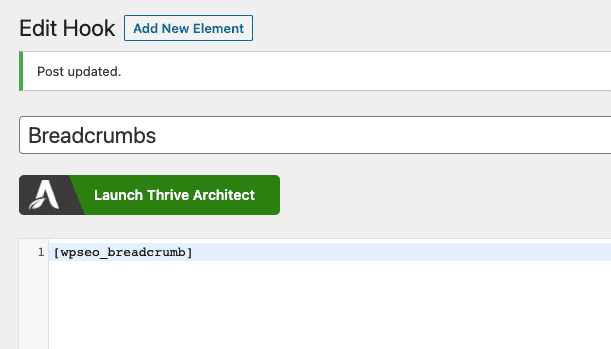
I’m now using only 2 hook elements:

This is the content of the 1st hook:

And this is the content of the 2nd hook:
I was using some CSS code that was referenced in GP forums, but I’ve now removed that.
Can you suggest any edits so as to remove ‘last updated’ before the author name?
Thanks.
January 14, 2021 at 8:26 pm #1619398Ying
StaffCustomer SupportHi Rob,
You could try this CSS to hide it:
.single .updated-date-label {
    display: none;
}
Let me know 🙂
January 14, 2021 at 8:49 pm #1619409StaffCustomer SupportAlternative to @Ying’s solution which would surely work, you can remove this previous snippet you’ve added to remove the 2nd
Last Updated:added to the page.add_filter( 'generate_post_date_output','tu_add_to_post_date' ); function tu_add_to_post_date( $output ) { return '<span class="updated-date-label">Last Updated: </span>' . $output; }January 14, 2021 at 9:36 pm #1619435Thanks, Ying!
January 14, 2021 at 9:41 pm #1619442Thanks, Elvin – it’s working 🙂
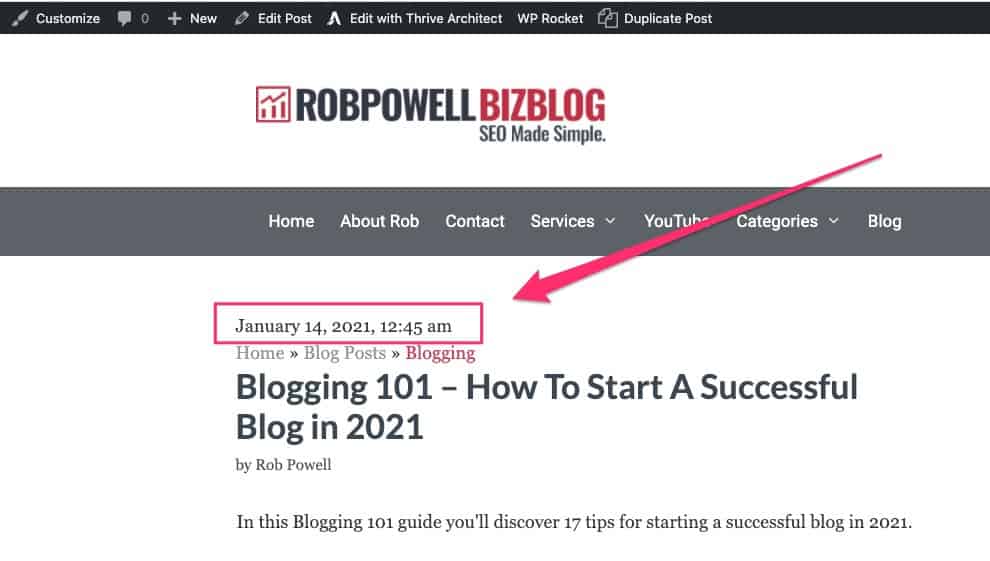
Just one last question: is there some CSS code I can use to hide the time stamp?:

Many thanks.
January 14, 2021 at 9:57 pm #1619455StaffCustomer SupportYou can change this code:
<span class="updated-date-label">Last Updated: </span><span class="modified-date"><?php echo get_the_modified_date('F j, Y, g:i a'); ?></span>to this:
<span class="updated-date-label">Last Updated: </span><span class="modified-date"><?php echo get_the_modified_date('F j, Y'); ?></span>We basically just change the format inside
get_the_modified_date()from'F j, Y, g:i a'to'F j, Y'to remove the time.January 15, 2021 at 12:18 am #1619545Great, thanks for that – it worked!
All good,
Rob
-
AuthorPosts
- You must be logged in to reply to this topic.