
- This topic has 10 replies, 2 voices, and was last updated 10 years, 11 months ago by
Bhekor.
-
AuthorPosts
-
July 22, 2015 at 1:14 am #122843
Bhekor
Hi,
Am having a little problem with my sidebar widgets, the widget don’t usually have their full width is either they float to the right or left or just looks tiny, so I sometimes use margin-left or right in my CSS to position them but this always affect the responsive layout of the site on different screen sizes. Am using Jetpack facebook widget and twitter timeline widget right now, the facebook widget seems ok but the twitter widget is having the same problem.July 22, 2015 at 9:10 am #122876Tom
Lead DeveloperLead DeveloperCan you link me to your site so I can take a look at what’s going on possibly?
August 19, 2015 at 12:55 pm #130677Bhekor
Thanks for replying, my site is not online yet, am still working/hosting it offline then use ftp client to upload it online when completed.
August 19, 2015 at 3:33 pm #130699Lead DeveloperLead DeveloperNo problem – any chance you can take a screenshot of the issue so I can see it?
August 20, 2015 at 1:19 am #130803Yes, here
 it looks as if it float to the right, I was able to align it perfectly on the desktop with CSS but this affect the responsiveness which I have to start writing different media queries to achieve. the widget area works great for other widgets but the facebook and the twitter widgets for some reason not cooperating have tried different widget plugin for the facebook and twitter but always come out the same. The widget in the image is Facebook Like Box (Jetpack).August 20, 2015 at 9:16 am #130878Lead DeveloperLead Developer
Hmm, very difficult for me to know what’s going on without being able to look at the code.
What’s the CSS you added for desktop?
August 21, 2015 at 1:41 am #131029.fb-page{
width: 230px !important;
margin-left: -60px !important;
margin-right: 60px;
}August 21, 2015 at 8:50 am #131117Lead DeveloperLead DeveloperWhat happens when you remove that code completely?
August 29, 2015 at 6:04 am #132854When I removed the code I got that in the picture above. But with the code I got this
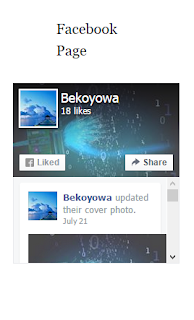 August 29, 2015 at 10:40 am #132906Lead DeveloperLead Developer
You can try to use that CSS only on desktop:
@media (min-width:767px) {
      .fb-page{
            width: 230px !important;
            margin-left: -60px !important;
            margin-right: 60px;
      }
}
September 1, 2015 at 2:31 am #133450OK, thanks
-
AuthorPosts
- You must be logged in to reply to this topic.
