Archived topic
Why GP Automatically Generates unwanted Schema? How to Clean Them?
7 replies · Started by Sibi Paul on March 22, 2021
Hi...
Generatepress is known for Clean codes...
but today I found it creates Unwanted Schema Markup.
Check this Attachments Picture.
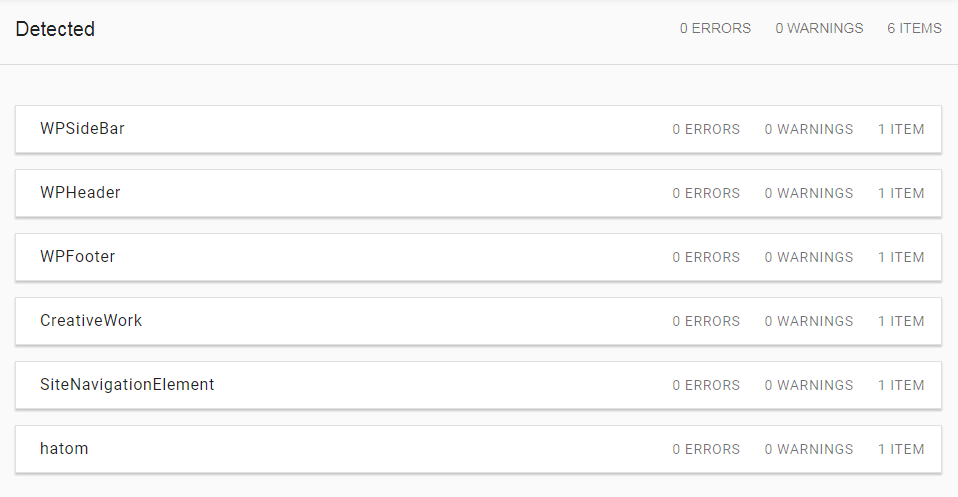
WPSideBar
WPHeader
WPFooter
CreativeWork
SiteNavigationElement
hatom
Why these Schemas are created in Generatepress? How can I Clean Them?
Thanks.
Hi there,
this doc explains how to remove them:
https://docs.generatepress.com/article/generate_schema_type/
I clicked on that link and I can see a code on that page...
I saw that...
Clicking and Viewing that page didn't make any change on my page,
unwanted schema is still loading on my page.
Do you have a working solution?
or
A Perfect Documentation?
Unless posting links to RAW codes, post a solution for this.
-----
if you are asking me to check these pages
https://docs.generatepress.com/article/using-filters/
https://docs.generatepress.com/article/adding-php/
I would like to say in advance, that's really useless...
------
I'll repeat again...
I want to remove Unwanted schema loading in the default installation.
without using a 3rd party plugin.
-----
if Generatepress is mean for cleanliness...
From where did these craps come from?
NB: that was the first question in my previous post, but you tried to answer the second question only.
Thanks.
Hi there,
This simple filter will remove schema.org references from the theme:
add_filter( 'generate_schema_type', '__return_false' );
I know, you don't want this link, but it tells you how to add the above filter: https://docs.generatepress.com/article/adding-php/
You can use a plugin like Code Snippets, or you can use a child theme to add it - your choice.
if Generatepress is mean for cleanliness…
From where did these craps come from?
These simple schema references are helpful to many, which is why they're in the theme. However, for people who don't need them, that one line of code is a very easy fix.
In GP 3.1.0, we'll be adding a toggle in the Customizer to disable them as well so the filter isn't needed.
That's the perfect reply.
----
can you add more explanations to this?
" These simple schema references are helpful to many, which is why they’re in the theme. "
What kind of help?
if it's really useful, I won't remove them...
----
GP 3.1.0
When it'll release?
You can learn more about structured data here: https://www.searchenginejournal.com/how-important-is-structured-data/257775/
No release date for 3.1.0 yet, but it's currently in active development.
TOM...
I know how Important is Schema Structure in SEO...
That's why I'm hand-picking actual schema for my pages...
but, My question is...
How does this schema help?
It simply provides the minimal structure for basic sites/users that may not be able to/want to set it up themselves. You can look up those individual types (WPSidebar, WPHeader etc..) if you'd like to learn more about what they do.
More advanced users or users that need a more complex setup can simply disable it and add their own (recommended).