
Archived topic
Weird spacing with Tangible Template block
9 replies · Started by Richard on March 24, 2023
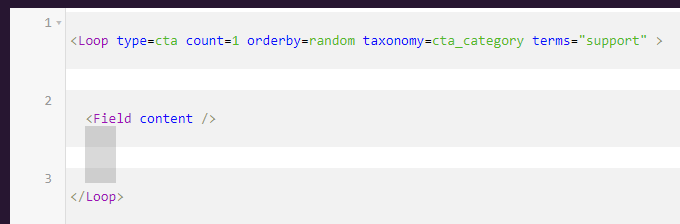
My Tangible Template blocks look like this in the edit window, so that selecting </Loop>, creates like the gray rectangle above it. It all goes away if I use the Inspector to remove the white space between lines. I'm trying to find the right selectors to do that in css. I've tried various combinations of these raw selectors without success:
div.CodeMirror-lines[role='presentation'] div[role='presentation'][style='position: relative; outline: none;'] div.CodeMirror-code[role='presentation'] div[style='position: relative;'] pre.CodeMirror-line[role='presentation'][style='text-indent: 0px; padding-left: 4px;']
Any ideas would be appreciated
Hi there,
not sure without actually seeing where that space is coming from.
Is it possible to see this in your editor ?
I'm sending you the login. Thanks.
I had a look - the code mirrors cursor element is absolute positioned - but it is relative to the main parent container not the individual row. So even if you use this CSS to adjust the height of it, it won't be in the correct position.
.CodeMirror-cursor {
    height: auto !important;
}
have you used this plugin before and without issue ?
I've used it extensively without problem, but not with GeneratePress.
.editor-styles-wrapper .block-editor-block-list__layout pre has a margin-bottom: 1.5em. If I uncheck that in the inspection window, it seems to work properly.
But this doesn't reach it. Is there some other way?
.editor-styles-wrapper .block-editor-block-list__layout pre {margin-bottom: 0;}
Try this:
.CodeMirror pre {
    padding: 0 4px;
    margin-bottom: 0 !important;
}I tried that css in two different places, including Customizer / Additional CSS and it didn't appear to do anything. Tried it on three different computers and cleared the object cache and browser cache (which I think is all the cache I have now).
Ah sorry my bad, adding CSS to the editor requires a PHP Snippet.
And there are 3 ( and more methods )
Option 1 - load just the inline style:
add_filter( 'block_editor_settings_all', function( $editor_settings ) {
	$css = '.CodeMirror pre {
        padding: 0 4px;
        margin-bottom: 0 !important;
        }';

	$editor_settings['styles'][] = array( 'css' => $css );

	return $editor_settings;
} );
Option 2 - load ALL customizer > Additional CSS in the editor:
add_filter( 'block_editor_settings_all', function( $editor_settings ) {
    $css = wp_get_custom_css_post()->post_content;
    $editor_settings['styles'][] = array( 'css' => $css );

    return $editor_settings;
} );
Option 3 - levearge GPs editor styles and load your own child theme stylesheet in the editor:
add_filter( 'generate_editor_styles', function( $editor_styles ) {
    $editor_styles[] = 'your-editor-style.css';

    return $editor_styles;
} );
Change the your-editor-style.css to the name of a stylesheet in the root of the child theme.
All these methods will do the same thing, and they will load that CSS in the editor including its responsive views.
Thanks.
You're welcome