
Archived topic
Viewport not set -error in Google Search Console
3 replies · Started by Kris on February 7, 2022
Hi guys,
Getting "Viewport not set" -error in Google Search Console for https://alice-in-wonderland-quotes.com in the mobile usability tab.
Would you know how to fix it?
Also, having problems closing the gap between header and nav. bar on mobile view. See image
https://alice-in-wonderland-quotes.com/wp-content/uploads/2022/02/gap-1.jpg
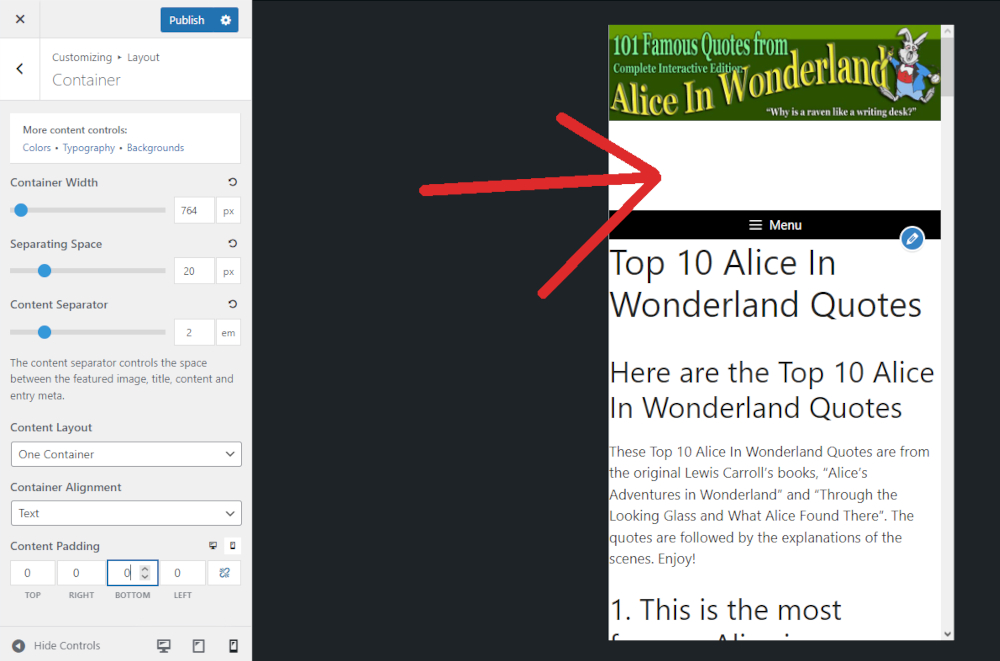
Please advice.
Thanks,
Kris
Hi Kris,
Here is a link you may refer to with regards to this: https://web.dev/responsive-web-design-basics/#viewport
You can try setting different values for different attributes depending on the viewport.
See this for reference: https://share.getcloudapp.com/xQuzQWoz
Also see: https://share.getcloudapp.com/L1uWy7y1
Upon checking your website on mobile view, I found that the viewport is being scaled correctly: https://share.getcloudapp.com/DOumJQxO
With that said, it may also be the case that Googlebot’s ‘Mobility Usability’ test gave incorrect results which happens at times.
See this for reference: https://support.google.com/webmasters/thread/7986432/content-wider-than-screen-mobility-error-while-live-test-says-mobile-friendly?hl=en
As said here, if this is the case, this is an issue that you can ignore, and not worry about.
With regards to the spacing, I can see that you added the header image as a background image, and then set padding to make the image appear 100%. In line with this, you can try adding this CSS to lessen the spacing as the viewport scales down:
@media (max-width:768px) {
    header .inside-header.grid-container {
        padding-top: 25%
    }
}
You may modify the max-width value(768px) and the padding-top value(25%) to your preferred values.
Here is a link you may refer to with regards to adding CSS: https://docs.generatepress.com/article/adding-css/
Another way you may address this is by adding the image as an image block.
See this as reference: https://share.getcloudapp.com/DOumJQlP
Hope this helps! :)
OK, I'm just going to ignore the Viewport error. In fact last Saturday shows only 2 pages with that error.
Re. the gap, your CSS advice fixed it at 23% Thanks, mate!
Cheers,
Kris
Glad I was able to help! Feel free to reach out any time if you’ll need assistance with anything else. :)