
Archived topic
Sticky Menu Display Issue on Safari
13 replies · Started by Sol on January 20, 2022
Hi There,
I hope you are well.
I have done some research and can't seem to identify the issue. I was wondering if you would be able to help? The sticky menu on this website looks exactly as it should on Chrome, however, it isn't displaying correctly on Safari. The alignment is off and the logo vanishes. The CSS that we are using is as follows:
@media(min-width: 769px) {
.inside-header>.site-branding,
.inside-header>.navigation-branding,
.inside-header>.site-logo,
.site-branding-container,
#site-navigation .navigation-branding .site-logo,
#sticky-navigation .navigation-branding {
position: absolute;
left: 50%;
transform: translateX(-50%);
z-index: 1000;
}
#site-navigation {
margin-left: unset !important;
display: flex;
}
.site-header .main-navigation:not(#sticky-navigation) .inside-navigation {
margin: unset;
}
#site-navigation,
#primary-menu,
.main-navigation .inside-navigation {
flex: 1;
}
/* Change nth-child(#) to first item to right */
.main-navigation ul li:nth-child(3) {
margin-left: auto;
}
}
@media (min-width:769px) {
.main-navigation .main-nav ul li.nav-button a {
background-color: #ffff;
border: 2px solid #15AA6F;
color: #000000;
line-height: 35px; /*this number will likely need to be adjusted*/
}
}
h1, h2, h3 {
text-align: center;
}
Do you know how we could resolve this?
I am looking forward to hearing from you. Thank you so much in advance.
Hi there,
Can you link us to the site in question?
Hi there,
I did link it in the text above but you can find the website here.
Hi there,
Should the site header and the sticky navigation look identical?
If so it will require a little reworking. If you're ok with that then:
1. Remove any CSS you have for the Center Logo... see note below*
2. Enable the Navigation as Header option in Customizer > Layout > Header.
3. In Customizer > Layout > Primary Navigation set the Nav and inner width to suit and increase the Menu Item Height to increase the height of navigation to match
4. Remove the logo you have in Customizer > Layout > Sticky Navigation
At that point you should have a default looking nav with logo to left and menu right, and the same for Sticky nav.
Once where there this *CSS should be used to center the logo:
https://docs.generatepress.com/article/centering-logo-navigation/
Hi There,
Thank you so much for getting back to me.
I would like the sticky navigation to look different from the primary navigation. However, I would like the sticky navigation to look the same on Safari and Chrome. Currently, it looks exactly as we would like on Chrome but then it looks different on Safari.
I look forward to hearing from you.
I see no difference between the two browsers - see screenshot:
https://www.screencast.com/t/hfgWaCdLkszT
Safari above
Chrome below
What do you see ?
Hi There,
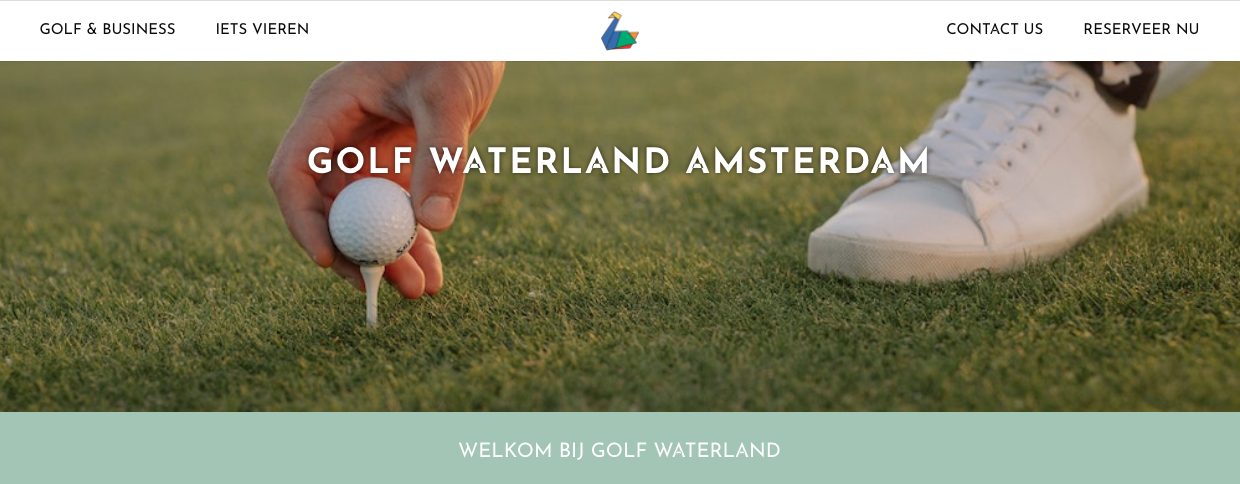
Thank you so much for getting back to me. I have attached a screenshot to show you what we are seeing. I look forward to hearing from you.
Hi Sol,
Upon viewing the link you provided on Safari from my end, similar to David, I found the sticky navigation there looked the same as the one in Google Chrome.
Kindly view this for reference: https://share.getcloudapp.com/NQux72An
Also see: https://share.getcloudapp.com/DOum65L8
With that said, could you try clearing your Safari’s cache so we could rule out caching as a potential cause for this issue? Could you also try viewing the website from a different device?
Hi there,
Thank you so much for getting back to me.
I have cleared my cache and then updated the design to look the same as the screenshot attached. However, when I open the page in another browser or clear my cache again, it reverts back to the design that you are seeing. Please can you help? I would like the design to look like the image below on all browsers:
Thank you so much in advance.
Do you have any cache plugins installed on the site ? If so can you disable them.
Hi There,
Thank you for getting back to me. I have cleared the internal cache and the website is now displaying correctly on Chrome and incorrectly on Safari again.
Please let me know how I should proceed?
Have you cleared your browser caches?
As this is how it looks now on my Safari:
Hi David,
We have cleared our cache and it looks like this on chrome:

And this on Safari:

Thank you so much in advance.
You have an optimization Plugin enabled now which is removing CSS or changing its order.
Disable that plugin, clear the browser caches and recheck the site.