Archived topic
Some block CSS not loading in footer element
7 replies · Started by Adrian on October 16, 2022
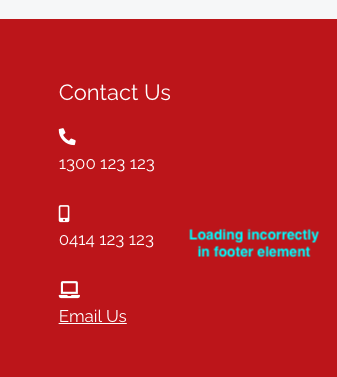
I've tried 2 different third party icon list blocks (Otter and Spectra) in a GeneratePress footer element and they both don't appear to be loading CSS and their layout is broken.
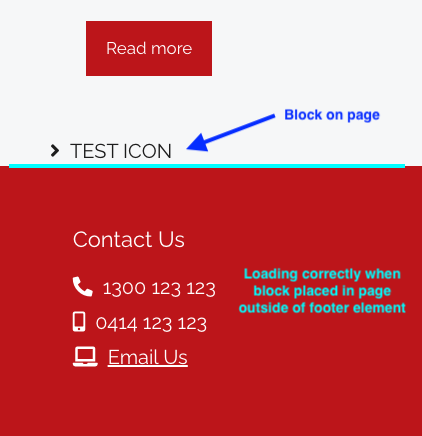
If I add the same block/s to a page they work fine on the page, and also when the block is loading on a page the icon list appears correctly in the footer.
The icon list appears correctly when editing the footer element in WP admin.
I've tried setting the element it as Block - Site Footer, Hook footer, Hook before_footer, and Hook after_footer, and get the same result.
It's as though the CSS for the block isn't loading when it's only inserted into a GeneratePress element, but does load when the block is also inserted onto the page.

Hi Adrian,
For reference, can you provide the link to the site in question?
You may use the Private Information field for this: https://docs.generatepress.com/article/using-the-premium-support-forum/#private-information
Hi Fernando,
I’ve edited my original post to include a private link.
There’s a test block on the home page just above the footer, on any other pages you’ll see how the icon list breaks in the footer element.
Cheers,
Adrian
Hi Adrian,
Not sure how that plugin works but it seems to parse just the content. If you add it in the Header for instance, does it work?
Alternatively, why not use a GB Headline Block for the icons as well? You can add icons there as well. Example: https://docs.generateblocks.com/article/headline-overview/#icon
I'm not using a header element, just the GP customizer header.
GB Headline Block seems to work, it just has limited built in icon options.
I had to find the SVG versions of the Font Awesome icons and use those and will need to add some CSS to remove underlines on links, but all good, that works.
Thanks!
I see. You're welcome Adrian!
For reference, when looking for free SVG icons, I've been personally using these:
https://icons.getbootstrap.com/
Hope these help!
These are great thanks!
You're welcome Adrian!