
Archived topic
Site Library - Import stuck at "Importing content"
5 replies · Started by Flaminia on April 19, 2022
Hi,
I'm trying to import some sites from the Site Library, but for some of them the import gets stuck at "Importing content". For example with "Construction", "Studio 7" and "Dispatch" (which is the site I would like to import) I have this problem, but also with others I have tried. As first thing I tried to rebuild permalinks in Settings->Permalink, but without success. I've also installed the Query Monitor plugin, but even from there I don't see any visible errors. Wordpress debug (enabled in wp-config.php) doesn't show any errors either. With other templates that I have tried to import (e.g. "Scribe", "Dev", "Search"), I do not have any problems.
I am working on a newly installed Wordpress installation (no plugin) in a subdomain using a minimal child theme with GP Theme 3.1.3 and GP Premium 2.1.2. The subdomain is password-protected via .htaccess, but even if you remove the protection, the problem still occurs.
I will be grateful for any help you can provide.
Hi there,
Can you check if your server meets below settings to be able to import site larger sites?
upload_max_filesize (256M)
max_input_time (300)
memory_limit (256M)
max_execution_time (300)
post_max_size (512M)
If you have a specific error code, please check the below article for solutions:
https://docs.generatepress.com/article/error-codes-importing/
Let me know :)
Thank you for your quick reply.
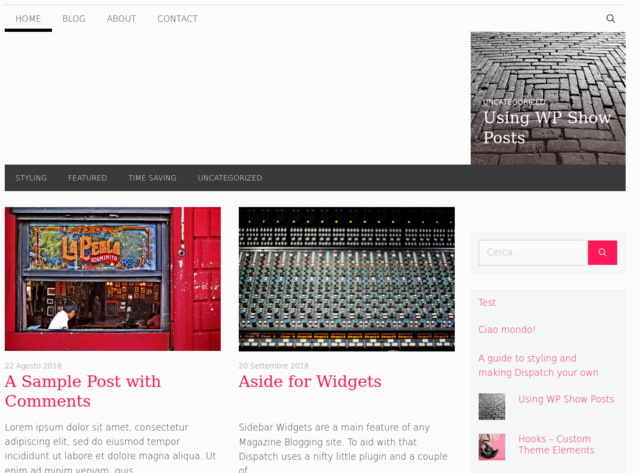
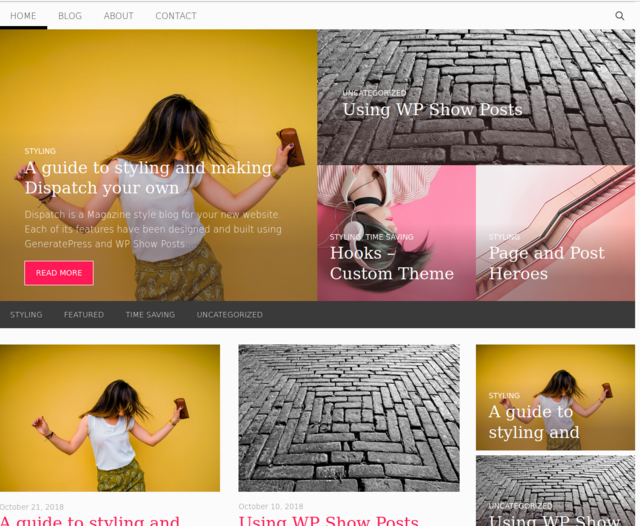
It seems that my hosting has considerably more conservative values for these parameters. I edited the values from .htaccess and verified via phpinfo that the new values were accepted and it seems ok. Now the import comes to an end, but there is something wrong because something seems to be missing:
My site
Site Library
Wordpress does not return any error, while in debug.log I found these errors that seem to be related to WP-Show-Posts:
[19-Apr-2022 17:14:45 UTC] WPSP_Resize.process() error: Image must be local: https://xxxxx/wp-includes/images/media/default.png
[19-Apr-2022 17:14:52 UTC] WPSP_Resize.process() error: Image must be local: https://xxxxx/wp-includes/images/media/default.png
[19-Apr-2022 17:15:05 UTC] WPSP_Resize.process() error: Image must be local: https://xxxxx/wp-includes/images/media/default.png
[19-Apr-2022 17:15:10 UTC] WPSP_Resize.process() error: Image must be local: https://xxxxx/wp-includes/images/media/default.png
[19-Apr-2022 17:15:13 UTC] WPSP_Resize.process() error: Image must be local: https://xxxxx/wp-includes/images/media/default.png
[19-Apr-2022 17:15:16 UTC] WPSP_Resize.process() error: Image must be local: https://xxxxx/wp-includes/images/media/default.pngHi there,
your latest 3 posts are missing their featured images, if you add them it should display the grid correctly.
Yes, there were indeed two test posts of mine without images, but in my previous post I was referring to the absence of images in the imported posts. Some of the images downloaded during the import were corrupted. In the end, however, I succeeded in importing everything correctly. Thank you for your help! I'll close the topic and mark it as " resolved ".
Aah ok, glad to hear that it worked out in the end!
