
- This topic has 11 replies, 2 voices, and was last updated 3 years, 4 months ago by
David.
-
AuthorPosts
-
December 2, 2022 at 4:33 am #2446523
Mi
Hello,
I am looking for a way to show only the primary category on the meta-entry-items on main page and archive pages instead of all categories (single page/blogpost should stay the same).
Here:
add_filter( 'generate_header_entry_meta_items', function() {
    return array(
        'date',
       'categories',
    );
} );
The breadcrumbs use a primary-caterory funktion, but I can´t find, how they do it ^^’
I tried this https://generatepress.com/forums/topic/showing-only-one-primary-category/#post-1136469 but nothing happened.
I hope you can help me!
Thank you 🙂December 2, 2022 at 9:25 am #2447000David
StaffCustomer SupportHi there,
are you using RankMath on your site ?
December 2, 2022 at 9:50 am #2447030Is it a plugin? Then no.
December 3, 2022 at 5:42 am #2447822StaffCustomer SupportSo that code requires RankMath SEO plugin, are you using any SEO plugin eg. Yoast ?
December 3, 2022 at 6:37 am #2447851Yes, I am using Yoast. I really thought the primary-category is a wordpress thing? Never thought that it is just a feature from another plugin! 😮
December 5, 2022 at 3:25 am #2450016StaffCustomer SupportYeah, its a plugin thing.
And its complicated. See here where Tom originally created a shortcode to display a Primary Category if one existed, if not it displays the firsst term.I tweaked that code to work with the Themes post meta. Try this PHP Snippet:
add_filter('generate_category_list_output', 'dynamic_category_link_function');
function dynamic_category_link_function($category){
    if ( 'post' !== get_post_type() ) {
	return;
    }
    $categories = get_the_category();
    $category_link = '';

    if ( class_exists('WPSEO_Primary_Term') ) {
        // Show the post's 'Primary' category, if this Yoast feature is available, & one is set
        $wpseo_primary_term = new WPSEO_Primary_Term( 'category', get_the_id() );
        $wpseo_primary_term = $wpseo_primary_term->get_primary_term();
        $term = get_term( $wpseo_primary_term );

        if ( is_wp_error( $term ) ) {
            // Default to first category (not Yoast) if an error is returned
            $category_link = get_category_link( $categories[0]->term_id );
            $term_name = get_term( $categories[0]->term_id  )->name;
        } else {
            // Yoast Primary category
            $category_link = get_category_link( $term->term_id );
            $term_name = get_term( $term->term_id )->name;
        }
    } else {
        // Default, display the first category in WP's list of assigned categories
        $category_link = get_category_link( $categories[0]->term_id );
        $term_name = get_term( $categories[0]->term_id  )->name;
    }

    return sprintf(
        '<span class="cat-links">%1$s<span class="screen-reader-text">%2$s</span>
        <a href="%3$s" rel="category tag">%4$s</a>
        </span> ',
        apply_filters( 'generate_inside_post_meta_item_output', '', 'categories' ),
        esc_html_x( 'Categories', 'Used before category names.', 'generatepress' ),
        $category_link,
        $term_name
    );
}
December 5, 2022 at 6:06 am #2450197Uh, yes, that looks complicated ^^’ But it works like a charm! Thank you!
I see it right, that it replaces the categories everywhere, right? So I do not have the chance to show all categories at one point and just the primary at an other? And it´s not working in combination with “add taxonomy to pages” …I have to think about then, what is more important ^^`
But thank you a lot for your help!
December 5, 2022 at 8:17 am #2450457StaffCustomer SupportSo here in the code, we set a get out clause. ie. if its NOT a POST, eg. its a Page or other post type. then just return the standard categories:
if ( 'post' !== get_post_type() ) {
	return;
}
for example you could change this to:
if ( 'post' !== get_post_type() || is_single() ) {
	return;
}
And this would mean it would show the regular categories on a single post. So now only archives showing the
postpost type will show just the primary category.Let us know where you want to show primary and where you want to show ALL categories and we can help with the code.
December 5, 2022 at 12:25 pm #2450743I believe I was thinking about this the wrong way. It´s really a bit complicated, and I don´t know if the effort is worth it. Maybe I will just keep it the way it is now.
As I understand the code, it means that it changes the function(? don´t know if function is the right word here ^^’) of the category-function itself? I thought, that there would be a way to just write “show all categories here” and “show just primary category there”.What I was looking for is this:
This is an archive page. It contains posts and pages, which has this category. Under the title it says “date + categories” and it says that for all types – pages and posts. Under the preview follows the list off categories in the taxonomies again.
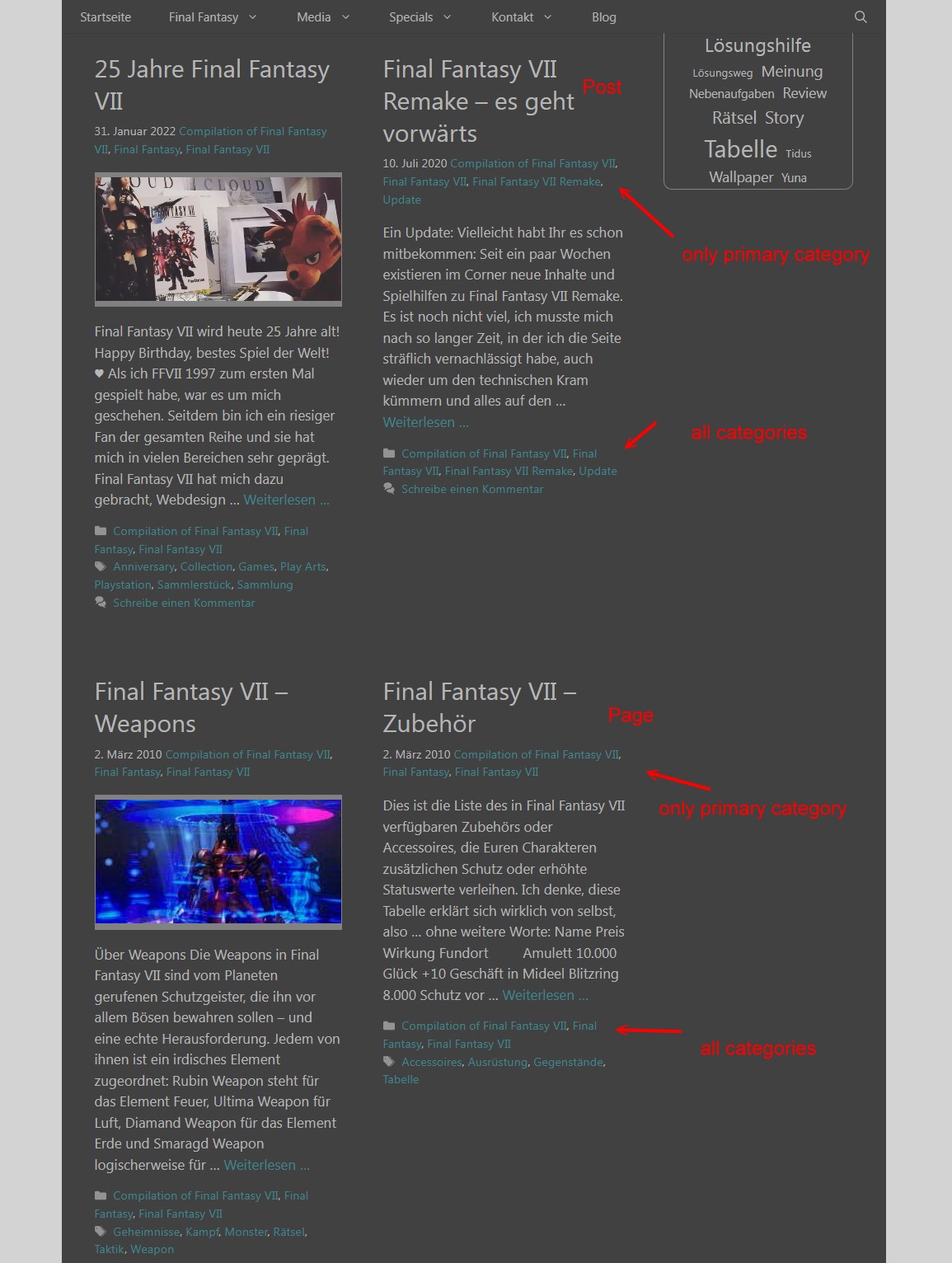
I was hoping to just show the primary category under the title (date + primary-category) – and keep all categories as a “link-list” below.
And when I go on the single-post-view

it keeps the list with all categories under the title again.I don´t know if I can explain it good enough ^^ And I don´t think that it is worth so much effort. I though I would just write “primary-category” instead of “categories” in my meta-entry-items and thats all ^^’ Just a little change, no such a big thing 😀
Edit: And when I add your code, it doesn´t show the complete categories anymore. Then there is just the primary category for the posts. And for the pages, the place near the date and the whole taxonomy below is empty.
December 6, 2022 at 4:01 am #2451341StaffCustomer SupportOk, instead use the original code Tom provided here:
https://generatepress.com/forums/topic/category-link-issue-on-gp-element/page/2/#post-1761111
This will create the a shortcode:
[dynamic_category_link]The in appearance > Elements, create a new Hook Element.
In the text area add the shortcode.
Set the Hook togenerate_after_entry_title
Check the Execute Shortcodes
Set the Display Rules toBlogandAll ArchivesThis should not break anything 🙂 And just return the primary category after the first Date
December 6, 2022 at 9:34 am #2451765Ok, I´m totally confused now.
I tried this, and it adds just the link adress to my primary-category unter the other categories beneath the date, not a link itself.
And it works just on the main page, not in the archives.I deleted the code and the hook and now my “taxonomy for pages” isn´t working anymore in all archives which contains just pages no posts …
I thank you so much for your kind and patient help, but I will stop this now and fokus on the more important things.
Thank you!
December 7, 2022 at 3:29 am #2452738StaffCustomer SupportYeah sorry in couldn’t make that work.
If you have time to revisit in the future then let us know 🙂 -
AuthorPosts
- You must be logged in to reply to this topic.
