
Archived topic
Shortcodes for categories showing on posts under categories in header element
9 replies · Started by William on August 18, 2020
Hi there,
If there is a shortcode for a category, is there a way to make the shortcode for the appear for all posts that contain in the header element, for that category?
Kind regards,
Will
Hi there,
Would the template tag work?
https://docs.generatepress.com/article/header-element-template-tags/#post_terms-taxonomy
I don't think so - the shortcode I made using ACF called 'author_info' - the content for this field is filled in on the category page:
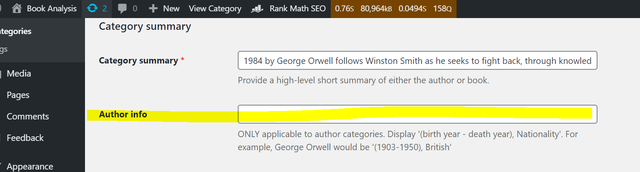
I want to display such a shortcode in the header element for all posts under that category.
Kind regards,
Will
Hi there,
i provided you with the method to do that here for the Category Info:
The same principles apply here simply change the shortcode name and the get_field to whatever you set up in ACF.
Hi there,
Thanks for this but it does not seem to provide the right functionality.
On such a post page, if I add the shortcode [category_summary] or [category_image], to the post header element, nothing shows.
The [category_summary] and [category_image] can be see on this category page. I would like to add these to post header elements and show if they are under the same category.
Kind regards,
Will
As much as we like to help where we can building ACF code is out of our scope.
Best to ask on ACF support on how to get the current posts category description.
Okay thanks anyway
ACF support is really good - they should be able to help quickly.
Hi there,
I've just managed to muster something together for this, so thought to share with you and the community as others might find it useful.
add_shortcode( 'shortcode_name', function() {

    $categories= get_the_category();

    $term = get_category($categories[0]->term_id);

    $shortcode_name= get_field('shortcode_name', $term);

    return $shortcode_name;

} );
Where replacing 'shortcode_name' for the custom field of the category will allow you to add the shortcode into the post as [shortcode_name].
Kind regards,
Will
Awesome - thanks for sharing :)
