Archived topic
remove block from specific page
7 replies · Started by aik on February 9, 2023
I would like to remove the right column for a specific page or feed-news
I went to form and entered all the exceptions for the feed-news page but this still has it
the strange thing is that this right column has some css rules that I didn't give, I can't even find it in the modules

Hi there,
Any chance you can link us to the page in question?
You can use the private information field:
https://docs.generatepress.com/article/using-the-premium-support-forum/#private-information
Let me know :)
no problem
It's been added in via a block element - right sidebar.
Go to appearance > elements > Sidebar – Latest posts, and add this page to the excluded list.
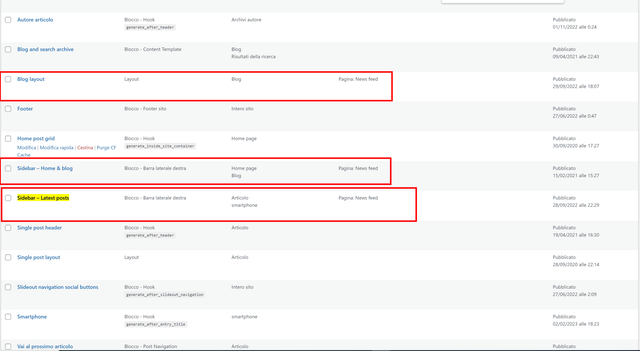
I have already tried these settings, but nothing changes, I also excluded the right sidebar layout but nothing changes, I emptied the cloudflare cache but the bar continues to remain, which obviously has a css that I did not write, the one in the sidebar is different from the one that appears in the feed-news page
Hi Aik,
So we can take a closer look at the issue, can you provide admin login credentials?
Please use the Private Information field for this: https://docs.generatepress.com/article/using-the-premium-support-forum/#private-information
do it
The page you linked is not a static page, it's your blog.
So just remove the blog from the location.