
Archived topic
Re-position WooCommerce Header (or reformat woocommerce page)
8 replies · Started by John on May 18, 2020
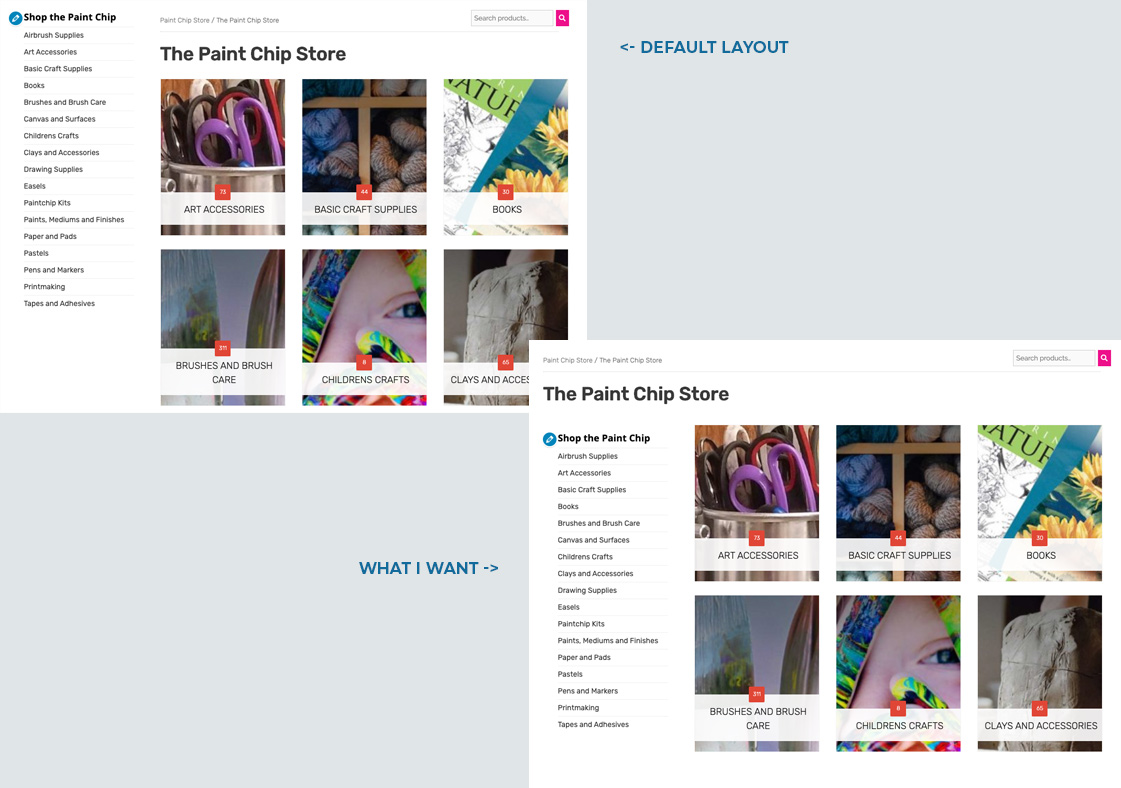
Hello. This is easier to describe with screenshots. I would like to take the existing design:
sidebar/content (header + product categories)
and turn it into
header
sidebar/products
Basically take the Woocommerce page title, breadcrumb (and my custom search filter) to be above the 2 column sidebar/content design.
Please reference this:
Hi there,
can you provide a link to the site so i can see what is currently in place - then i may be able to figure out what can be done :)
How is the Search being added?
I assume the breadcrumb is the default function.
The search is added through a hook (element) on the woocommerce_breadcrumb trigger
Yes, the breadcrumb is the default
I suppose I could wrap it all up in a custom element using variables for the section title, then use css to hide the original location, which I guess I'll do. I wasn't sure if there was something baked into WP/GP for this already.
Ok, I've figure it out. I still have to find the variable for the page title, but I did as I mentioned in the comment above.
This is how I got the page title fyi
<h1 class="woocommerce-products-header__title page-title"><?php woocommerce_page_title()?></h1>
That sounds like the best approach. To unhook everything and then re-hook them.
Couple of things that may help:
// Remove the title - which you have replaced with your own function
add_filter( 'woocommerce_show_page_title', '__return_false' );

// Remove the breadcrumb which you can hook back in elsewhere
remove_action( 'woocommerce_before_main_content', 'woocommerce_breadcrumb', 20, 0 );