
Archived topic
Problems with amp
9 replies · Started by JOSE on December 15, 2020
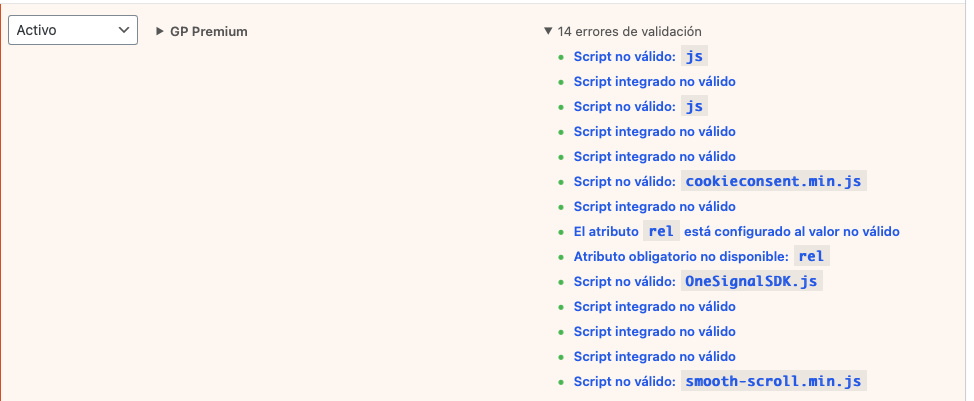
I install the oficial amp plugin and the amp for generate press plugin and get errors. I use dispatch and it's not correct the size in the first four photos and problems with plugins like gp premium:
Thanks
I have seen that most of the errors are plugin and some element. The one that I do not know how to adjust is the header.
Happens in pc and mobile
Thanks
Hi there,
to remove JS errors related to the Theme you need to install this AMP plugin:
https://github.com/tomusborne/amp-for-generatepress
You can download the zip file by clicking the code button.
To force the images to fill the space try adding this CSS:
.page-hero amp-img.amp-wp-enforced-sizes[layout="intrinsic"] > img {
    object-fit: cover !important;
}Hi David,
Thanks for your answer.
Yes the plugin was installed.
Thanks for the code, it´s a lot better know in pc and mobile. Only the first image not fill the space, the other 3 is perfect. you can see in the link. I had Async JavaScript plugin on now its perfect
Thanks
Glad to hear that!
Hi,
Actually only I have 7 errors:
- elements/class-hooks.php:186 (wp_footer)
- elements/class-hooks.php:186 (wp_head)
- gp-premium/general/js/smooth-scroll.min.js
-generate-smooth-scroll-js
- wp-includes/js/jquery/jquery.min.js
- wp-includes/js/jquery/jquery-migrate.min.js
- wp-show-posts/js/jquery.matchHeight.js
Ideas?
Thanks
ok
Did you get all of this resolved?
Let us know :)
Hi Tom.
I go understanding the errors,
Mainly problems with plugins that I have adjusted by changing it for others or other alternatives. Also some elements that I had created for example for analatycs.
I'll see if there are errors in google search the next days. The good thing is using the standard amp there are no differences in the design and it can be modified very easily.
Thanks
No problem :)
