
Archived topic
Problem with drop down list
7 replies · Started by Ivan on May 13, 2021
Hi, I have a small problem with the GP theme. I have a premium, and I can't find where to configure font size or position of text for drop-down lists in Woocommerce when I have a product with variations. Text is half visible.
You can check here: https://adpgroup.hr/proizvod/ix-ox-krizic-kruzic/
Here is the image too:
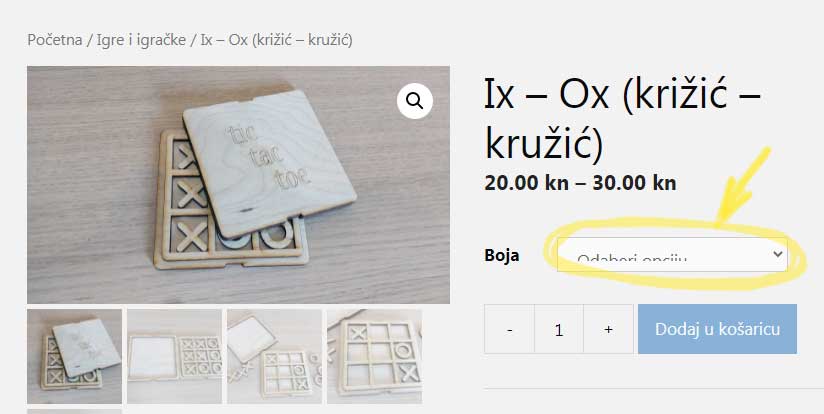
Hi there,
the 'mini orange login' plugin is adding this CSS:
select {
	-webkit-appearance: menulist-button;
	height: 35px;
}
Which is causing the issue... plugins shouldn't add styles without their own specific classes.
To get round add this CSS:
body select {
    height: initial;
}
It will stop Select boxes from being affected by that CSS.
That's it!
Thank you very much!
Best regards
Ivan Kosak
You're welcome
Hello,
I know you gave me the solution to this problem. But I now have the same problem (half visible font on drop-down menu) but with another website with the same theme and the same mini orange plugin. I forgot how I fixed this before. :-(
I'm looking but I can't find where should I put this extra code. Can you help, please? What plugin and what file should I edit? Or is it on your theme?
Hi Ivan,
You can add it through Appearance > Customize > Additional CSS.
Or see our other recommendations on adding CSS here - https://docs.generatepress.com/article/adding-css/
Thank you Elvin! You saved me!
No problem. Let us know if you need further help. :D