
Archived topic
Old-Style Templates & Elements
3 replies · Started by Rick on June 6, 2022
I apologize for what I think is a newbie question. I haven't worked with WP or GeneratePress for years, and now we have blocks and such. Been reading through as much documentation as I can find, trying to wrap my head around this, but I'm still not clear.
"Back in the day," we had PHP Templates (single.php, front-page.php, etc.). Now I don't think we do. Although "What the File" still tells me what some pages on my GeneratePress child theme are using page.php or index.php.
I'm thinking that instead of such templates as front-page.php or single.php, I would create what I need using an Element of the Block type. Very confusing, if I'm right, since I am so used to hand-coding everything in a PHP file.
Am I right about this? Are Elements (among maybe some other things, it seems) replacements for the old method of creating PHP Templates?
Again, sorry if this is obvious, but I'm just a little confused.
Thank you.
Hi Rick,
Good question!
GeneratePress, and all other themes still use templates such as index.php etc. WordPress follows a Template Hierarchy, in which when a person visits a site, it finds a specific template appropriate for the specific page visited, and if that template doesn’t exist, it all falls down to the default index.php which is required by WordPress.
Template Hierarchy: https://developer.wordpress.org/files/2014/10/Screenshot-2019-01-23-00.20.04.png
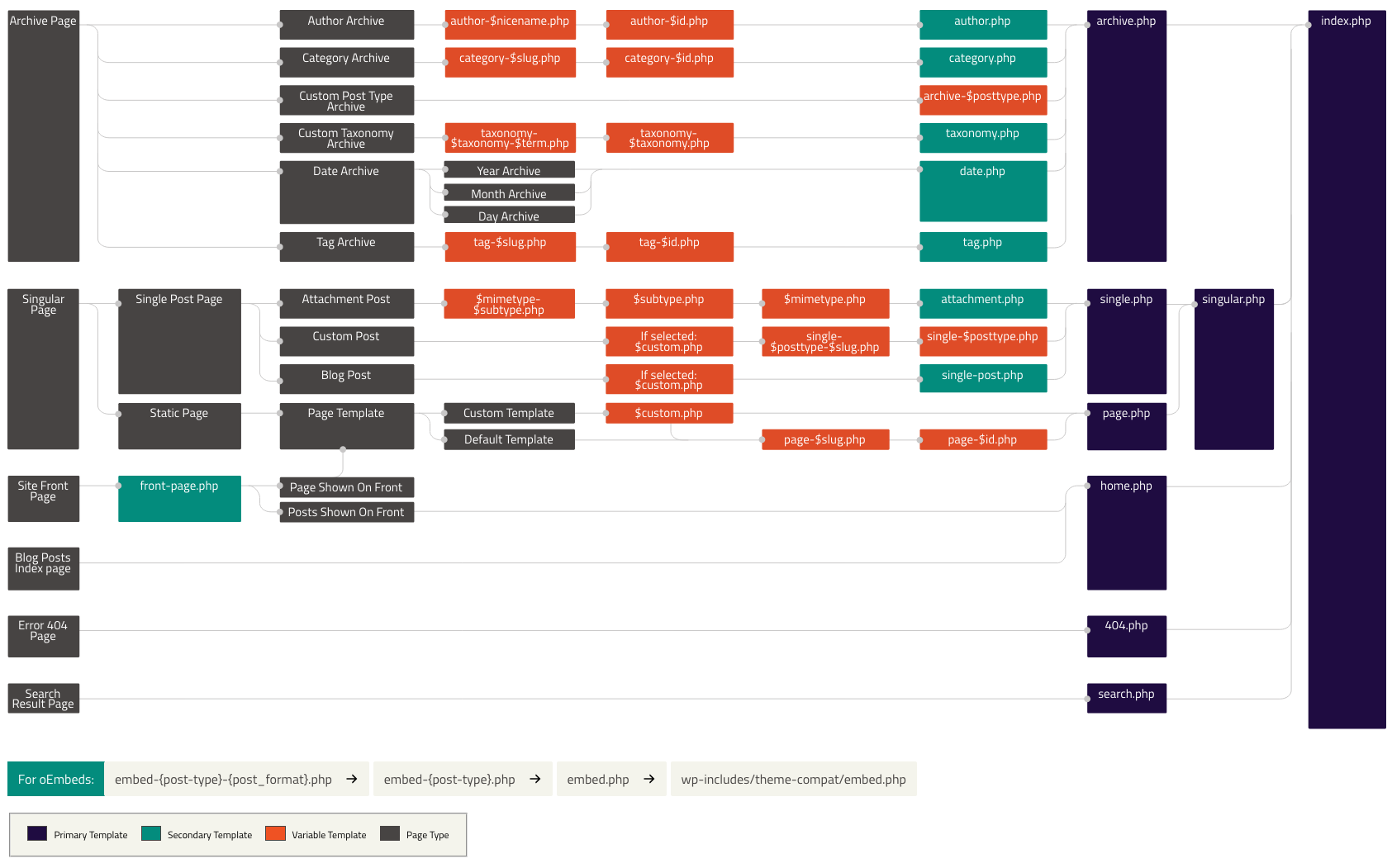
GeneratePress follows this template system by WordPress.
Now, with regards to Elements, WordPress has what are called hooks.
“Hooks are a way for one piece of code to interact/modify another piece of code at specific, pre-defined spots.”
Reference: https://developer.wordpress.org/plugins/hooks/
There are two types of hooks, action and filter hooks.
Elements uses action hooks to basically insert Blocks or code in specific spots/instances during and when a page loads.
The templates present in GeneratePress also has its own action hook in addition to the ones present in WordPress.
Through these hooks, you’ll be able to basically modify a page.
For instance, through Block Elements, you may add Blocks in specific pages. Say you want to add a Headline before the content of all pages, in the template files of GeneratePress, there’s an action hook called generate_before_main_content which you may hook on to, to achieve as such.
Hope this clarifies!
Hmmm...because I did find and make copies of the php template I wanted in GP. But I couldn't get it to work, not even when I used the old style header (in comments) that I remembered from before.
Anyway, I was able to get what I wanted to work using the Elements area.
If you make a copy of a template file, and you add it to you GP Child theme, that file should override the original theme file.
Glad you were able to figure it out though!