
Archived topic
My Blog page is empty - completely
12 replies · Started by Martin on July 7, 2022
Hi there.
I rarely use the 'blog' feature of WordPress but I decided to start using it on a new website.
I created a blank page called 'Blog' and set this page as the Blog page in Settings.
Added 'Blog' to the menu.
When I visit 'Blog' it is complete empty; not even any menu, header or footer.
I'm guessing I have messed something up somewhere but no idea what?
Any thoughts?
Thanks.
Hi Martin,
Can you try rebuilding your permalink structure? Just go to Settings > Permalinks, and hit save changes.
If that doesn’t work, can you go to Tools > Site Health and check if there’s any critical issue that needs to be resolved?
Moreover, do you have custom code? Can you try temporarily removing them? Or, if you’re using the Child theme, switch to the parent theme temporarily to test.
It would be best to take a backup of your site before doing so.
Kindly let us know how it goes.
OK. So the permalink rebuild didn't change anything. Setting the active theme to GP did show the blog page correctly. So clearly something is wrong with my child theme.
I guess I need to copy some more files across to my child theme.
In my child theme I created custom PHP files for my custom post types but I don't have any files in their for single and archives of blog posts.
I assumed these would be loaded from GP if they weren't present in the child theme?
My child theme includes:
archive.php
footer.php
functions.php
header.php
index.php
single.php
Plus all my custom 'single' files and other required includes for my custom post types.
Yes, the template files should be loaded from the Parent theme if it’s not overridden in Child Theme.
How have you modified single.php?
If all those template files are for your CPT, you can try to rename them to be specific for your CPT. Here’s the template hierarchy: https://developer.wordpress.org/files/2014/10/Screenshot-2019-01-23-00.20.04.png
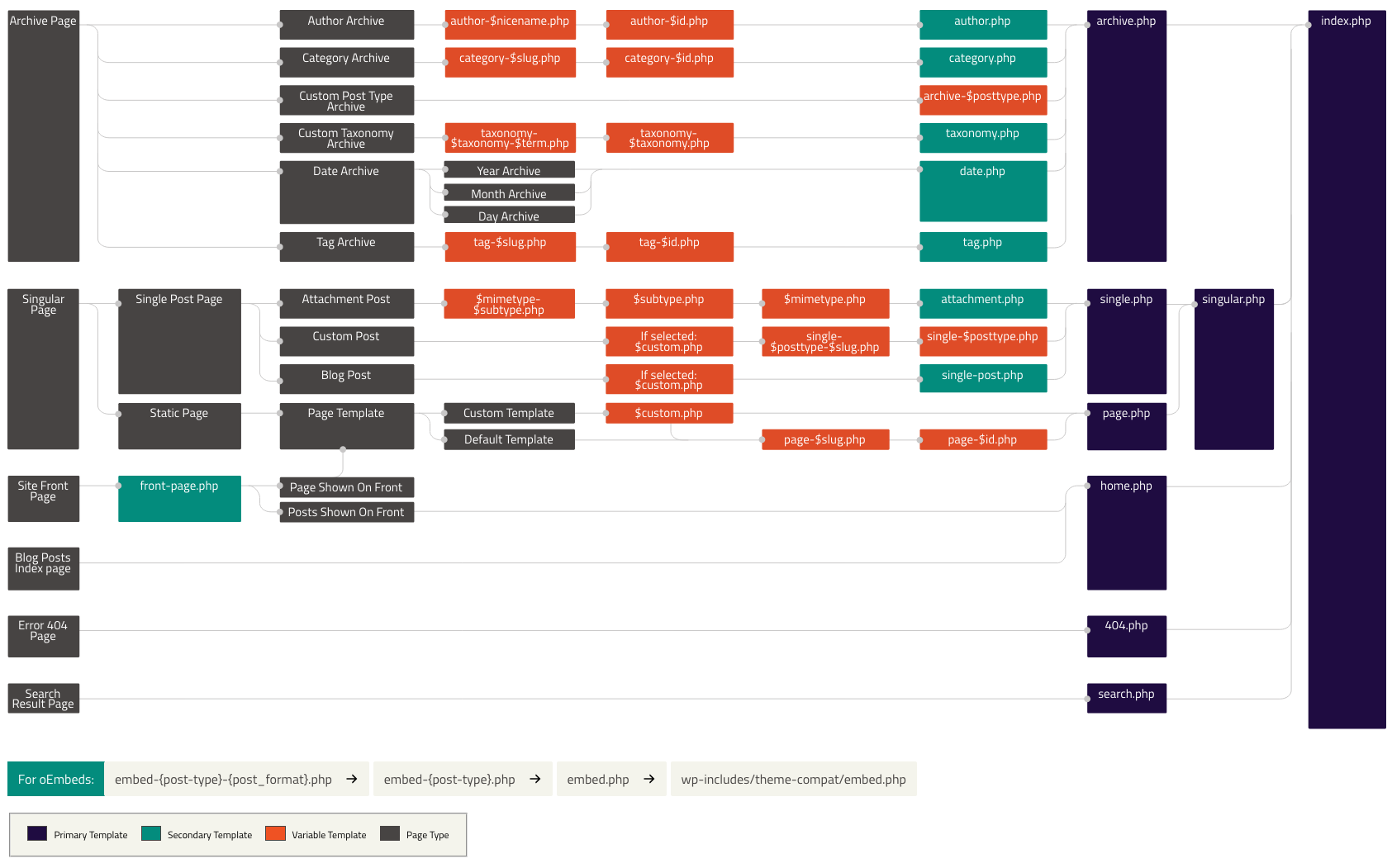
For instance, if your CPT slug is project, single.php would be single-project.php and content-single.php would be content-project.php. Reference: https://docs.generatepress.com/article/setting-up-a-simple-custom-post-type/
Hope this clarifies!
Single.php and archive.php haven't been changed. All I created was files for my CPT. I didn't change anything that 'should' affect the default 'post' types.
How can I send a screenshot of my child theme?
My CPT is for 'venues' so in my child theme I have:
content-venue.php
footer.php
functions.php
header.php
index.php
screenshot.png
single-venue.php
style.css
When I go to /blog/ absolutely nothing appears. There's not a single line of HTML when I view source.
Even though I am logged in, it doesn't even include the admin bar code, nothing.
Strangely, when I go to a blog category, that displays correctly.
You can share screenshots as such: https://docs.generatepress.com/article/using-the-premium-support-forum/#uploading-screenshots
Do you have any custom code in functions.php? Can you try temporarily removing them?
It would be good to take a backup of your site before doing so.
If you have a staging site where we can do some tests, that would be great as well.
You may share the credentials through the private information field if you have one: https://docs.generatepress.com/article/using-the-premium-support-forum/#private-information
Kindly let us know how it goes.
No significant changes to my functions.php.
<?php
/**
 * GeneratePress child theme functions and definitions.
 *
 * Add your custom PHP in this file.
 * Only edit this file if you have direct access to it on your server (to fix errors if they happen).
 */

function generatepress_child_enqueue_scripts() {
	if ( is_rtl() ) {
		wp_enqueue_style( 'generatepress-rtl', trailingslashit( get_template_directory_uri() ) . 'rtl.css' );
	}
}
add_action( 'wp_enqueue_scripts', 'generatepress_child_enqueue_scripts', 100 );

add_filter( 'login_url', 'custom_login_url', PHP_INT_MAX );
  function custom_login_url( $login_url ) {
    $login_url = site_url( 'gwreset.php', 'login' );
    return $login_url;
}

  add_filter( 'retrieve_password_message', 'my_retrieve_password_message', 10, 4 );
  function my_retrieve_password_message( $message, $key, $user_login, $user_data ) {

    // Start with the default content.
    $site_name = wp_specialchars_decode( get_option( 'blogname' ), ENT_QUOTES );
    $message = __( 'Someone has requested a password reset for the following account:' ) . "\r\n\r\n";
    /* translators: %s: site name */
    $message .= sprintf( __( 'Site Name: %s' ), $site_name ) . "\r\n\r\n";
    /* translators: %s: user login */
    $message .= sprintf( __( 'Username: %s' ), $user_login ) . "\r\n\r\n";
    $message .= __( 'If this was a mistake, just ignore this email and nothing will happen.' ) . "\r\n\r\n";
    $message .= __( 'To reset your password, visit the following address:' ) . "\r\n\r\n";
    $message .= '<' . network_site_url( "gwreset.php?action=rp&key=$key&login=" . rawurlencode( $user_login ), 'login' ) . ">\r\n";

    // Return the filtered message.
    return $message;

  }

// filter/hook to modify WPUF Account page's tab/section
add_filter('wpuf_account_sections',function ($sections){
    unset( $sections['venue'] ); //remove (post) tab from Account page
    //unset( $sections['dashboard'] );
	unset( $sections['submit-post'] ); //remove (Add Post [slug name submit-post]) tab from Account page
    return $sections;
},999);

// Limit access to media library (users can only see/select own media) //
   add_filter( 'ajax_query_attachments_args', 'wpsnippet_show_current_user_attachments' );
   function wpsnippet_show_current_user_attachments( $query ) {
      $user_id = get_current_user_id();
      if ( $user_id && !current_user_can('activate_plugins') && !current_user_can('edit_others_posts')) {
         $query['author'] = $user_id;
      }
      return $query;
   }

/**
* Disabled Editing of specific fields
*
* @param [type] $field
* @return array
*/
function guestwiki_field_disabled($field) {
    // Disabled
    $field['disabled'] = true;
    // Readonly
    $field['readonly'] = true;
  return $field;
}
add_filter('acf/prepare_field/name=venue_category', 'guestwiki_field_disabled');Hi there,
what is in the index.php ? Is it possible to temporarily remove that template to see if its interfering ?
OMG! How did I miss that?
I had put a 'Nothing here' index file in there!
Removed that and the problem is resolved.
Thanks for nudging me to take a look.
You're welcome :)