Archived topic
Modify Newsroom Front Page
7 replies · Started by Jimin on November 27, 2022
I want to modify lifestyle, entertainment, and community widgets on the newsroom front page, what files should I find and modify?
I also want to modify the categories that are exposed to that widget.
Please understand that there may be something strange in the context as it is written with a translator.
Thank you.
Hi Jeong,
To modify these, go to Pages > All Pages > Home — Front Page in your Admin Dashboard.
Open the List View, and select the Query Loop Blocks to be modified.
In their Block Settings, add a Parameter. Choose "Taxonomies" > "Categories", and set the categories you prefer.
Thank you for your kind reply.
That part has been resolved.
If you look at the Community widget on the front page of the newsroom, the title of the article on the right is down below the picture.
I think it's because the title is long.
I'd like to change the title to two lines next to the picture, is it possible?
It's not because it's too long. That's just how it's structured.
If you want that layout, you'll need to alter the structure. Specifically, you'll need to place the image and the title on a Grid Block separated by columns.
Example: https://share.getcloudapp.com/8LugQPx4
Reference: https://docs.generateblocks.com/article/grid-overview/
I'm sorry to bother you.
I haven't solved it yet T.T
Could you check the image below one more time?
Thank you.
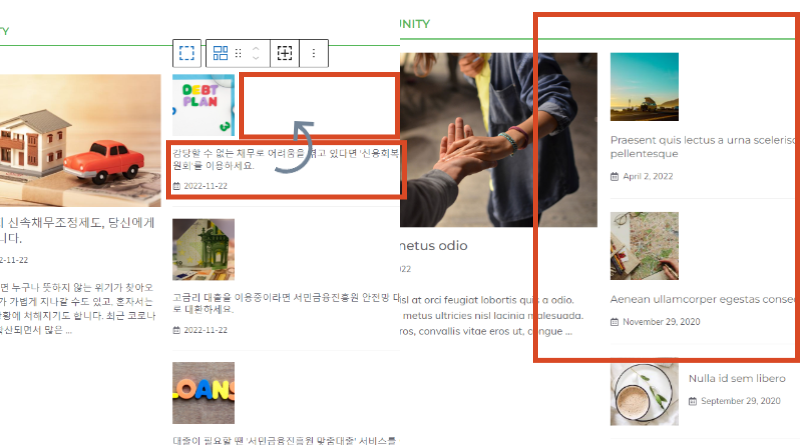
I see. Try setting the Container Width of the Containers inside the Grid Block. Examples:
https://share.getcloudapp.com/7KujdLz4
https://share.getcloudapp.com/2Nu6RybJ
You can set it to 25% and 75% respectively as I've done. Make sure the flex-basis is set to auto as well as shown in the examples.
I've solved everything.
Thank you for letting me know.
You're welcome Jeong!