
Archived topic
Missing Button Hover Settings...
4 replies · Started by Roland on June 28, 2022
Hello Support!
I'm looking at the documentation and I see hover color settings on the GP Buttons, but I'm not seeing them in my installation. I'm sure I've done something incorrectly in one of the settings or in the install. The following image and screen shot shows the Hover settings in the GP documentation, but it's not in my Button block settings:
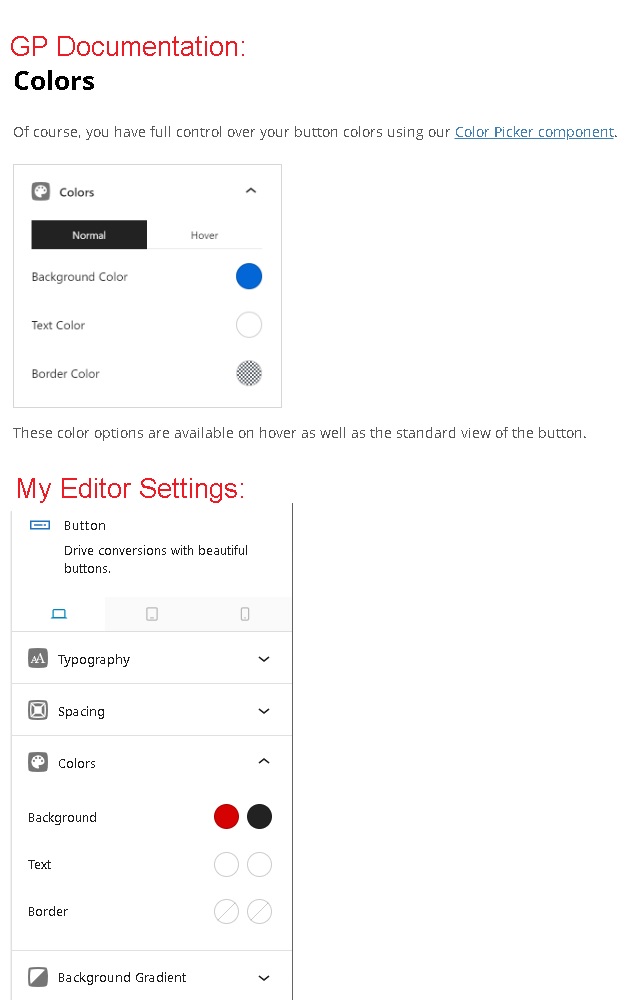
Hoping you can help me out with this.
Our site is currently running in a temporary sandbox domain:
https://sgp-gp.duanebentzen.com
Hi Roland,
With the new Block settings layout, the hover colors can be modified through the second column of color pickers.
Specifically, these ones: https://share.getcloudapp.com/llu0oKwn
Hope this clarifies!
Thanks Fernando,
That did it! Of course, thanks so much for the clue!
- Duane
Closing this ticket. I expect I'll have more questions.
You’re welcome Duane! No problem, just reach out to us anytime, and we’ll do our best to assist. :)
