
Archived topic
Menu items: How to equalize the spacing?
6 replies · Started by Sascha on May 21, 2022
Hello
as you can see here, the space between the menu-items is not equal.
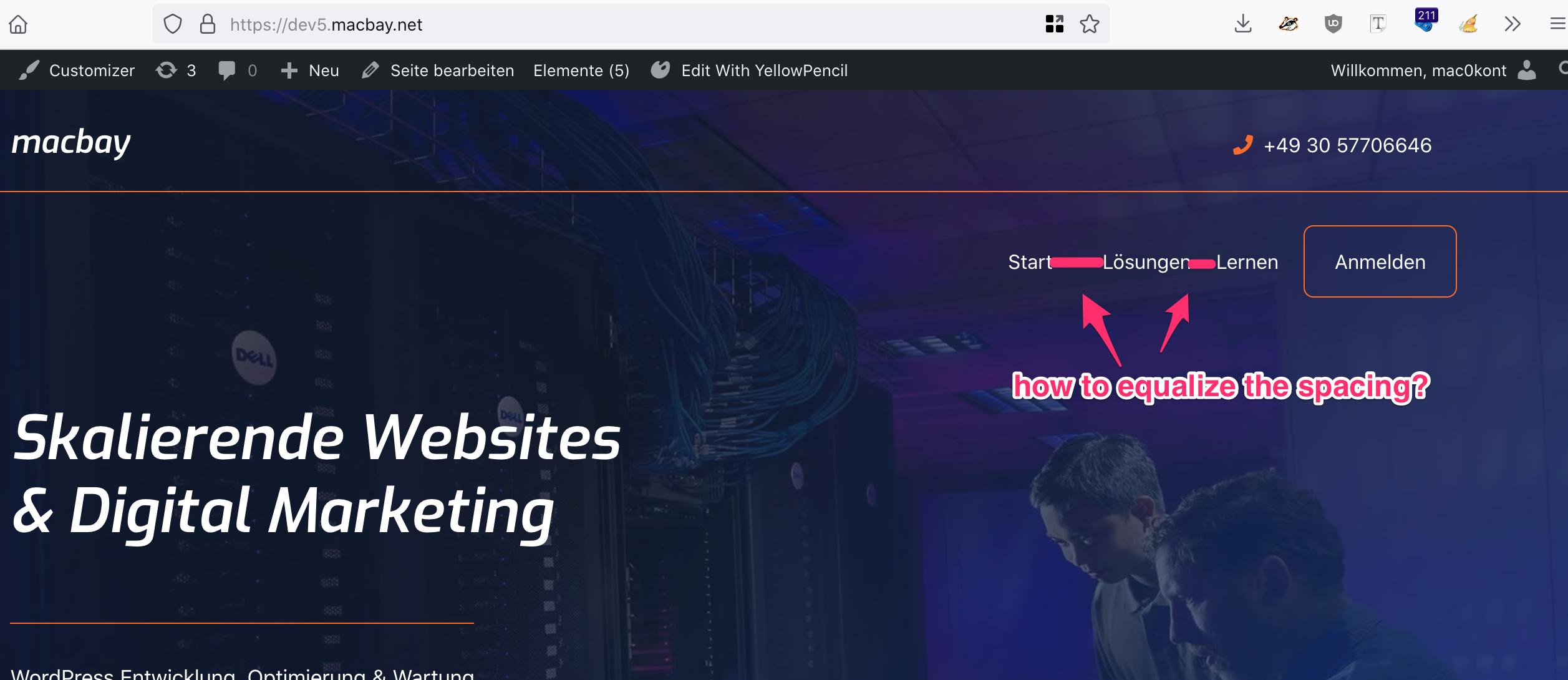
I haven't found any settings to correct this, can you please help me?
Thank you in advance and kind regards,
Sascha
Hi there,
Any chance you can link us to the site in question?
You can use the private information field.
https://docs.generatepress.com/article/using-the-premium-support-forum/#private-information
Let me know :)
Sorry, something I overlooked.
So is the issue resolved?
The item spacing should be the same by default.
Oh, sure, I thought you would just take it from the screenshot ;-)
dev5.macbay.net
Oh, sure, I thought you would just take it from the screenshot 😉
dev5.macbay.net
Hi Sacha,
Thank you for adding the link to your site!
The issue stems from the dropdown menu toggle being hidden through a custom CSS. If you display it by default, the spacing should be identical: https://share.getcloudapp.com/nOuXzrod
To resolve this, you may add this CSS in Appearance > Customize > Additional CSS:
.main-navigation .main-nav ul li.menu-item-has-children > a {
    padding-right:20px;
}
Kindly let us know how it goes. :)