Archived topic
Link clicking is not working
12 replies · Started by Sanu Kumar on May 22, 2021
Link clicks are not working. See this screen video: https://www.loom.com/share/40ccd807582245d29c8a132dc759b4e0
and it is happening on every post.
No, I didn't fix it yet. The video you show is fine. Links are working below the container block and the video you share is about the same.
Take a closer look at this video again which I shared: https://www.loom.com/share/40ccd807582245d29c8a132dc759b4e0
and open this page: https://www.masteryblogging.com/how-to-start-a-blog-using-greengeeks/
and try to click on "Greengeeks" the same as I show in the screen video. The link won't open and And it is not working in every post, in which the link is above the container block or up to its alignment.
Again, try to open this post, because I have a link right to the start of the post. URL: https://www.masteryblogging.com/how-to-start-a-blog-using-greengeeks/
It's not working because you have this CSS added:
.single-post .page-overlay+#page {
    position: relative;
    margin-top: -200px;
}
Try setting the inner container z-index to 0 on the page hero above.
I can't see any option for z index. Could you help me to find that?
Hi there,
edit the block elememt, select the parent container block - in settings > Spacing there ware two fields for outer and inner z-index below the other spacing options ( padding, margins, borders )
ok, I found this and set the inner index to 0 but still, the link is not working.
Here's how I did: https://www.loom.com/share/b5f41ed98f5e4591a5f6b844df41d34b
but when I inspect CSS, it is showing z-index to 1. How's that possible, I saved the inner index to 0 as I shared in the video.
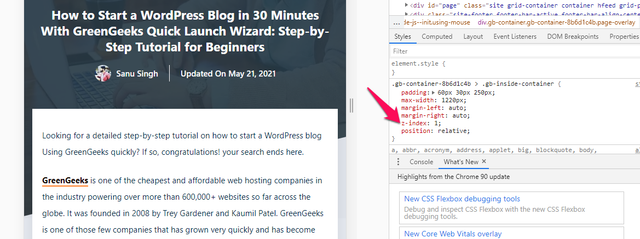
I added this CSS
.gb-container-8b6d1c4b > .gb-inside-container {
    z-index: 0;
}
and it is working now! I don't know if it works on every post or page.
but still want to know why it happened when I set it z-index to 0 in the block settings.
Aah if you have a pseudo background element then it will force the z-index to 1 - its something we're looking into resolving without breaking other features. The CSS method is the way to go for now.
ok but does this CSS works on every post or page?
It will work on every page - but i would suggest you do this instead. Select the Container Block , and in Advanced > Additional CSS Class(es) add: zero-index
Then replace your CSS with this:
.gb-container,zero-index > .gb-inside-container {
    z-index: 0;
}
This will ensure that if the Blocks ID ever got updated the CSS would still work.
thank I'll do this.
I already have one class page-overlay added in that so just to confirm should I use comma (,) or space to add another class like this page-overlay, zero-index or this page-overlay zero-index
You're welcome