Archived topic
Layout bar
7 replies · Started by Romain on August 31, 2020
Hello,
When I want to edit a page, the "layout" and "sections" bar are now on the bottom of my page. I would like it to go back on the right side with the other settings. i don't know how it got there in the first place.
How could I do that?
Thank's
Romain
Hi there,
Not sure if I fully understand.
Are you using the Gutenberg editor or Classic editor?
Can you show a screenshot of what you are seeing? You can use a service like this and provide the direct links here:
https://postimages.org/
Hi,
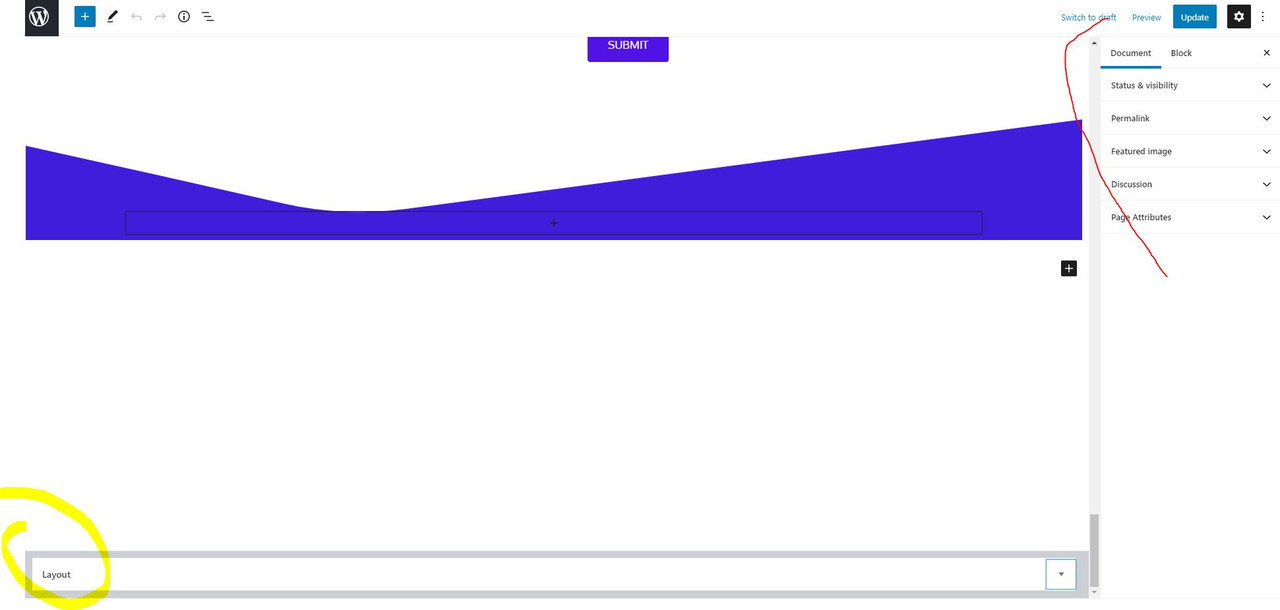
https://i.postimg.cc/BbB3qNgz/edit.jpg
The layout is now on the bottom where there is the yellow circle, I believe it was where the red circle is before. I don't know what I did to put it there.
Thank's
Can you try if you are able to drag it back to the side?
I tried, but it didn't work.
Hmm I just gave it a shot and unfortunately that didn't work for me either.
I was able to drag the layout metabox to below the post but unable to drag it back to the side.
I could only fix it by resetting the site.
I think this is a Gutenberg issue so not something we can fix though but will check with our team to see if anyone has a workaround :)
Alright, thank's for your help. Let me know if you find a solution
That's a Gutenberg issue unfortunately so not really something we can fix :(
Hopefully they will provide a fix in the future updates!