
Archived topic
Including a CSS class in one or more elements,
12 replies · Started by Glasul Vietii on January 11, 2023
Hy, how can i do this with Generate press?
Method 2 - Form launch button
By including a CSS class (f230ro-launch) in one or more elements, they will launch the custom form on click.This class can be attached to any button or element on the page where you have included the script. The class does not influence existing CSS styles in the site and the display of the button.
Example implementation:
<button class="f230ro-lansare">Redirect</button>
<script src="https://formular230.ro/share/58b1051c4"></script>
To help you out, we've also included a button class that will style the element to look like a button (f230ro-button). I've also included some subclasses for altering the appearance.
Button initialization examples:
<div class="f230ro-launch f230ro-buton">Redirect</div>
So my question is how can i implement this into a button on a page to run this script? (https://formular230.ro/share/58b1051c4)
Hi there,
are you using the Block editor? If so then use a GB Buttons Block, and with the button selected go to Advanced > Additional CSS Class(es) and add the class name there.
I done that Advanced > Additional CSS Class(es) and add the class name there.
But the script https://formular230.ro/share/58b1051c4 is not on my website.
I dont understand how to implement :
<button class="f230ro-lansare">Redirect</button>
<script src="https://formular230.ro/share/58b1051c4"></script>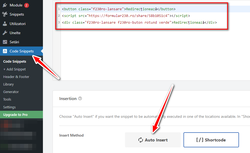
1. Go to Appearance > GeneratePress and activate the Elements Module.
2. In Appearance > Elements -> Add New --> Hook.
3. In the Hook text area - add your script eg.
<script src="https://formular230.ro/share/58b1051c4"></script>
4. Set the Hook to: wp_footer
5. Set the Display Rules > Location to: Entire Site or add just the places you want it to fire eg. Posts -> All Posts
Then you can add your Button with your CSS Class in the page editor.
Thanks, i will do some tests and give feedback.
thank you, is working when i put in CSS class f230ro-lansare , but i want to get to work this:
Button initialization examples:
<div class="f230ro-launch f230ro-buton">Redirect</div>
Right now when i hoover on the button it doesnt show up the "little hand", because the url field on the button i left it empty.
If in Advanced > Additional CSS Class(es) I put f230ro-launch f230ro-buton on page refresh it show up that form, i dont have the time to scroll down, just refresh or load new page and show up the form. I want to show up the form on button click and the button to have that "little hand" on hoover.
Nevermind is working, stupid of me!!
I typed wrong name of the class, it shout be this: "f230ro-lansare f230ro-buton rotund verde"
Thank you for all the help!
Ok , the button is working but i when i click to go to another page or article it show up the form on all the page.
I want the form to show up only when i click on that particular button.
What can i change in the hook?
Where can i see the issue ?
I have sent you login details.
Can you ask the author of that script ?
I will give a try. May I ask what is the problem? Why it is not working on button click?
Did you login and checked?
Thanks!
I did look, but the issue will be related to the script which is why you need to talk the author