
Archived topic
Image Block - Dynamic data > Link new tab (target blank)
5 replies · Started by akal on December 21, 2022
Hi, could you please consider adding the ability to check "open in a new tab" (target='_blank') when "Enable Dynamic Data" + "Link Source" is checked ?
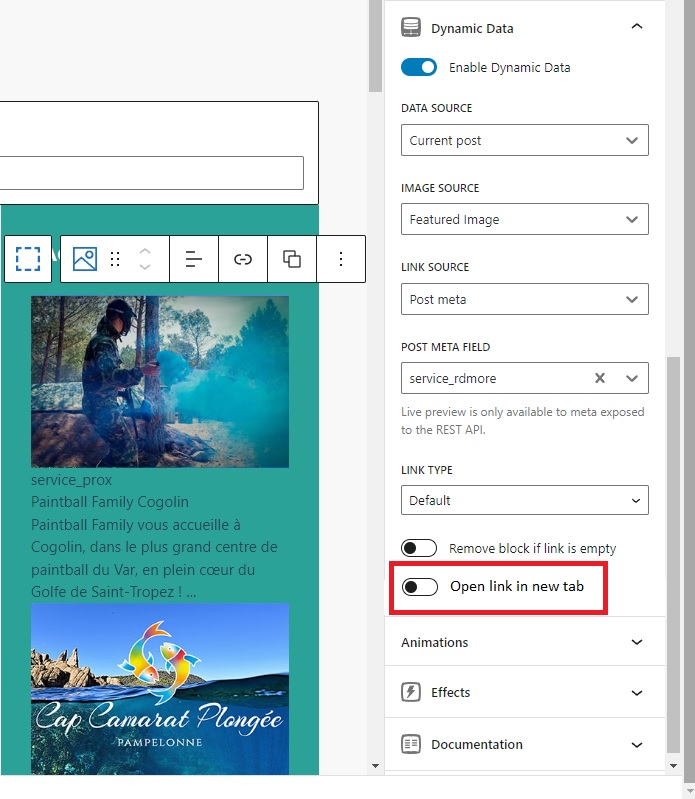
Hi Akal,
For feature requests, you may raise a topic here: https://community.generateblocks.com/c/feature-requests/6
As for the current solution for this, you can add open-in-new-tab-cu to the class list of the Block that's a link.
https://wordpress.com/support/wordpress-editor/adding-additional-css-classes-to-blocks/
Then, add this snippet:
function db_rerender_url_new_tab( $block_content, $block ) {
	if(!is_admin() && ! empty( $block['attrs']['className'] ) && strpos( $block['attrs']['className'], 'open-in-new-tab-cu' ) !== false  ) {
			$my_search='href="';
			$my_replace='target="_blank" href="';
			$new_content = str_replace($my_search, $my_replace, $block_content);
			return $new_content;
	}
    return $block_content;
}

add_filter( 'render_block', 'db_rerender_url_new_tab', 10, 2 );
Adding PHP: https://docs.generatepress.com/article/adding-php/#code-snippets
Many thank for fast reply, working as expected ^^
You're welcome, Akal!
Thanks for the solution.
You're welcome, Lee!