Archived topic
How to display only primary category on blog site?
4 replies · Started by pz on January 8, 2018
Viewing posts 1–5 of 5
Example here:
https://bukrower.pl/blog/regeneracja-po-treningu-a-zmeczenie/

How to display only primary category?
I use this PHP snippet:
/**
 * CSS also required, see: http://generatepress.com/forums/topic/all-meta-in-one-single-line/#post-108079
 */

if ( ! function_exists( 'generate_posted_on' ) ) :
/**
 * Prints HTML with meta information for the current post-date/time and author.
 */
function generate_posted_on() {

	if ( 'post' !== get_post_type() )
		return;

	$time_string = '<time class="entry-date published" datetime="%1$s" itemprop="datePublished">%2$s</time>';
	if ( get_the_time( 'U' ) !== get_the_modified_time( 'U' ) )
		$time_string .= '<time class="updated" datetime="%3$s" itemprop="dateModified">%4$s</time>';

	$time_string = sprintf( $time_string,
		esc_attr( get_the_date( 'c' ) ),
		esc_html( get_the_date() ),
		esc_attr( get_the_modified_date( 'c' ) ),
		esc_html( get_the_modified_date() )
	);

	printf( __( '<span class="posted-on">%1$s</span> <span class="byline">%2$s</span>', 'generatepress' ),
		sprintf( '<a href="%1$s" title="%2$s" rel="bookmark">%3$s</a>',
			esc_url( get_permalink() ),
			esc_attr( get_the_time() ),
			$time_string
		),
		sprintf( '<span class="author vcard" itemtype="http://schema.org/Person" itemscope="itemscope" itemprop="author">%1$s <a class="url fn n" href="%2$s" title="%3$s" rel="author" itemprop="url"><span class="author-name" itemprop="name">%4$s</span></a></span>',
			__( 'by','generatepress'),
			esc_url( get_author_posts_url( get_the_author_meta( 'ID' ) ) ),
			esc_attr( sprintf( __( 'View all posts by %s', 'generate' ), get_the_author() ) ),
			esc_html( get_the_author() )
		)
	);

	$categories_list = get_the_category_list( _x( ', ', 'Used between list items, there is a space after the comma.', 'generatepress' ) );
	if ( $categories_list ) {
		printf( '<span class="cat-links"><span class="screen-reader-text">%1$s </span>%2$s</span>',
			_x( 'Categories', 'Used before category names.', 'generatepress' ),
			$categories_list
		);
	}

	$tags_list = get_the_tag_list( '', _x( ', ', 'Used between list items, there is a space after the comma.', 'generatepress' ) );
	if ( $tags_list ) {
		printf( '<span class="tags-links"><span class="screen-reader-text">%1$s </span>%2$s</span>',
			_x( 'Tags', 'Used before tag names.', 'generatepress' ),
			$tags_list
		);
	}

	if ( ! post_password_required() && ( comments_open() || get_comments_number() ) ) {
		echo '<span class="comments-link">';
		comments_popup_link( __( 'Leave a comment', 'generatepress' ), __( '1 Comment', 'generatepress' ), __( '% Comments', 'generatepress' ) );
		echo '</span>';
	}
}
endif;

if ( ! function_exists( 'generate_entry_meta' ) ) :
/**
 * Remove footer entry meta
 *
 */
function generate_entry_meta() {

	return '';

}
endif;Same problem here:
https://bukrower.pl/blog/
Hi there,
Just to confirm, you only want one category to display in the post meta? How are you defining the "primary" category?
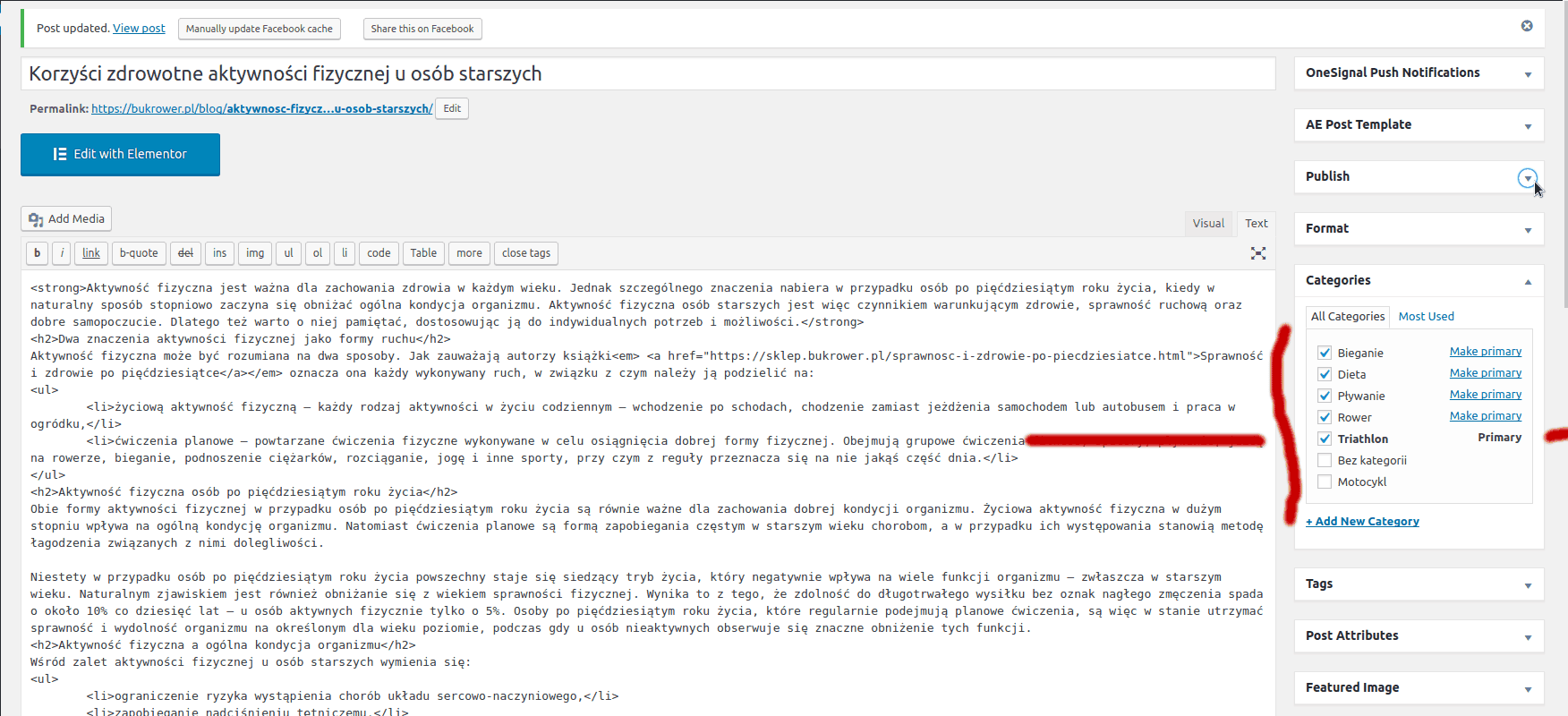
Yes only one. I set the primary category in wordpress editor, see the picture below.
It looks like instead of this block of code:
$categories_list = get_the_category_list( _x( ', ', 'Used between list items, there is a space after the comma.', 'generatepress' ) );
if ( $categories_list ) {
    printf( '<span class="cat-links"><span class="screen-reader-text">%1$s </span>%2$s</span>',
        _x( 'Categories', 'Used before category names.', 'generatepress' ),
        $categories_list
    );
}
You would need to use this block in that spot: https://gist.github.com/jawinn/1b44bf4e62e114dc341cd7d7cd8dce4c#file-primary_category-php-L3-L43
Be sure not to include the first <?php or closing ?>.
This archived topic is closed to new replies.