
Archived topic
How to decrease the navigation bar's height? through CSS
27 replies · Started by Ravi Dixit on March 12, 2023
Hello,
1) I want to decrease the height of my website's navigation bar. I have done it through the customizer options but I want to decrease it more. I have tried through CSS but the menus are not aligning properly. Can you provide me with the working code to do that? I have shared my website URL in the private field.
2) I want to decrease the space between a menu and a down arrow, check here https://prnt.sc/nrbOrUXrQtbt so it can come closer to the menu item.
3) How to make the Primary Nav menu and Secondary Nav Menu slider only for mobile? Like on this website crictracker.com
Hi Ravi,
1. There're two navigation bars, one is added using the WP navigation block, and the other is the secondary navigation, which one are you referring to?
https://www.screencast.com/t/GpyxjOsktM4I
2. The arrow is very close to the navigation menu item currently, have you already changed some settings?
3. What do you mean by menu slider? Do you mean to make the menu scrollable on mobile?
Leave the first two points because I have done it by creating custom navigation using Elements.
Can you help me with the 3rd point? Yes it should be scrollable something like this site CricTracker.com
Also. I need both the nav menus scrollable on mobile primary and secondary.
Hi Ravi,
You'll need to disable the Primary and Secondary Navs from collapsing first.
Go to Customize > Layout > Primary Navigation and set the Breakpoint to 0.
Then, follow this as well: https://docs.generatepress.com/article/disable-secondary-navigation-mobile-menu/
Let us know once that's done and we'll proceed with the next step.
I have done what you asked, now you are good to proceed.
Also, please share the code to add a shadow under the primary navigation menu also I am not able to add the search icon at the right of the primary menu. When I am adding a search block through Elements where I created the primary nav, the search field is coming. I only want to add the icon as used in the shared example site.
Thanks a lot for the help
Can you change the CSS code you added from the reference link I shared to this:
@media(max-width: 768px) {
    .secondary-navigation {
        text-align: center !important;
    }

    .secondary-navigation .sf-menu>li {
        float: none;
        display: inline-block !important;
    }

    nav#secondary-navigation .main-nav > ul {
    display: flex;
    flex-wrap:nowrap;
        width: 700px;

    }
    nav#secondary-navigation .main-nav {
        overflow-X: scroll;
    }
    nav#secondary-navigation .main-nav > ul > li {
        padding: 0 20px;
        white-space:nowrap;
    }
    .gb-container.gb-container-f3031b95 nav.wp-block-navigation {
    overflow-X: scroll;
}

.gb-container.gb-container-f3031b95 nav.wp-block-navigation ul.wp-block-navigation__container {
    flex-wrap: nowrap;
    width: 200px;
}
.gb-container.gb-container-f3031b95 nav.wp-block-navigation ul.wp-block-navigation__container > li > a{
    white-space:nowrap;
    padding: 0 20px;
}
}
Please open a new topic for the 2nd inquiry.
I have changed the CSS. and Why I need to create a new topic, it is complete related to my current query.
Here's one of our topic guidelines "Topics should be focused on one question at a time. Once we resolve your topic, you'll be able to create a new topic with the next question if needed."
This prevents topics to be too long. Hope you understand.
Okay I understood, thanks for this! Please solve this query first.
Have you added the code I provided? How did it go?
I have added the code PHP code mentioned on the page you shared through a code snippets plugin and then the CSS code in the Additiona Css.
The sliding menu for both navigations js working, but not how I am expecting.
Check this https://i.postimg.cc/dVPLQtXV/918920-C9-C4-A5-47-FD-85-BA-E540-D9048-E86.jpg
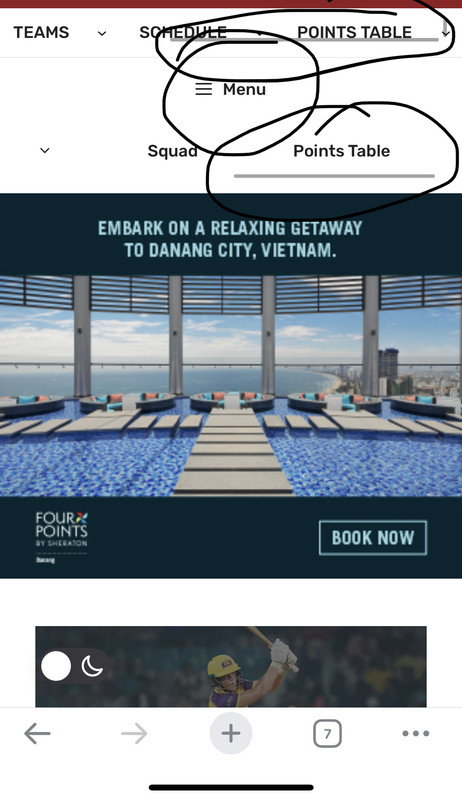
Sliders are having slider line at the bottom, which I don't need. Also, the menus are going up and down there which is not needed. It should be fixed at their position and don't move up or down.
MENU is also visible there, which makes the secondary nav accessible from two ways.
Also, when I click on any menu which has sub-menus, the sub-menus are opening inside the container and are not visible.
Please help me to fix these issues.
I see this sort of modification is a bit more complicated a may already be out of our scope of support.
Can you remove the CSS code first? I'll see if there's an easy fix.
I have removed the CSS added, please look into it.
Is there any update on this topic as it is very important for me to fix it asap