Archived topic
How to align the Before-Header Element Content with Main Content?
3 replies · Started by Sascha on February 23, 2023
Hello
please, allow me to handle this request here, since I use both GPP & GBP and would like to keep all my support tickets here.
Also, I have no idea if this issue is realated to GP or GB, also explained why I struggle & dislike to use GB-Support, please bear with me 🙏
So, I find the Secondary nav feature of GP a bit limited, because I cannot add icons to the sec-nav.
So I created a Block-Element hooked into "before_header", added a Container > Container > 3x Headlines, BUT: They don't stay within the container, as you can see on this screenshot.
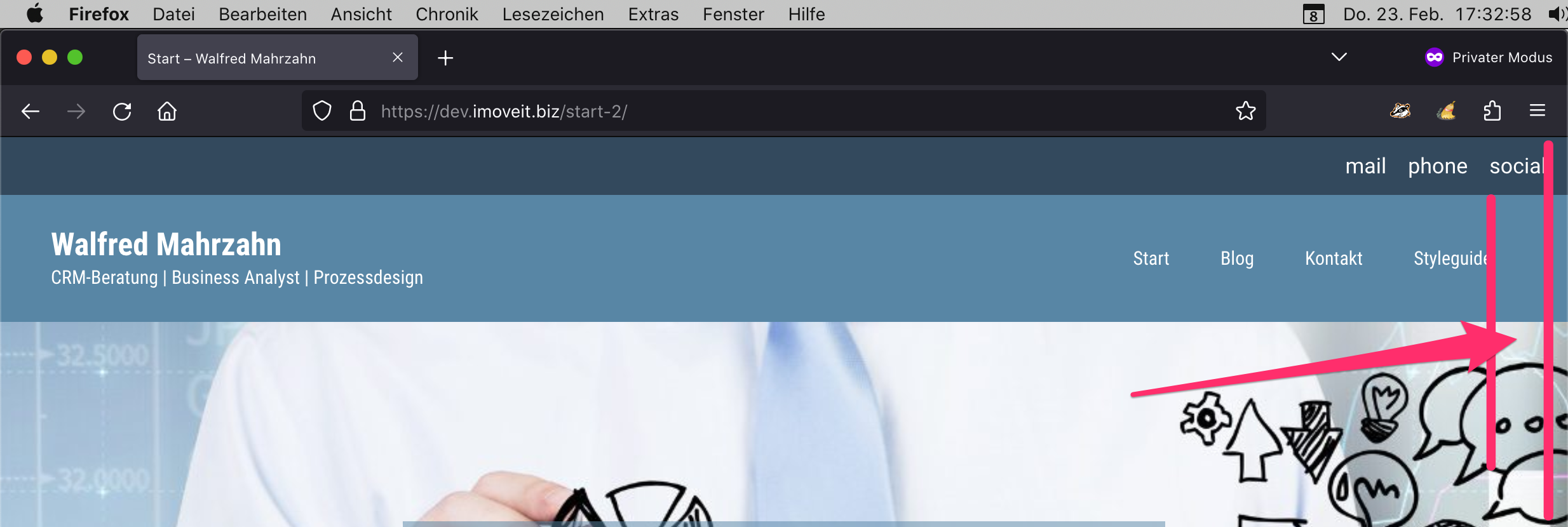
What I have to configure to make them stay in main content width? Use the "Align" button does not change, Layout-settings in Container Block won't work etc.
Can you please help me here?
Or can you create a tutorial about how to add a secondary-nav using GB & GP-Elements? I'm sure other users would find it also helpful 🙏
Kind regards,
Sascha
Hi there,
i assume you're using GenerateBlocks 1.7.
When you first add a Container Block, in the Blocks Toolbar, click then option to Insert Inner Container.
Then add your buttons or whatever inside the inner container to keep it contained.
Thanks, but the buttons are already inside Container > Container
Add some right padding to the Container to match that of your site header.