
Archived topic
header widget is pushing primary menu (nav float right) down
6 replies · Started by niall on June 16, 2022
Hi,
When I add a header widget it's pushing the primary menu (nav float right) down - see image attached
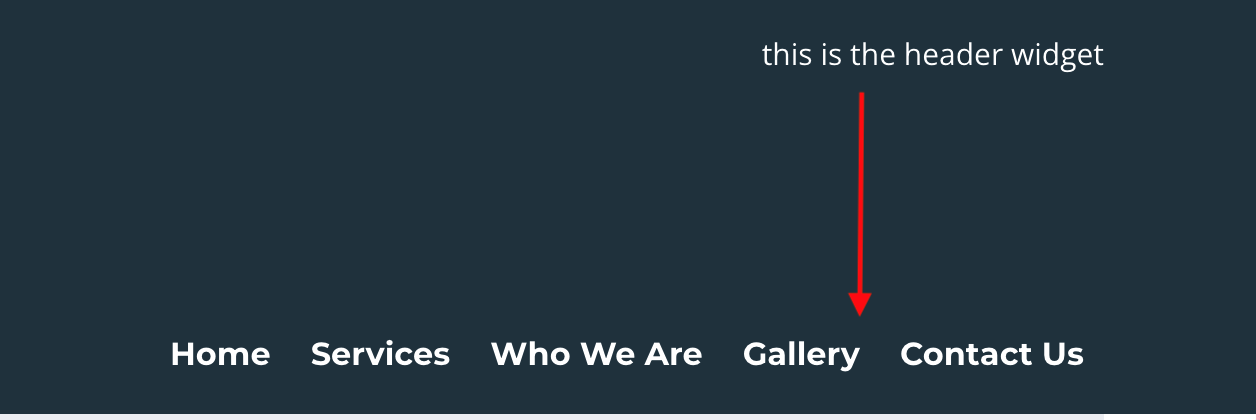
I think it might be something to do with the float, I've tried clearing the float, setting overflow:hidden but its not making any difference, if i remove the float the menu pops back into place but now the header widget is on the left hand side over the site logo. The header widget and menu dont have any extra margins so i'm stumped as to what's pushing the menu down so far.
Thanks in advance
Hi there,
can you share a link to the site where i can see the issue ?
Hi David,
You can see the issue here
Ok, so you have paragraph in the header widget, which attracts the body bottom margin in the typography settings.
You can use some CSS to remove it or reduce it:
.header-widget p {
    margin-bottom: 0;
}Hi David,
I removed the margin from the p tag in the header widget and also the top margin on the main-navigation and it hasn't made any difference, i dont think its a margin or padding issue, it seems to be more related to a float somewhere not clearing correctly but i cant for the life of me figure out what exactly is going on
issue not resolved but i went with a different solution
Glad to hear you found a solution